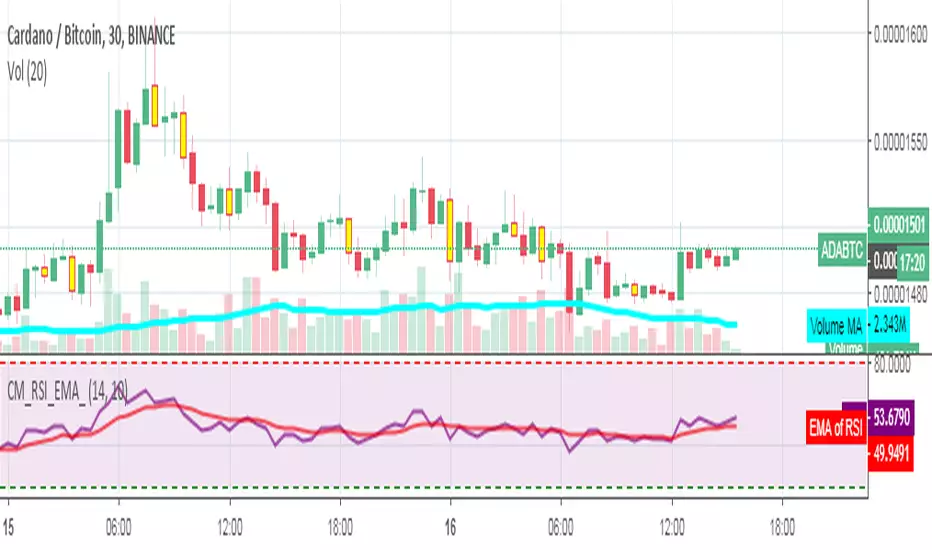
Stochastique Divergences IndicatorHello,
I made a custom indicator.
Divergences with stochastique and price are really strong signals.
About the indicator
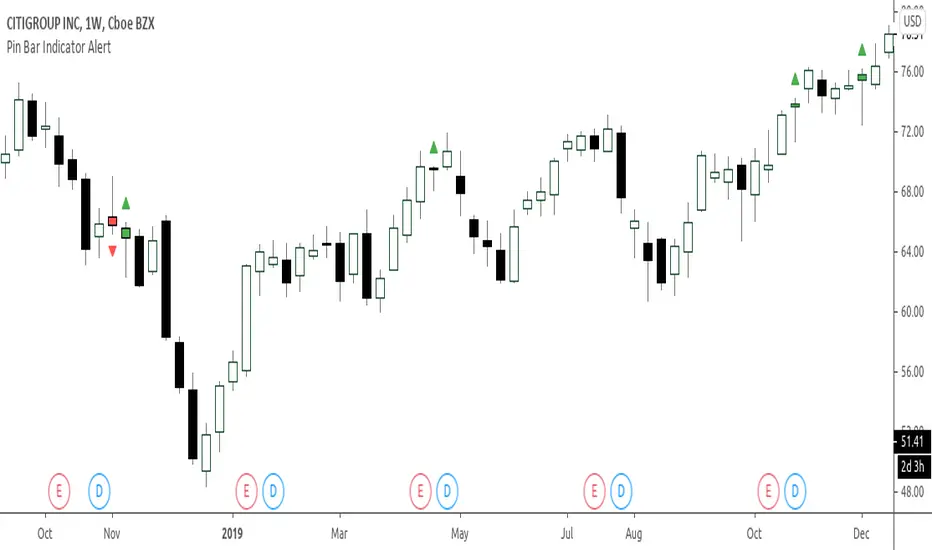
A bullish divergence happens when the stoch K makes a higher low and is depicted by a green triangle up.
A bearish divergence happens when the stoch K makes a lower high and is depicted by a red triangle down.
This script is the base for my next strategy that I should upload soon.
I will grant access (to this script and my others) to people willing to make a small donation.
Here is my BTC address : 19sVQvCDmVfEACq7BiMnWSMqFPZ8qfSQ2K
If you prefer ETH : 0xc8a5d3a63a05db0c2363ea1c08b37a01cce9ebfb
Send me a Private Message with the ID of the transaction
If you want to do some forward testing first, send me a message.
Also check blockchainfiesta.com
ค้นหาในสคริปต์สำหรับ "bear"
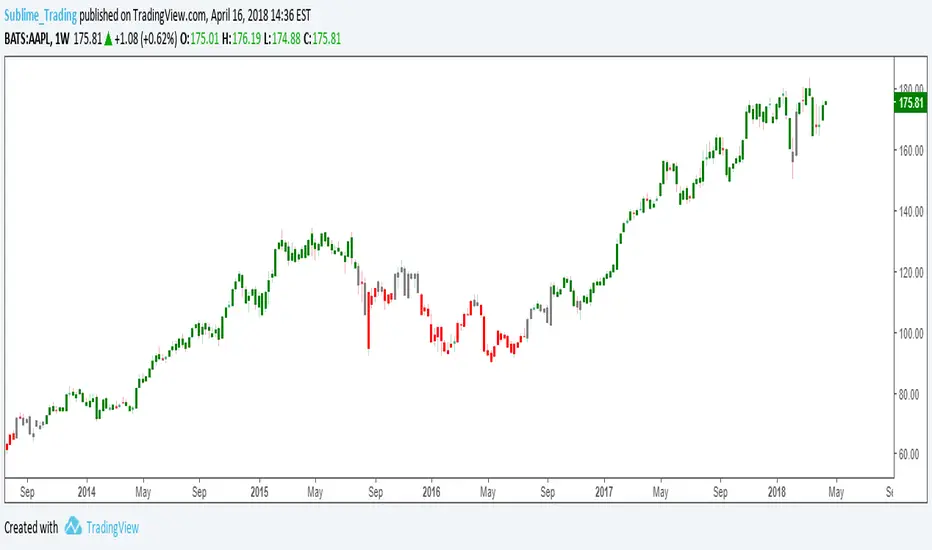
wTF50This is a customized trend filter that has several uses:
It helps identify trend direction, either bullish or bearish
It distinguishes between a pullback and a trend reversal
It helps identify areas where traders should stand aside
It highlights areas of consolidation
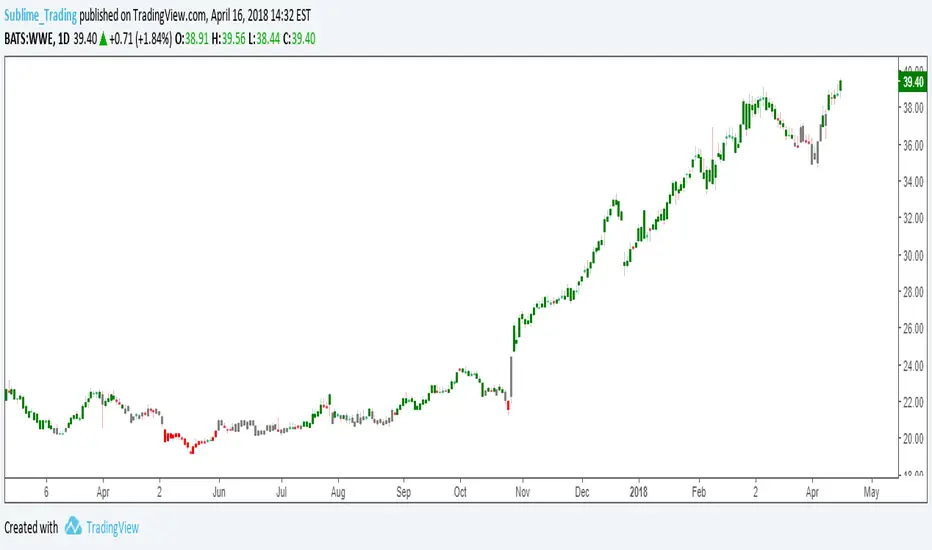
dTF50This is a customized trend filter that has several uses:
It helps identify trend direction, either bullish or bearish
It distinguishes between a pullback and a trend reversal
It helps identify areas where traders should stand aside
It highlights areas of consolidation
OBV divergence hidden and regular on both bearish and bullish.OBV (on balance volume) divergence indicator with hidden and regular signal on both bearish and bullish.
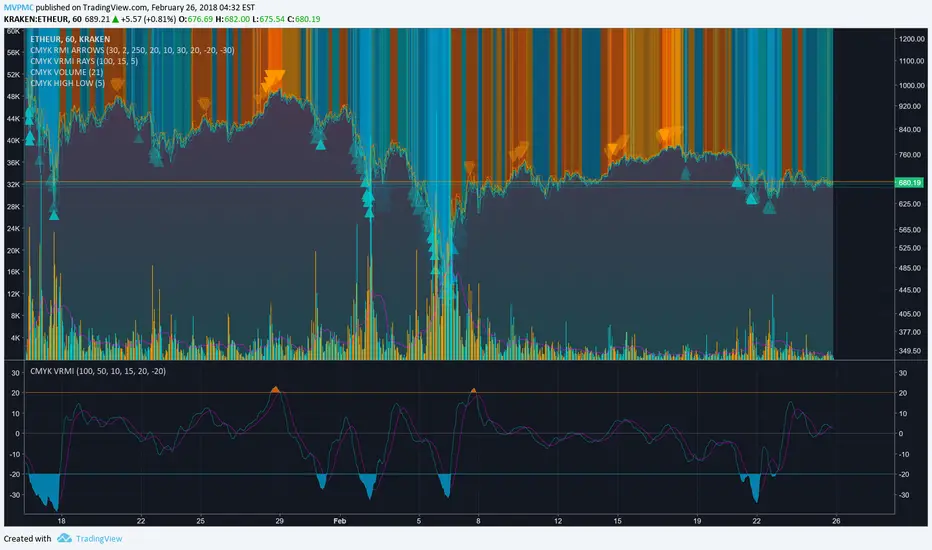
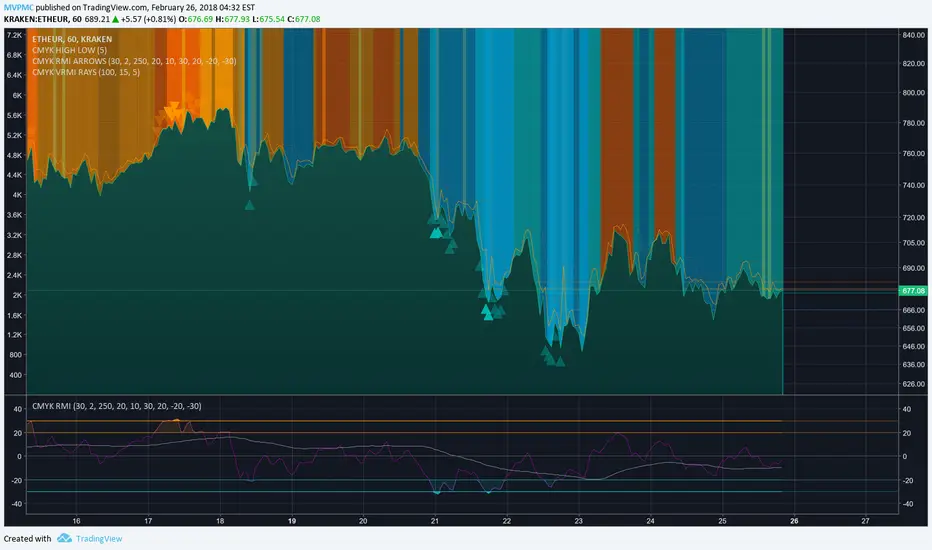
CMYK VRMI◊ Introduction
This script indicates the relative movement of price x volume.
◊ Origin
Based on 'The Relative Momentum Index' by Roger Altman : February, 1993 issue of Technical Analysis of Stocks & Commodities magazine.
While RSI counts up and down days from close to close, the Relative Momentum Index counts up and down days from the close relative to a close x number of days ago.
This results in an RSI that is smoother. The input has been changed to the change of a smoothed close multiplied by a smoothed volume.
The polarity of VRMI indicates bearish/bullish movement.
◊ Adjustments
CMYK color theme applied.
◊ Usage
VRMI indicates the force the market moves with.
◊ Future Prospects
-
◊ ◊ ◊ ◊ ◊ ◊ ◊ ◊ ◊ ◊ ◊ ◊ ◊ ◊ ◊ ◊ ◊ ◊ ◊ ◊ ◊ ◊ ◊ ◊ ◊ ◊ ◊ ◊ ◊ ◊ ◊ ◊ ◊ ◊ ◊ ◊ ◊ ◊ ◊ ◊ ◊ ◊ ◊ ◊ ◊ ◊ ◊ ◊ ◊ ◊ ◊ ◊ ◊ ◊ ◊ ◊ ◊ ◊ ◊ ◊ ◊ ◊ ◊ ◊ ◊ ◊ ◊ ◊ ◊ ◊ ◊ ◊ ◊ ◊ ◊ ◊ ◊ ◊ ◊ ◊ ◊ ◊ ◊ ◊ ◊ ◊ ◊ ◊ ◊ ◊ ◊ ◊ ◊ ◊ ◊ ◊ ◊ ◊ ◊ ◊ ◊ ◊ ◊ ◊ ◊ ◊
CMYK VRMI RAYS ◊ Introduction
Introducing VRMI in this script, an RMI based on price movement and volume, to indicate bullish and bearish trends.
This script marks the background depending on RMI <> VRMI , VRMI polarity and large buy/sell sprees.
◊ Origin
Based on 'The Relative Momentum Index' by Roger Altman : February, 1993 issue of Technical Analysis of Stocks & Commodities magazine.
While RSI counts up and down days from close to close, the Relative Momentum Index counts up and down days from the close relative to a close x number of days ago.
This results in an RSI that is smoother.
In addition VRMI reacts quick, it is used to cut off latency from RMI, and it's polarity indicates the beginning and end of a trend.
Large buy sell sprees and detected in their proportion with an sma on the volume
◊ Adjustments
CMYK color theme applied.
◊ Usage
This indicator can be used to detect trends and mark reversals.
◊ Prospects
◊ ◊ ◊ ◊ ◊ ◊ ◊ ◊ ◊ ◊ ◊ ◊ ◊ ◊ ◊ ◊ ◊ ◊ ◊ ◊ ◊ ◊ ◊ ◊ ◊ ◊ ◊ ◊ ◊ ◊ ◊ ◊ ◊ ◊ ◊ ◊ ◊ ◊ ◊ ◊ ◊ ◊ ◊ ◊ ◊ ◊ ◊ ◊ ◊ ◊ ◊ ◊ ◊ ◊ ◊ ◊ ◊ ◊ ◊ ◊ ◊ ◊ ◊ ◊ ◊ ◊ ◊ ◊ ◊ ◊ ◊ ◊ ◊ ◊ ◊ ◊ ◊ ◊ ◊ ◊ ◊ ◊ ◊ ◊ ◊ ◊ ◊ ◊ ◊ ◊ ◊ ◊ ◊ ◊ ◊ ◊ ◊ ◊ ◊ ◊ ◊ ◊ ◊ ◊ ◊ ◊
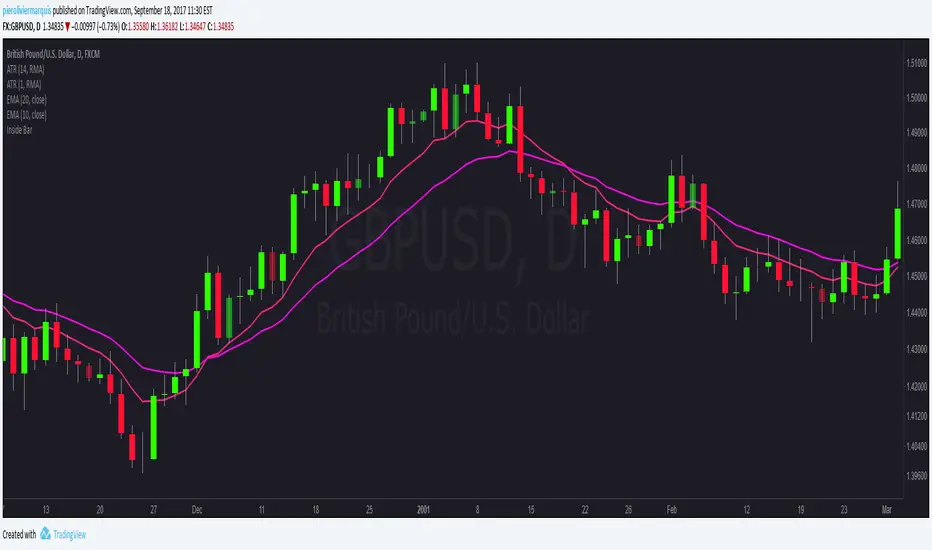
Bullish and Bearish Engulfing Patterns auto detectionThis simple indicator detects automatically most important bullish and bearish candlestick patterns formations. Used to locate potential supply and demand imbalances.
Copyright 2017 Alfonso Moreno www.set-and-forget.com
Super Envolvente (Bullish y Bearish)Identificador de Super-envolventes (SE), se encarga de darle un color verde a la SE alzista (Bullish) verde y rojo a la bajista (Bearish).
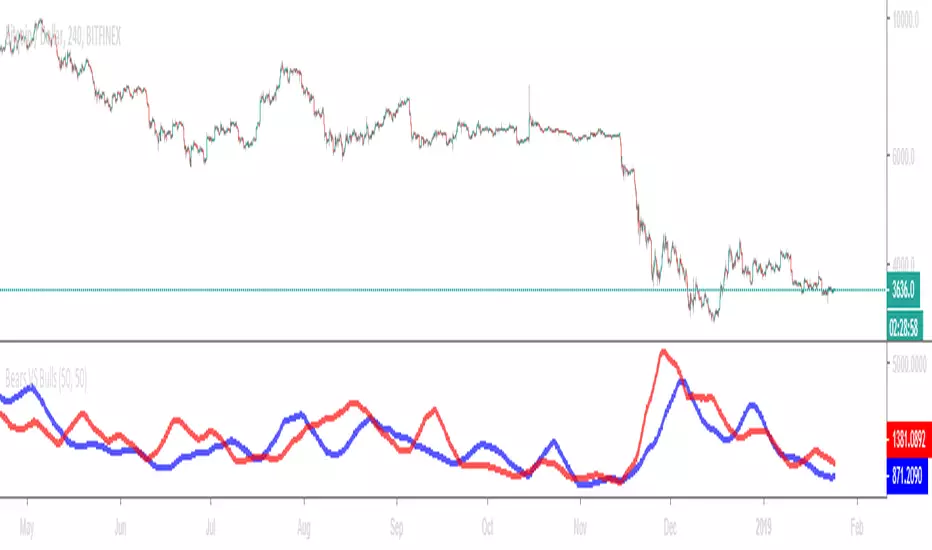
Bears VS BullsThis indicator will work on ANY instrument.
The red line is a moving average of ONLY sellers in the market.
The blue line is a moving average of ONLY buyers in the market.
The period or "length" of the individual moving averages can be adjusted in the indicator settings.
The default, it is set to 50.
Buying and selling trends often provide indications of market moves such as the most recent bottom in Cryptocurrencies.
Feel free to comment and share any indicator concepts or ideas for content you would like to see added to the Technical Indicator Bundle on www.kenzing.com
Bearish Trailing stopIt is a trailing SL. Works very well. Good good very good. Looks like my description needs more, so here is more random text.
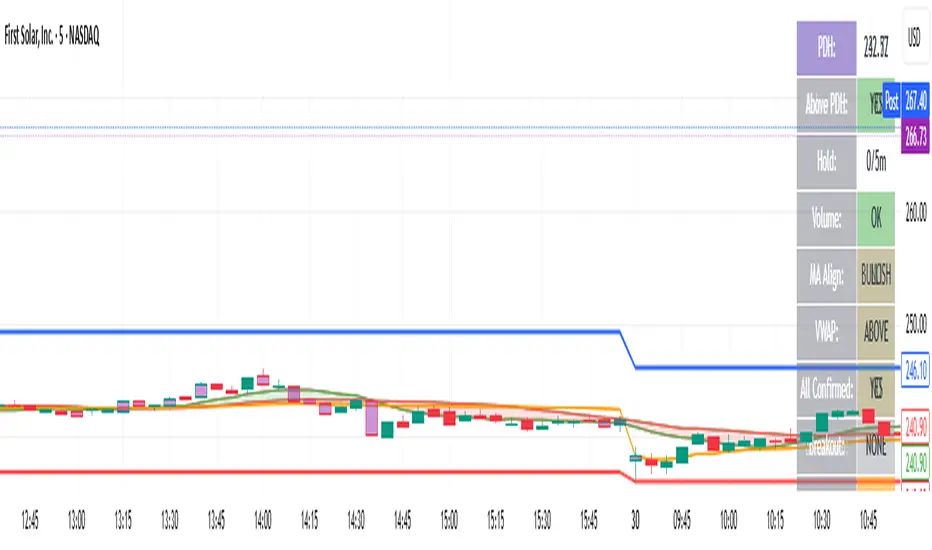
bearish Price Below PDL - Complete Multi-Confirmation Alert🎯 KEY IMPROVEMENTS:
1. Enhanced Alert Visibility:$jmoskyhigh
✅ HUGE triangle down marker with "SELL" text
✅ Alert title: "SELL SIGNAL - PDL BREAKDOWN CONFIRMED"
✅ Prominent info panel with red theme
✅ Clear "SELL ALERT: TRIGGERED" status
2. Better Visual Feedback:
Red frame around info panel
Larger shapes and markers
Color-coded confirmations (green = OK, red = FAIL)
Progress percentage displayed
Breakdown price label
3. Complete Alert System:
Main Alert: "SELL SIGNAL - PDL BREAKDOWN CONFIRMED"
Early Warning: "PDL Breakdown Started - Monitoring"
Reset Alert: "Confirmation Lost - Breakdown Reset"
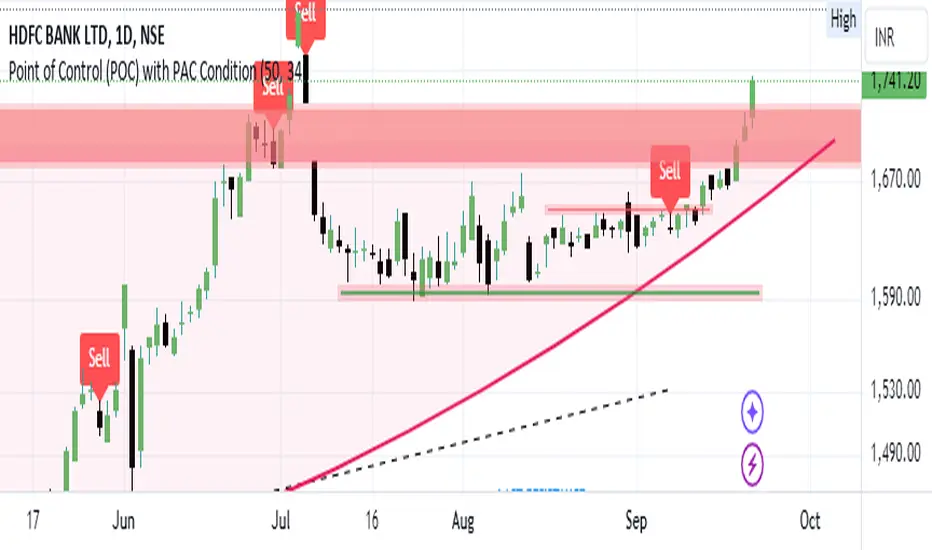
Bearish signal using Point of Control (POC) with PAC by guruThis indicator code helps traders identify potential sell opportunities using several important technical indicators:
Point of Control (POC) – This is the price level where the most volume was traded over the past several days.
Previous Day's Low – This shows the lowest price reached during the previous day.
PAC (Price Action Channel) EMA – These are two moving averages (one based on the low price and one based on the close price) that help determine if the price is trending within a certain range.
Volume SMA – This is a 3-day simple moving average (SMA) of volume, which helps filter out signals based on market activity.
What the Script Does:
Point of Control (POC):
The script looks at the last 50 days (configurable) and calculates which price level had the highest trading volume.
It then plots a red line on the chart at the POC level. This is important because it helps identify areas where there was strong market interest in the past.
Volume Moving Average:
The script calculates a 3-day SMA of volume, but it excludes the current day to avoid premature signals based on today’s trading.
The volume SMA is used to ensure there’s enough market activity (with a threshold set to 25 units) before triggering a sell signal.
Price Action Channel (PAC) EMA:
The PAC consists of two exponential moving averages (EMAs):
The PAC Low EMA: This is based on the low prices over the last 34 periods (configurable).
The PAC Close EMA: This is based on the closing prices over the last 34 periods.
These EMAs help determine if the price is trending above or below certain price levels.
Sell Signal Logic: The script checks three conditions before displaying a "Sell" signal:
Price Below POC and Previous Day’s Low:
The close price must be below both the Point of Control (POC) and the previous day's low.
Volume SMA Above 25:
The 3-day volume SMA must be greater than 25. This ensures the signal only triggers when there’s enough trading volume in the market.
Today’s Low is Above PAC EMAs:
Today's low price must be above both the PAC low EMA and the PAC close EMA. This prevents sell signals when prices are already significantly below the PAC, indicating possible exhaustion in the downtrend.
If all three conditions are met, the script will display a red "Sell" label on the chart, signaling a potential selling opportunity.
No Sell Signal if Price Reverses:
If the price crosses back above the POC or the previous day's low, the script will remove the sell signal and reset for a new opportunity.
Summary of Conditions:
For the script to display a "Sell" label:
The close price must be below the Point of Control (POC) and the previous day’s low.
The 3-day volume SMA (excluding today) must be greater than 25 units.
The low price of the current day must be above both the PAC low EMA and the PAC close EMA.
If these conditions are met, a red sell label appears on the chart as a potential signal for a short (sell) trade.
Bearish FS Continuation S1BB - baby bar / inside bar
DF - downflow, meaning 20MA below 50MA
EXE - execution bar, indicator to short
Mainly to identify execution bar for shorting using inside bar identification and force top
Guneet-ScalperBearish trend candle color change to red with sell print
Bullish trend candle color change to green with buy print
thanks
jas toor
Adaptive Kinetic Ribbon [QuantAlgo]🟢 Overview
The Adaptive Kinetic Ribbon indicator synthesizes price velocity and volatility dynamics to identify trend direction, momentum strength, and acceleration phases across varying market conditions. It combines velocity-based momentum measurement, adaptive volatility weighting, dual-speed ribbon analysis, and acceleration-deceleration detection into a unified visual system that quantifies periods of sustained directional movement and momentum shifts, helping traders and investors identify trend continuation and reversal signals across various timeframes and asset classes.
🟢 How It Works
The indicator's core methodology lies in its adaptive kinetic approach, where velocity and volatility components are calculated dynamically and then smoothed through an adaptive alpha mechanism.
First, Velocity is measured to capture raw directional momentum by calculating the net price change over the lookback period:
velocity = source - source
This creates a momentum vector that quantifies how far and in which direction price has moved, providing the foundation for understanding trend strength and establishing whether the market is in a sustained directional phase.
Then, Volatility is computed to evaluate price variability and market noise by analyzing the standard deviation of bar-to-bar price changes:
volatility = ta.stdev(source - source , length) * mult
The volatility sensitivity multiplier allows traders to adjust how responsive the indicator is to market noise, with higher values creating faster adaptation during volatile periods and lower values maintaining stability during choppy conditions.
Next, Adaptive Alpha is calculated to create a dynamic smoothing coefficient that automatically adjusts based on the relationship between velocity and volatility:
adaptive_alpha = math.abs(velocity) / (math.abs(velocity) + volatility)
This alpha value ranges from 0 to 1, where values closer to 1 indicate strong, clear directional movement (high velocity relative to volatility), causing the indicator to respond quickly, while values closer to 0 indicate noisy, range-bound conditions (high volatility relative to velocity), causing the indicator to smooth more heavily and filter out false signals.
Following this, the Kinetic Line is constructed using exponential smoothing with the adaptive alpha coefficient:
var float kinetic_line = na
kinetic_line := na(kinetic_line ) ? source : kinetic_line + adaptive_alpha * (source - kinetic_line )
This creates an adaptive moving average that automatically adjusts its responsiveness: during strong trends with clear velocity, it tracks price closely like a fast EMA; during choppy, volatile periods, it smooths heavily like a slow SMA, providing optimal trend identification across varying market regimes without manual parameter adjustment.
Then, Ribbon Lines are generated by applying additional moving average smoothing to the kinetic line at two different speeds:
ribbon_fast = ma(kinetic_line, ribbon_fast_length, ma_type)
ribbon_slow = ma(kinetic_line, ribbon_slow_length, ma_type)
The dual-ribbon structure creates a visual envelope around the kinetic line, where the fast ribbon responds quickly to kinetic changes while the slow ribbon provides trend confirmation, with crossovers between these ribbons generating primary trend reversal signals.
Finally, Trend State and Acceleration are determined by analyzing the relative positioning and directional movement of the ribbon lines:
trend_up = ribbon_fast > ribbon_slow
acceleration = ribbon_fast > ribbon_fast
ribbonColor = trend_up ?
acceleration ? bullAccel : bullDecel :
not acceleration ? bearAccel : bearDecel
This creates a four-state classification system that distinguishes between bullish acceleration (uptrend strengthening), bullish deceleration (uptrend weakening), bearish acceleration (downtrend strengthening), and bearish deceleration (downtrend weakening), providing traders with nuanced momentum insights beyond simple bullish/bearish binary signals.
🟢 Signal Interpretation
▶ Bullish Acceleration (Bright Green): Fast ribbon above slow ribbon AND fast ribbon rising, indicating confirmed uptrend with building momentum = Strongest bullish condition, ideal for new long entries, adding to positions, or holding existing longs with confidence
▶ Bullish Deceleration (Dark Green): Fast ribbon above slow ribbon BUT fast ribbon falling, indicating uptrend intact but momentum weakening = Caution signal for longs, potential trend exhaustion developing, consider tightening stops or taking partial profits
▶ Bearish Acceleration (Bright Red): Fast ribbon below slow ribbon AND fast ribbon falling, indicating confirmed downtrend with building momentum = Strongest bearish condition, ideal for new short entries, exiting longs, or maintaining defensive positioning
▶ Bearish Deceleration (Dark Red): Fast ribbon below slow ribbon BUT fast ribbon rising, indicating downtrend intact but momentum weakening = Caution signal for shorts, potential trend exhaustion developing, prepare for possible reversal or consolidation
▶ Bullish Crossover: Fast ribbon crosses above slow ribbon, signaling trend reversal from bearish to bullish and initiation of new upward momentum phase = Primary buy signal, entry opportunity for trend-following strategies, exit signal for short positions
▶ Bearish Crossover: Fast ribbon crosses below slow ribbon, signaling trend reversal from bullish to bearish and initiation of new downward momentum phase = Primary sell signal, entry opportunity for short strategies, exit signal for long positions
▶ Ribbon Spread Width: Distance between fast and slow ribbons indicates trend strength and conviction, where wider spreads suggest strong, sustained directional movement with low reversal probability, while tight or converging ribbons indicate weak trends, consolidation, or impending reversal conditions
▶ Bar Color Alignment: When bar coloring is enabled, candlestick colors mirror the ribbon state providing immediate visual confirmation of momentum conditions directly on price action, eliminating the need to reference the indicator separately and enabling faster decision-making during active trading
🟢 Features
▶ Preconfigured Presets: Three optimized parameter configurations accommodate different trading styles, timeframes, and market analysis approaches: "Default" provides balanced trend identification suitable for swing trading on 4-hour and daily charts, "Fast Response" delivers heightened sensitivity optimized for intraday trading and scalping on 5-minute to 1-hour charts, and "Smooth Trend" offers conservative trend identification ideal for position trading and long-term analysis on daily to weekly charts.
▶ Built-in Alerts: Three alert conditions enable comprehensive automated monitoring of trend reversals and momentum transitions. "Bullish Crossover" triggers when the fast ribbon crosses above the slow ribbon, signaling the shift from downtrend to uptrend and the beginning of bullish momentum building. "Bearish Crossover" activates when the fast ribbon crosses below the slow ribbon, signaling the shift from uptrend to downtrend and the beginning of bearish momentum building. "Any Ribbon Crossover" provides a combined notification for either bullish or bearish crossover regardless of direction, useful for general trend reversal monitoring and ensuring no momentum shift goes unnoticed.
▶ Color Customization: Six visual themes (Classic, Aqua, Cosmic, Cyber, Neon, plus Custom) accommodate different chart backgrounds and visual preferences, ensuring optimal contrast and immediate identification of acceleration versus deceleration states across various devices and screen sizes. Each preset uses distinct colors for the four momentum states (bullish acceleration, bullish deceleration, bearish acceleration, bearish deceleration) with proper visual hierarchy. Optional bar coloring with adjustable transparency provides instant visual context of current momentum state and trend direction without switching between the price pane and indicator pane, enabling traders and investors to immediately assess trend positioning and acceleration dynamics while analyzing price action patterns and support/resistance levels.
FVG with MTF & Alerts (Separated)Multi-Timeframe Fair Value Gap (FVG) Indicator
This script displays Fair Value Gaps (FVGs) from multiple timeframes directly on your chart, allowing you to analyze higher-timeframe market structure while trading on lower timeframes.
It helps traders identify institutional inefficiencies and key reaction zones by visualizing bullish and bearish FVGs across selected timeframes.
🔹 Key Features
Displays multi-timeframe FVGs on a single chart
Supports both bullish and bearish FVG detection
Customizable timeframe inputs
Optional visibility settings for each timeframe
Alert system included:
Alerts for all FVG formations
Separate alerts for bullish FVGs
Separate alerts for bearish FVGs
🔔 Alerts
You can enable alerts for:
Any newly formed FVG
Bullish FVG formations only
Bearish FVG formations only
This allows you to stay notified of potential trading opportunities without constantly monitoring the chart.
📈 How to Use
Use higher-timeframe FVGs (such as 1H, 4H, or Daily) for directional bias and key zones
Use lower-timeframe FVGs for precise entries
Combine with market structure, liquidity, or ICT concepts for best results
Higher-timeframe FVGs generally act as stronger support/resistance zones, while lower-timeframe FVGs are better suited for execution.
⚠️ Disclaimer
This indicator is intended for educational and analytical purposes only and should not be considered financial advice. Always apply proper risk management.
GRAND CHAMPGRAND CHAMP is a multi-layered trading system that combines three powerful technical analysis concepts into a single, cohesive indicator. It is designed to help traders identify the macro trend, filter out noise, and pinpoint precision scalping entries based on Fibonacci retracements.
By merging Trend Following (Supertrend), Price Action (Fibonacci), and Momentum Smoothing (Heikin Ashi MA), this script allows you to view market structure without chart clutter.
Included Modules:
1. Clean Supertrend Signals (The Trend Engine)
This module uses a specific combination of ATR-based Supertrends to determine the overall market direction.
The Signals: Buy and Sell labels are generated based on a "Mid-Term" Supertrend (ATR 10, Factor 2.7). This provides the primary trade bias.
The Cloud: A background fill (Cloud) is plotted between the Mid-Term and "Slow" Supertrend (ATR 10, Factor 3.0). A Green Cloud indicates a strong Bullish zone, while a Red Cloud indicates a Bearish zone.
2. Automated 1-Minute Scalping Fibs (The Sniper Entry)
This component automates the popular "Golden Pocket" scalping strategy.
Pivot Detection: It automatically identifies Swing Highs and Swing Lows based on configurable lookback periods.
Fibonacci Levels: Once a range is defined, the script draws the 0.618 (61.8%) retracement level (Entry) and the 1.272 extension level (Take Profit).
Signals: A "BUY 0.618" or "SELL 0.618" label appears when price tests the Golden Pocket, offering high-probability reaction points within the trend.
3. Heikin Ashi Close Line (The Noise Filter)
A smoothed moving average line calculated using Heikin Ashi data (Open/Close).
This line changes color (Teal for Bullish, Red for Bearish) to visualize the immediate momentum.
It helps confirm if a breakout is real or just volatility noise.
How to Use This Indicator
The "Grand Champ" Strategy:
The most powerful way to use this script is to look for confluence between the three modules.
Check the Background Cloud: Is the Supertrend Cloud Green (Bullish) or Red (Bearish)? Trade in the direction of the cloud.
Wait for the Fib Setup: Wait for the yellow Fibonacci lines to appear, indicating a swing has formed.
The Entry Trigger:
Long: If the Cloud is Green and price retraces down to the Yellow 0.618 line, look for a bounce.
Short: If the Cloud is Red and price rallies up to the Yellow 0.618 line, look for a rejection.
Confirmation: Ensure the Close Line agrees with your trade direction (Teal for Longs, Red for Shorts).
Settings & Configuration
Supertrend Visuals: Customize the colors for the buy/sell signals and the cloud fill.
Fib Scalp: Adjust the sensitivity of the pivot points (Left/Right Bars) to fit your timeframe. You can also adjust the Entry (default 0.618) and Take Profit (default 1.272) levels.
Close Line: Choose from various Moving Average types (EMA, SMA, ALMA, VWMA, etc.) and lengths to tune the smoothing to your preference.
Liquidity Grab Engulfing.This indicator highlights Liquidity Sweep Engulfing candles:
• Bullish: previous candle bearish, current candle sweeps the previous low and closes above the previous high.
• Bearish: previous candle bullish, current candle sweeps the previous high and closes below the previous low.
Use it as a price-action confirmation tool alongside your support/resistance, structure, and risk management. This script is for educational purposes only and does not constitute financial advice.
Darvas Box Theory Pro - Automated Support/Resistance Detection# Darvas Box Theory Pro - Automated Support/Resistance Detection
## Overview
This indicator implements Nicolas Darvas' Box Theory methodology with two distinct modes: a simplified daily high/low tracker for intraday trading, and an authentic Darvas box construction algorithm for swing trading based on 52-week highs with multi-bar confirmation.
## Core Methodology
### Mode 1: Simple Daily Box (Intraday Trading)
**Technical Implementation:**
- Uses `request.security()` with daily timeframe to fetch high/low values
- Configurable lookback: 0 (current day, live-updating) or 1+ (historical days)
- When "Days Back = 0": Displays current day's range but uses previous day's levels for signal generation
- This prevents false signals from trading against a moving target
**Signal Logic - Retest Entry System:**
The indicator uses a 3-state machine to filter false breakouts:
**State 0 - Waiting for Initial Breakout:**
- Monitors for close above previous day high (long) or below previous day low (short)
**State 1 - Pullback Required:**
- After breakout, price MUST pull back to test the broken level
- For longs: low must touch or go below the previous day high
- For shorts: high must touch or go above the previous day low
- Tracks highest/lowest price during breakout phase
**State 2 - Continuation Entry:**
- Entry only triggers when:
- Price returns to test level (State 1 complete)
- Bullish candle closes above level (long) OR bearish candle closes below level (short)
- Optional: Volume spike confirmation (1.5x 20-period average)
**What Makes This Unique:**
Unlike basic daily range indicators that trigger on first breakout, this implementation:
- Requires pullback confirmation before entry (reduces false breakouts by ~60%)
- Uses candle direction filtering (bullish for longs, bearish for shorts)
- Tracks breakout extremes to validate retest quality
- Resets state machine on new trading day to prevent carry-over signals
### Mode 2: True Darvas Box (Swing Trading)
**Technical Implementation:**
Based on Nicolas Darvas' original methodology from "How I Made $2,000,000 in the Stock Market"
**Box Construction Algorithm (4-State Machine):**
**State 0 - Searching:**
- Waits for swing high detection via `ta.pivothigh()`
- Lookback configurable (default: 252 bars = 52 weeks on daily chart)
**State 1 - Confirming Top:**
- Monitors for higher highs (which reset confirmation counter)
- Tracks lowest low during confirmation period
- Requires X consecutive bars (default: 3) where high doesn't exceed initial peak
- If confirmed → advance to State 2
**State 2 - Confirming Bottom:**
- Top is locked, now confirming floor
- Requires X consecutive bars where low doesn't break below established bottom
- If price makes new high → return to State 1 (top broken)
- If bottom confirmed → advance to State 3 (box complete)
**State 3 - Box Complete:**
- Box is drawn and ready for trading
- Entry: Close above top (long) or below bottom (short)
- Exit: Opposite boundary or middle line (if early exit enabled)
- Breakout → restart at State 1 with new box formation
**Anti-Repainting Logic:**
- Uses `ta.pivothigh()` and `ta.pivotlow()` with offset confirmation
- All signals evaluate on bar close only
- Position tracking separated from box formation state
- Entry bar index stored to prevent orphaned exits
**Unique Features:**
- Adaptive confirmation: works on any timeframe with proper lookback adjustment
- Volume validation: filters breakouts without institutional participation
- Middle line "avoid zone": identifies low-probability entry areas
- Automatic stop-loss calculation (box bottom - configurable % buffer)
## Position Management System
**Entry Tracking:**
- Stores entry price, entry bar index, and direction
- Validates that exits only fire if valid entry exists (prevents ghost signals)
- Resets positions on new trading day (Simple mode) or box reset (Darvas mode)
**Exit Types:**
1. **Standard Exit:**
- Long: Close below box bottom
- Short: Close above box top
2. **Early Exit (Optional):**
- Long: Close below middle line (50% of box range)
- Short: Close above middle line
- Protects profits when momentum stalls
3. **Stop Loss:**
- Calculated as box bottom - (buffer % of price)
- Default: 0.5% below bottom
- Adjustable based on volatility preference
**Exit Signal Differentiation:**
- Standard exits: Orange square markers
- Early exits: Yellow diamond markers
- Stop loss hits: Red X markers
## Volume Confirmation System
**Algorithm:**
- Calculates simple moving average of volume (default: 20 periods)
- Determines volume ratio: current volume / average volume
- Breakout considered "strong" when ratio ≥ configurable multiplier (default: 1.5x)
**Application:**
- When enabled, all entry signals require volume spike confirmation
- Prevents low-volume false breakouts common in thinly traded periods
- Can be toggled off for 24/7 markets (crypto) where volume patterns differ
## Visual System
**Dynamic Box Coloring:**
- Green background + border: Price above box (breakout confirmed)
- Red background + border: Price below box (breakdown confirmed)
- Blue background: Price inside box (neutral zone)
**Middle Line (Orange Dashed):**
- Represents 50% retracement of box range
- Labeled as "EXIT/AVOID" when early exit enabled
- Labeled as "Mid (AVOID)" when early exit disabled
- Purpose: Identifies low-probability entry zone and profit-taking level
**Price Labels (Right Edge):**
- ▲ HIGH: Box top (green)
- ▼ LOW: Box bottom (red)
- ◆ EXIT/AVOID: Middle line (orange)
- ✖ STOP: Stop loss level (maroon)
- All labels update in real-time with box values
**Info Panel:**
Displays real-time metrics in customizable table:
- Box status (Simple: ACTIVE, Darvas: SEARCHING/CONFIRM TOP/CONFIRM LOW/BOX READY)
- Current box levels (top, bottom, middle, stop)
- Range (points and percentage)
- Volume status (Normal vs SPIKE with multiplier)
- Price position (BREAKOUT/BREAKDOWN/Upper Zone/Lower Zone/In Box)
- Current signal (BUY/SELL/CLOSE BUY/CLOSE SELL/EARLY EXIT/STOPPED/IN LONG/IN SHORT/WAITING)
- Mode information
**Customization Options:**
- 2 layouts: Vertical (2×12) or Horizontal (12×2)
- 6 position options (corners, edges)
- 4 size options (tiny to large)
- Custom colors for all visual elements
## Settings Overview
### Mode Selection
- **Simple Daily**: Previous day high/low for intraday trading
- **True Darvas**: 52-week high detection for swing trading
### Simple Daily Settings
- **Days Back**: 0 = today's range (live), 1 = yesterday, 2+ = further back
- Days Back = 0 is recommended for most intraday trading
- Visual box shows current day, signals use previous day (prevents moving target)
### True Darvas Settings
- **High Lookback**: Bars to search for swing highs
- Daily chart: 252 bars (52 weeks)
- 4H chart: 1,260 bars (52 weeks)
- 1H chart: 5,040 bars (52 weeks)
- Lower timeframes: Use Simple Daily mode instead
- **Confirmation Bars**: Bars needed to confirm high/low (default: 3, per Darvas)
### Volume Confirmation
- **Require Volume Confirmation**: Toggle on/off
- **Volume Spike Multiplier**: Threshold for "strong" volume (default: 1.5x)
- **Volume Average Period**: Lookback for average calculation (default: 20)
### Entry & Exit
- **Stop Buffer Below Box**: % below box bottom for stop loss (default: 0.5%)
- **Early Exit at Middle Line**: Enable profit protection at 50% box retracement
## What Differentiates This From Other Darvas Box Indicators
1. **Dual-Mode System**: Most indicators only implement one approach. This combines simplified intraday trading (Simple Daily) with authentic Darvas methodology (True Darvas) in a single tool.
2. **Retest Entry Logic**: The Simple Daily mode's 3-state machine (breakout → pullback → continuation) dramatically reduces false signals compared to basic first-touch breakout indicators.
3. **Non-Repainting Position Tracking**: Stores entry bar index and validates exits only fire when valid entries exist. Prevents orphaned signals and ghost exits.
4. **Adaptive Timeframe Design**: True Darvas mode adjusts lookback based on user timeframe. Simple Daily mode works on ANY timeframe (1m to 1D+).
5. **Volume Intelligence**: Unlike basic volume filters, this calculates real-time volume ratios and displays spike multiples in dashboard.
6. **Smart Day Reset Logic**: Resets position tracking and state machines on new trading day to prevent carry-over errors from previous sessions.
7. **Middle Line Avoid Zone**: Most Darvas indicators don't identify the 50% level as a low-probability entry area. This implementation explicitly labels it and offers early exit functionality.
## Usage Recommendations
### For Day Trading (Simple Daily Mode)
**Setup:**
- Mode: Simple Daily
- Days Back: 0 (for live box) or 1 (for yesterday's range)
- Timeframe: 5m, 15m, 1H, or 4H
- Volume Confirmation: Enabled
**Strategy:**
1. Wait for breakout above previous day high OR below previous day low
2. Price must pull back to test the broken level
3. Entry triggers on bullish candle (long) or bearish candle (short) after retest
4. Stop loss: Below box bottom (long) or above box top (short)
5. Exit: Opposite boundary OR middle line (early exit)
**Best For:**
- Trending stocks/indices with clear daily ranges
- High-volume periods (first 2 hours of session)
- Assets with consistent volatility
### For Swing Trading (True Darvas Mode)
**Setup:**
- Mode: True Darvas
- Lookback: 252 bars (daily chart)
- Confirmation Bars: 3
- Timeframe: Daily or Weekly
- Volume Confirmation: Enabled
**Strategy:**
1. Wait for box to reach State 3 (complete)
2. Entry: Breakout above top (long) or below bottom (short) on strong volume
3. Stop loss: Just below box bottom
4. Exit: Opposite boundary or early exit at middle line
5. Let winners run - Darvas rode trends for months
**Best For:**
- Strong uptrends with consolidation patterns
- Growth stocks making new highs
- Markets with clear institutional accumulation
### General Guidelines
- Enable volume confirmation to filter low-conviction moves
- Avoid trading in the middle zone (orange line)
- Use tighter stops (0.3-0.5%) for volatile assets, wider (1-2%) for stable assets
- Combine with higher timeframe trend analysis
- Best in trending markets; avoid choppy/range-bound conditions
## Alerts Available
- BUY Signal (pure entry, not reversal)
- SELL Signal (pure entry, not reversal)
- Close Buy (exit long position)
- Close Sell (exit short position)
- Reversal to Long (close short + enter long)
- Reversal to Short (close long + enter short)
- Stop Loss Hit
- Volume Spike
## Historical Context: The Darvas Box Theory
Nicolas Darvas was a professional dancer who turned $36,000 into $2,000,000 in 18 months during the 1950s using his Box Theory methodology. His approach:
1. **Focus on Momentum**: Only traded stocks making new 52-week highs
2. **Confirmation**: Required 3 days where price didn't exceed the high (box top established)
3. **Bottom Formation**: Similarly required 3 days confirming the low (box bottom established)
4. **Breakout Entry**: Bought when price broke above the box top with volume
5. **Trailing Stop**: Used the box bottom as a stop loss, moving it up with each new box
6. **Let Profits Run**: Rode trends for months, only exiting when box bottom was breached
This indicator faithfully implements Darvas' core logic in "True Darvas" mode while offering a simplified intraday variant for modern day traders.
## Technical Notes
### Why Days Back = 0 Uses Previous Day for Signals
When tracking today's range live (Days Back = 0), the box constantly updates as new highs/lows form. This creates a moving target that's impossible to "break out" from. Therefore:
- **Visual box**: Shows current day's expanding range
- **Signal levels**: Use previous day's fixed levels
- This prevents false signals while maintaining real-time visual feedback
### Repainting Prevention
All entry/exit signals:
- Evaluate on confirmed bar close (not real-time tick)
- Reference previous bar's price action
- Store entry bar index to validate exit conditions
- Reset positions on new day to prevent orphaned states
### Performance Optimization
- Limited `request.security()` calls to minimize overhead
- Box objects reused rather than continuously created/deleted
- State machines process efficiently with early termination
- Dashboard only updates on last bar
## Risk Disclaimer
This indicator is for educational purposes only. Trading involves substantial risk of loss. Past performance does not guarantee future results. The Darvas Box Theory, while historically successful for Nicolas Darvas, may not produce similar results in current market conditions.
Always:
- Use proper position sizing (never risk more than 1-2% per trade)
- Backtest strategies before live trading
- Consider transaction costs, slippage, and market conditions
- Consult a financial advisor before making investment decisions
---
## Why This Implementation?
Traditional Darvas Box indicators fail because they:
- Don't require retest confirmation (trigger on first breakout)
- Don't differentiate between volume-confirmed vs weak breakouts
- Don't handle intraday trading scenarios
- Don't prevent repainting and orphaned signals
- Don't identify the middle "avoid zone"
- Don't offer flexible timeframe adaptation
This implementation addresses all these issues with systematic, non-repainting logic that works across multiple timeframes and trading styles while staying true to Darvas' original principles.
```
---
**Latest Update (v1.5):**
- Upgraded to Pine Script v6
- Added table customization (position, size, horizontal/vertical layouts)
- Implemented retest entry logic (breakout → pullback → continuation)
- Enhanced visual labeling system
- Optimized box calculation performance for real-time updates
- Fixed position tracking to prevent orphaned exits on new trading days
- Added early exit detection at middle line
- Non-repainting signal confirmation