• ผลิตภัณฑ์
  • ชุมชน
  • ตลาด
  • โบรกเกอร์
  • เพิ่มเติม
เริ่มกันเลย
  • ศูนย์ช่วยเหลือ
  • /แหล่งความรู้
  • /
  • /Groups of drawings
  • /How to create nested groups of drawings?
ในหน้านี้
How nested groups workHow nested groups workSynchronization of nested groupsSynchronization of nested groups

How to create nested groups of drawings?

In the Object Tree, you can put groups inside other groups to organize your drawings into several levels. For example, a "Weekly analysis" group can hold "Levels", "Trendlines", and "Patterns" groups, each with its own drawings and subgroups. There's no limit on nesting depth.

You can create a nested group in one of the following ways:

  1. Open the Object Tree, hold Ctrl (Windows) / Cmd (Mac) or Shift and select the drawings and/or groups you want to group. Then click the "Create a group of drawings" button on the top panel of the Object Tree.
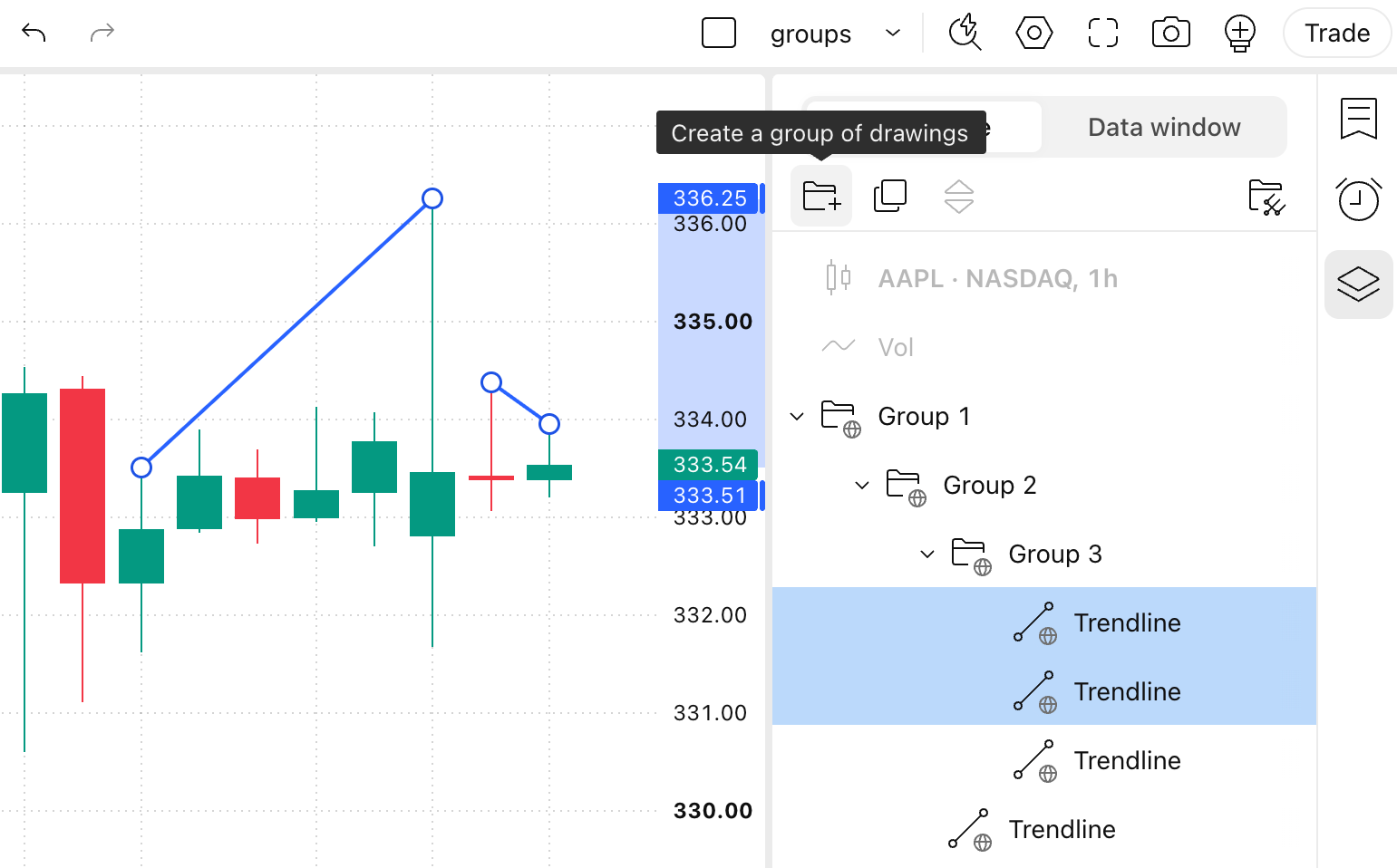
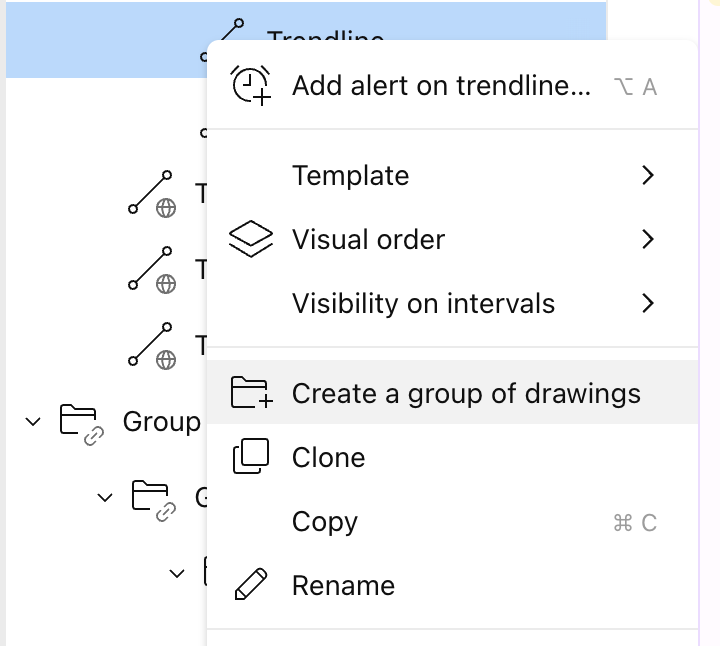
  2. Select the drawings and/or groups in the Object Tree, right-click and choose "Create a group of drawings" from the context menu.
  3. Drag a group in the Object Tree and drop it inside another group.
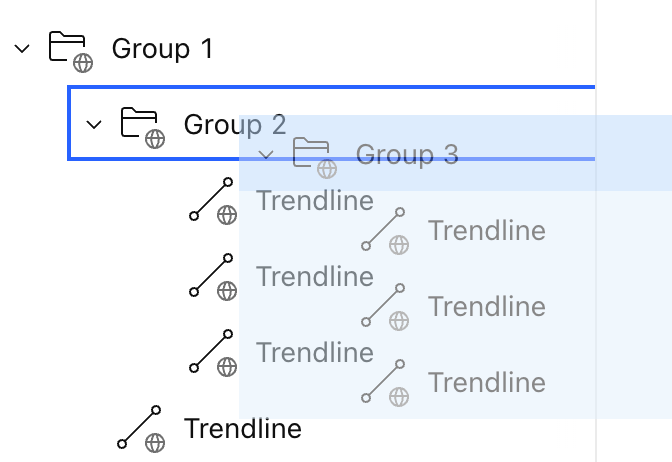
If you drop a drawing or a group onto another group's header, it's placed at the top of that group, right below the header. Collapsed groups stay collapsed when you drag over them or drop something onto them.

How nested groups work

A group works as a single unit together with everything inside it:

  • Selecting a group selects all of its contents, including nested groups and drawings at every level.
  • Deleting a group deletes it with all its nested groups and drawings.
  • A nested group keeps its position among the other items of its parent group.
  • If a group becomes empty — for example, you delete all drawings in it — the group is removed automatically. This works at any nesting level.

Synchronization of nested groups

The top-level group sets the sync mode for everything inside it. All nested groups and drawings in it always have the same sync mode.

  • When you move a group into another group, it switches to the sync mode of the parent group, together with all its contents. Drawings behave the same way.
  • When you move a nested group to the top level of the Object Tree, its sync mode doesn't change.
ฉันต้องการปรับแต่งการมองเห็นสำหรับหลาย ๆ ออบเจ็กต์
เครื่องมือวาดภาพที่มีใน TradingView

สร้างขึ้นโดยมนุษย์

เลือกข้อมูลตลาดที่ให้บริการโดย ICE Data Services. เลือกข้อมูลอ้างอิงที่ให้บริการโดย FactSet. Copyright © 2026 FactSet Research Systems Inc.Copyright © 2026, American Bankers Association. CUSIP Database ที่ให้บริการโดย FactSet Research Systems Inc. All rights reserved. SEC filings และเอกสารอื่นๆ ที่ให้บริการโดย Quartr.© 2026 TradingView, Inc.

มากกว่าแค่ผลิตภัณฑ์
  • ซูเปอร์ชาร์ต
ตัวคัดกรอง
  • หุ้น
  • ETF
  • พันธบัตร
  • เหรียญคริปโต
  • คู่ CEX
  • คู่ DEX
  • Pine
ฮีทแมพ
  • หุ้น
  • ETF
  • เหรียญคริปโต
ปฏิทิน
  • ทางเศรษฐกิจ
  • ผลประกอบการ
  • เงินปันผล
  • IPO
ผลิตภัณฑ์เพิ่มเติม
  • กระแสข่าว
  • พอร์ตโฟลิโอ
  • กราฟพื้นฐาน
  • เส้นแสดงอัตราผลตอบแทน
  • Options
  • แผนที่มหภาค
  • Pine Script®
  • MCP Server
แอป
  • แอปมือถือ
  • เดสก์ท็อป
ชุมชน
  • เครือข่ายทางสังคม
  • กำแพงแห่งรัก
  • แนะนำเพื่อน
  • โปรแกรมสำหรับครีเอเตอร์
  • กฎระเบียบการใช้งาน
  • ผู้ดูแลการใช้งาน
ไอเดีย
  • การซื้อขาย
  • การศึกษา
  • คัดสรรโดยบรรณาธิการ
Pine Script
  • อินดิเคเตอร์ & กลยุทธ์
  • Wizards
  • ฟรีแลนซ์
  • ตลาดซื้อขาย
เครื่องมือ & การสมัครสมาชิก
  • ฟีเจอร์
  • อัตราค่าบริการ
  • ข้อมูลตลาด
  • แผนสำหรับของขวัญ
การซื้อขาย
  • ภาพรวม
  • โบรกเกอร์
  • เปรียบเทียบโบรกเกอร์
  • The Leap
ข้อเสนอพิเศษ
  • ฟิวเจอร์ส CME Group
  • ฟิวเจอร์ส Eurex
  • ชุดหุ้นสหรัฐฯ
เกี่ยวกับบริษัท
  • พวกเราคือใคร
  • ภารกิจสำรวจอวกาศ
  • บล็อก
  • ศูนย์ช่วยเหลือ
  • อาชีพ
  • เครื่องมือสำหรับสื่อ
สินค้า
  • ไพ่ทาโรต์สำหรับเทรดเดอร์
  • The C63 TradeTime
นโยบาย & ความปลอดภัย
  • ข้อกำหนดการใช้งาน
  • คำจำกัดสิทธิ์ความรับผิดชอบ
  • นโยบายความเป็นส่วนตัว
  • นโยบายการใช้คุกกี้
  • คำชี้แจงสิทธิ์การเข้าถึง
  • เคล็ดลับความปลอดภัย
  • โปรแกรม Bug Bounty
  • สถานะเพจ
โซลูชันสำหรับธุรกิจ
  • วิดเจ็ต
  • ไลบรารีชาร์ต
  • Lightweight Charts™
  • ชาร์ตขั้นสูง
  • แพลตฟอร์มการซื้อขาย
โอกาสในการเติบโต
  • การลงโฆษณา
  • การเชื่อมต่อกับโบรกเกอร์
  • โปรแกรมสำหรับพาร์ทเนอร์
  • โปรแกรมสำหรับการศึกษา
ชุมชน
  • เครือข่ายทางสังคม
  • กำแพงแห่งรัก
  • แนะนำเพื่อน
  • โปรแกรมสำหรับครีเอเตอร์
  • กฎระเบียบการใช้งาน
  • ผู้ดูแลการใช้งาน
ไอเดีย
  • การซื้อขาย
  • การศึกษา
  • คัดสรรโดยบรรณาธิการ
Pine Script
  • อินดิเคเตอร์ & กลยุทธ์
  • Wizards
  • ฟรีแลนซ์
  • ตลาดซื้อขาย
โซลูชันสำหรับธุรกิจ
  • วิดเจ็ต
  • ไลบรารีชาร์ต
  • Lightweight Charts™
  • ชาร์ตขั้นสูง
  • แพลตฟอร์มการซื้อขาย
โอกาสในการเติบโต
  • การลงโฆษณา
  • การเชื่อมต่อกับโบรกเกอร์
  • โปรแกรมสำหรับพาร์ทเนอร์
  • โปรแกรมสำหรับการศึกษา
Look FirstLook First