ICT IRON-CLAD: Fixed Sessionsall sessions and killzones marked out with colours and lables as used by all tradersอินดิเคเตอร์ Pine Script®โดย garethsteadman47ที่อัปเดต: 15
ICT Sessions & Kill Zones (UTC-5)Simple and easy to use killzones and sessions indicatorอินดิเคเตอร์ Pine Script®โดย garethsteadman4754
3 Trading Sessions [TickDaddy]Customizable 3 trading session indicator. Asia, Longdon, New York. Adjust times for each session, color, opacity. toggle if you want to see future sessions coming up. อินดิเคเตอร์ Pine Script®โดย TickDaddy0
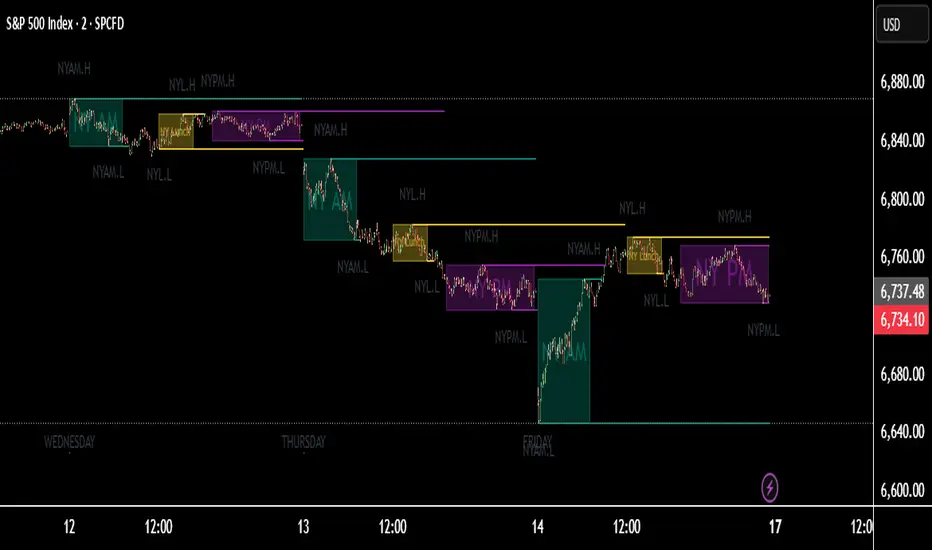
New York Sessions High/Low with Liquidity Purge CriteriaDisplays horizontal lines at the highest high and lowest low of the NY AM (09:30–12:00) and NY PM (13:30–16:00) sessions in New York time. Lines extend forward until price strongly breaks them by a user-defined threshold (N points), at which point they cease extending - liquidity purged. Option to show only active lines (unpurged liquidity) - toggle to hide old liquidity pools for a cleaner chart. Customizable colors, line styles, width, lookback days and purge threshold.อินดิเคเตอร์ Pine Script®โดย LimYX1127
Intraday Sessions Ranges with Time SegmentationSession Ranges indicator overlays customizable range boxes on major trading sessions (e.g. London, Premarket, NY AM and NY PM) using New York time. Toggle visibility, add evenly spaced vertical segment lines, and highlight key time zones. Perfect for traders marking price action and levels across multiple historical days.อินดิเคเตอร์ Pine Script®โดย LimYX7
ICT Asian & London Range + First Presented FVGIndicator: ICT Sessions + First Presented FVG What it does: This tool automates the markup of key ICT (Inner Circle Trader) timeframes and entry signals. It allows you to trade on higher timeframes (like the 5m or 15m) while the script automatically "looks inside" the 1-minute chart to find specific setups for you. Key Features: Session Ranges (Asian & London) Automatically highlights the Asian Session (8 PM - Midnight NY) and London Open (2 AM - 5 AM NY). Draws a shaded box for the session's High and Low. New: Extends the High and Low lines to 4:00 PM NY (end of the trading day) so you can use them as liquidity targets. The "First Presented" FVG (Sniper Logic) It detects the very first Fair Value Gap (FVG) that forms on the 1-minute chart immediately after a session starts. It draws this 1-minute gap on your current chart, regardless of what timeframe you are viewing. The FVG box automatically extends to the end of the trading day (4 PM NY), showing you where price might return to "mitigate" or react later in the day.อินดิเคเตอร์ Pine Script®โดย DropkingICTที่อัปเดต: 87
J&A Sessions & NewsProject J&A: Session Ranges is a precision-engineered tool designed for professional traders who operate based on Time & Price. Unlike standard session indicators that clutter the chart with background colors, this tool focuses on Dynamic Price Ranges to help you visualize the Highs, Lows, and liquidity pools of each session. It is pre-configured for Frankfurt Time (Europe/Berlin) but is fully customizable for any global location. Key Features 1. Dynamic Session Ranges (The Boxes) Instead of vertical stripes, this indicator draws Boxes that encapsulate the entire price action of a session. Real-Time Tracking: The box automatically expands to capture the Highest High and Lowest Low of the current session. Visual Clarity: Instantly see the trading range of Asia, London, and New York to identify breakouts or range-bound conditions. 2. The "Lunch Break" Logic (Unique Feature) Institutional volume often dies down during lunch hours. This indicator allows you to Split the Session to account for these breaks. Enabled: The script draws two separate boxes (Morning Session vs. Afternoon Session), allowing you to see fresh ranges after the lunch accumulation. Disabled: The script draws one continuous box for the full session. 3. Manual High-Impact News Scheduler Never get caught on the wrong side of a spike. Since TradingView scripts cannot access live calendars, this tool includes a Manual Scheduler for risk management. Input: Simply input the time of high-impact events (e.g., CPI, NFP) from ForexFactory into the settings. Visual: A dashed line appears on the chart at the exact news time. Audio Alert: The system triggers an alarm 10 minutes before the event, giving you time to manage positions or exit trades. Default Configuration (Frankfurt Time) Asian Session: 01:00 - 10:00 (Lunch disabled) London Session: 09:00 - 17:30 (Lunch: 12:00-13:00) New York Session: 14:00 - 22:00 (Lunch: 18:00-19:00) How to Use Setup: Apply the indicator. The default timezone is Europe/Berlin. If you live elsewhere, simply change the "Your Timezone" setting to your local time (e.g., America/New_York), and the boxes will align automatically. Daily Routine: Check the economic calendar in the morning. If there is a "Red Folder" event at 14:30, open the indicator settings and enter 14:30 into the News Scheduler. Trade: Use the Session Highs and Lows as liquidity targets or breakout levels. Settings & Customization Timezone: Full support for major global trading hubs. Colors: Customize the Box fill and Border colors for every session. Labels: Rename sessions (e.g., "Tokyo" instead of "Asia") via the settings menu.อินดิเคเตอร์ Pine Script®โดย jaberahmadanb4
TNT TRADER Sessions and Zones Premarket sessions and zone indicator full customization for premarket, yesterdays high and low , london, asia after hours etc. อินดิเคเตอร์ Pine Script®โดย TNT_TRADER-25
Asia & UK Sessions H/LThis will show you the Highs and Lows of the Asia and UK sessions on the same day.อินดิเคเตอร์ Pine Script®โดย manchante16ที่อัปเดต: 5
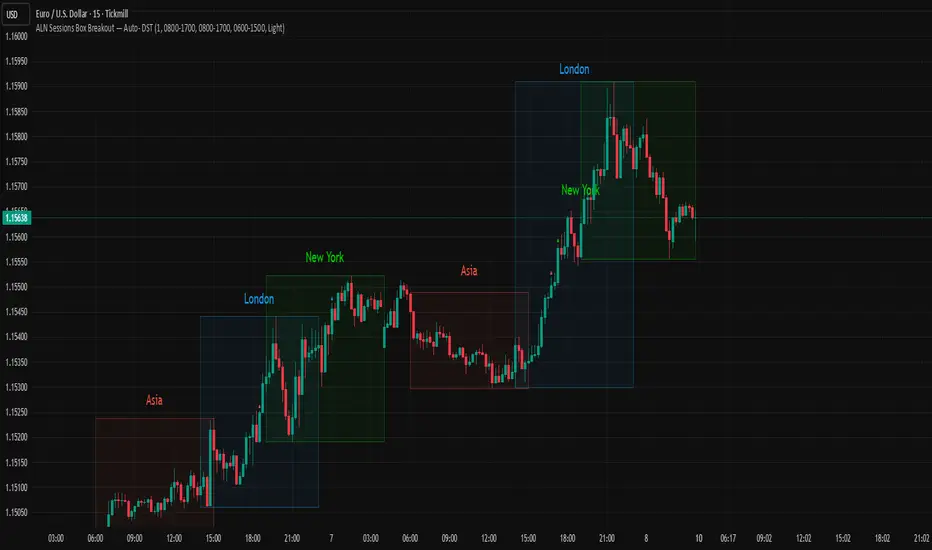
ALN Sessions Box Breakout — Auto- DSTDevoleper: Sheikh Rakib What it does This indicator draws session range boxes for Asia (Dhaka), London, and New York using each market’s own local time (DST-aware). After a session closes, it watches for the first close above the session high or below the session low and then marks that breakout once per session with clear chart markers and optional alerts. Key features Auto-DST, per-city timezones London session uses Europe/London New York session uses America/New_York Asia session uses Asia/Dhaka Your chart timezone doesn’t matter—the sessions track real local hours. Clean range boxes with adjustable opacity and optional outlines. Session labels that auto-center at the end of each session. One-shot breakout signals per session: Triangle up when price closes above the session high. Triangle down when price closes below the session low. Built-in alerts for: session starts and each breakout direction. Inputs London / New York / Asia (Dhaka) Show Session: toggle each session on/off Time Range: default London 08:00–17:00 (local), New York 08:00–17:00 (local), Asia 06:00–15:00 (Dhaka) Colour: box color for each session Settings Show Session Labels Show Range Outline Opacity Preset: Dark / Medium / Light (UTC Offset input is kept for display, not used in session detection.) Visuals & alerts Boxes extend from session open to close, continually updating the high/low. When the session ends, the final high/low are locked in, the label is centered, and the indicator begins monitoring for a breakout. Alerts Session start: Asia/London/New York Breakouts: “High Breakout” (close > high) and “Low Breakout” (close < low) for each session Create alerts from the TradingView alert dialog and choose the desired alertcondition. Logic notes (how signals fire) While a session is open, its box grows to contain all highs/lows. On the first bar after close, the script starts listening for a breakout: Close > session high → one up signal (fires once) Close < session low → one down signal (fires once) When the next same session begins, internal flags reset and a new box starts—so signals are inherently scoped to the period between that session’s close and its next open. Tips Use on intraday timeframes (e.g., 1m–30m) for clearer box structure. If you only want specific markets, toggle others off for a cleaner chart. For systematic entries, combine with your trend/volatility filters and use the breakout alerts as triggers or confirmations—this script doesn’t place trades. Disclaimer: Market timing and risk management are your responsibility. Past session behavior does not guarantee future performance.อินดิเคเตอร์ Pine Script®โดย Greenbd21
ALN Sessions Box — Auto- DSTDevoleper: Sheikh Rakib What it does Draws candle-synced high/low range boxes for the three major sessions—Asia (Dhaka view), London, and New York—on any timeframe. London and New York are DST-aware (times auto-shift on DST changes). Boxes update live with session high/low and close exactly on the session’s final bar. Key features Auto-DST: Uses Europe/London and America/New_York time zones, so session windows auto-adjust when DST turns on/off. Asia (BDT) window: Default 06:00–15:00 Asia/Dhaka (no DST). Candle-linked boxes: Top/bottom track session High/Low; right edge finalizes on the session end bar—clean breakout zones. Clean UI: Optional labels, outline toggle, and three opacity presets (Dark/Medium/Light). Plug & play: Drop in, customize colors/times, done. Inputs you can tweak Time Range (LOCAL) for each session Defaults: Asia 06:00–15:00 (Asia/Dhaka), London 08:00–17:00 (Europe/London), New York 08:00–17:00 (America/New_York) For equities, switch New York to 09:30–16:00—DST handling remains automatic. Colour per session, Show Session Labels, Show Range Outline, Opacity Preset. UTC Offset input is retained for compatibility but not used for session detection. Quick BDT reference (for the default 08:00–17:00 local windows) London → DST ON (BST): 13:00–22:00 BDT · DST OFF (GMT): 14:00–23:00 BDT New York → DST ON (EDT): 18:00–03:00 BDT (next day) · DST OFF (EST): 19:00–04:00 BDT (next day) Asia (Dhaka) → 06:00–15:00 BDT (no DST) Tips If you see dotted vertical lines, that’s TradingView Session breaks (Chart Settings → Appearance). Turn off if you prefer a cleaner view. Some symbols don’t trade during parts of a session—adjust Time Range as needed. Labels are placed inside the box; adjust opacity/colors to suit your theme. A sharp, professional session map for spotting breakouts, reversals, and volatility windows at a glance.อินดิเคเตอร์ Pine Script®โดย Greenbdที่อัปเดต: 28
Traderei SessionsTraderei Sessions shows the previous daily H/L + previous weekly H + L, daily open from the current day, the H/L from Asia/London/NY Session, including the 50% Level for Premium or Discount Price. VPOC for each Session. VPOC do not work on FX ! only Crypto + Gold ! 2 EMAs and 1 SMA, + 1 additional EMA/SMA. default settings for EMA 20/50, SMA 200 all lines, labels can be toggledอินดิเคเตอร์ Pine Script®โดย Monoro8111394
Trading Sessions with 15 minute ORBA working copy of the original Tradingview trading sessions indicator with the addition of horizontal lines marking the 15 minute opening range for your ORB strategy. The lines reset with each session start. อินดิเคเตอร์ Pine Script®โดย huffy13135
Monks - SessionsScript that shows the sessions of the market by coloring the candles of each market session as defined by the user. It also shows inside bars, a timer on the left of the screen, it shows if the previous high time frame candle has been gained (1D,1W or 1M). It also shows the days of the week as vertical linesอินดิเคเตอร์ Pine Script®โดย elfronza29
Watermark with Session Boxes (by Rufi)Watermark & Session Boxes - Chart Branding Tool What it does: Combines professional chart watermarking with automated trading session visualization for clean, branded analysis. Key Features: Smart Session Boxes: Auto-draws boxes around Asia (8PM-11:59PM), London (2AM-5AM), and NY (7AM-10AM) sessions using high/low detection Custom Watermark: Professional text overlay with your brand/tagline Full Customization: Adjustable colors, transparency (0-100%), and display limits (1-30 days) How it works: Uses Pine Script's time() function to detect session periods, tracks price extremes during each session, then draws filled rectangles from session high to low. Perfect for identifying key support/resistance levels from major trading periods. Best for: Intraday traders who want branded charts with clear session-based S/R levels. Ideal for forex, indices, and crypto on lower timeframes.อินดิเคเตอร์ Pine Script®โดย RufiFXที่อัปเดต: 76
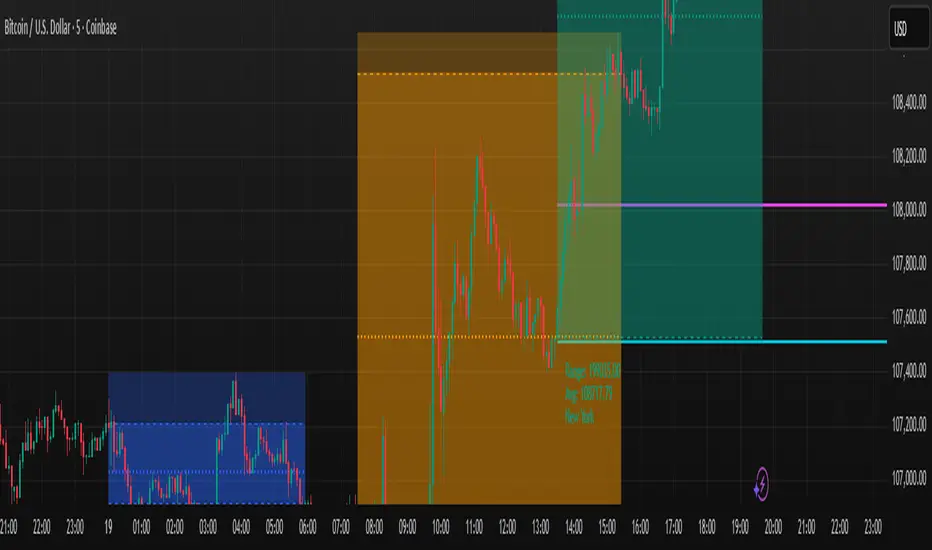
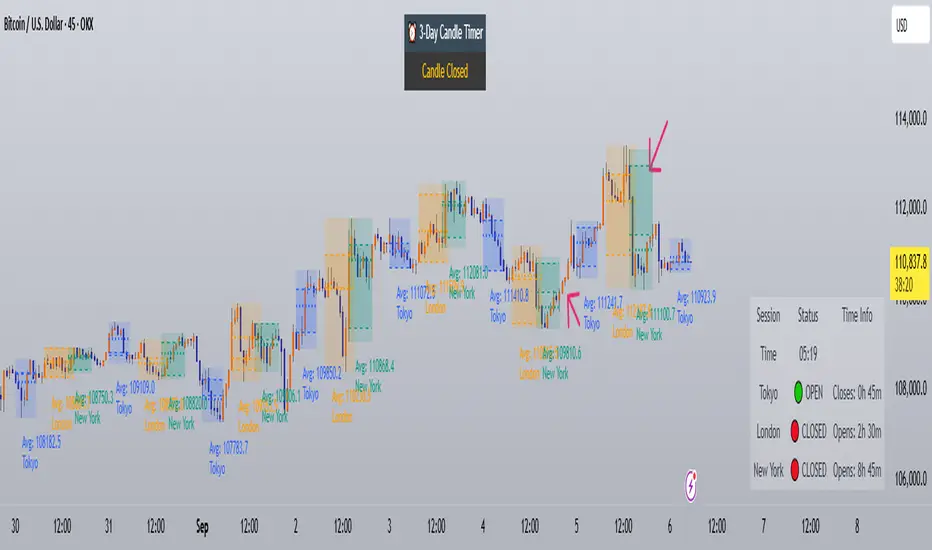
Trading Sessions with Holidays & Timer🌍 Trading Sessions Matter Markets breathe in cycles. When Tokyo, London, or New York steps in, liquidity shifts and price often reacts fast. Example: New York closed BTC at $110K, and when traders woke up, the price was already $113K. That gap says everything about overnight pressure and the next move. ⚡ Indicator Features ✅ Session boxes (Tokyo, London, NY) with custom colors & time zones ✅ Open/close lines → spot gaps & momentum ✅ Average price per session → see where pressure builds ✅ Tick range → quick volatility check ✅ 🏖 Holiday markers → avoid false quiet markets ✅ Live status table → session OPEN / CLOSED + countdown timer 🚀 How to Use Works on intraday timeframes (1m–4h) Watch session opens/closes → liquidity shift points Compare ranges & averages between Tokyo, London, NY Use the timer to prep before the next wave This tool helps you visualize the heartbeat of global markets session by session. 🔖 #BTCUSDT #Forex #TradingSessions #Crypto #DayTradingอินดิเคเตอร์ Pine Script®โดย HamadaMark2228
Keks Key Level Fx SessionsThis script is designed to automatically plot and manage key levels for the major FX trading sessions (London, New York, and Asia). It helps traders identify the most relevant price areas that often act as support, resistance, or breakout zones during active market hours. Key features: Marks session highs, lows, and midpoints Visualizes key intraday levels for better market structure analysis Highlights potential breakout and retest areas Works across multiple timeframes for flexibility Clean and minimal chart design to avoid clutter This tool is especially useful for traders who rely on session-based strategies, such as breakout trading, retests, or range trading, by providing a clear visual guide to the most important price zones.อินดิเคเตอร์ Pine Script®โดย Keks07336
Lumiere’s Indicator BundleThe Lumiere’s Indicator Bundle combines three of Lumiere’s most used tools into one script: 🔹 BOS Mark-out – Marks Breaks of Structure with clear bullish/bearish levels and optional alerts. 🔹 Liquidity Mark-ou t – Draws significant swing highs/lows and automatically removes them once swept. 🔹 Trading Session High/Low – Tracks Asia, London, and New York session ranges with customizable timezone. Why this bundle? I made this bundle so everyone can run all my indicators at once without having to pick and choose between them or worry about chart space limits. Instead of loading 3 separate indicators, this package gives you everything in one place. You can toggle each module (BOS, Liquidity, Sessions) on or off from the settings. All inputs are kept clean and organized in their own sections for easy adjustments. What to expect BOS lines always plotted on top for maximum clarity. Liquidity highs/lows update in real time and get removed when taken out. Session ranges show the active session’s high/low and can mark sweeps after the session closes. Default timezone is New York (UTC-4), but you can switch to any TradingView-supported timezone. BOS alerts are included, so you’ll never miss a structural break.อินดิเคเตอร์ Pine Script®โดย Lum1ereที่อัปเดต: 96
RFR Multi-EMA with Volume & SessionsSelf made Multi-EMA 10, 50, 100, 200 with Volume & Sessionsอินดิเคเตอร์ Pine Script®โดย RafiFarhanที่อัปเดต: 2
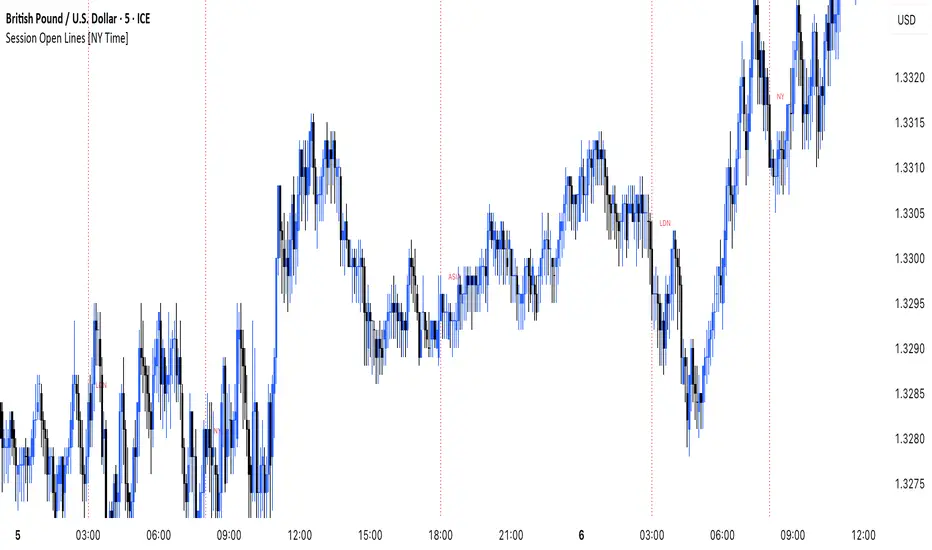
MANI SESSIONSOANDA:GBPUSD This indicator marks the opening times of the three main trading sessions — Asia, London, and New York — using vertical red dotted lines on the chart. Each session is labeled with a minimal tag (“ASIA”, “LDN”, “NY”) displayed directly on the line for clean and unobtrusive reference. All session times are based on the New York time zone and adjust automatically for each new day. This tool helps intraday traders quickly identify session shifts, plan entries around high-volume hours, and stay locked into session-based strategy. OANDA:GBPUSD อินดิเคเตอร์ Pine Script®โดย manigolestaniian8
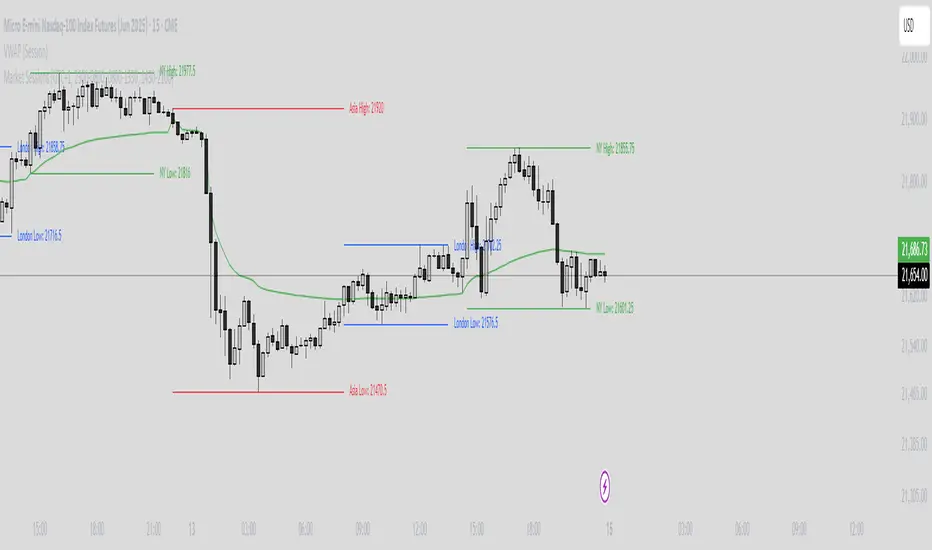
Market Sessions Indicator by NomadTradesCustomisable Market session indicator This indicator visually marks the high and low price levels for the Asia, London, and New York trading sessions directly on the chart, using distinct horizontal lines and color-coding for each session. Each session’s high and low are labelled for easy identification, allowing traders to quickly assess key support and resistance levels established during major global market hours. The indicator is designed for clear session demarcation, helping users identify price reactions at these significant levels and supporting multi-session analysis for intraday and swing trading strategiesอินดิเคเตอร์ Pine Script®โดย NomadTrades96ที่อัปเดต: 152
Time-based LiquidityThis indicator automatically marks important time-based liquidity levels on your chart, helping you stay aware of where major price reactions may occur and the market is forced to show its hand. Key Features: Previous Month’s, Week’s, and Day’s Highs and Lows: Displays PMH/PML, PWH/PWL, and PDH/PDL — key reference points where liquidity often accumulates. Intraday Session Highs and Lows: Divides the trading day into quarters (00:00–06:00, 06:00–12:00, etc. following Day’s Quarterly Theory) and tracks session highs and lows dynamically across these periods. Current Session 90-Minute Quarters: Splits the active session into 90-minute intervals to highlight short-term liquidity structures and potential reaction zones. Level Alerts: Tracks when each liquidity level is reached and enables customizable alerts so you don’t miss important price movements. Use Case: This tool provides an organized, time-based framework for identifying where liquidity is likely to concentrate across different timeframes and intraday cycles. Use these levels for forming bias, planning entries, exits, or anticipating price reactions at key points in the market structure. Customization Options: Enable/disable liquidity levels to display (Daily, Weekly, Monthly, Sessions, Session Quarters) Customize the appearance of each level (color, style, line width) Enable or disable tracking and alerts for level interactions อินดิเคเตอร์ Pine Script®โดย OGDubที่อัปเดต: 2929509
Horizontal Sessions - B A N K $This is a simple indicator that has been designed to aid intraday trading and has only 1 function; Information ℹ️ This indicator prints Horizontal Lines in a separate chart pane above/below for the 3 main session killzones in the markets; Asia, London & New York + Optimal Exit Time. The indicator is only visible up to and including the 1h timeframe. Settings ⚙️ The default timings are set to perfectly align with each session killzone however the Start & End times for each session can be changed in the settings. You can change the colour & line thickness of the horizontal lines in the settings.อินดิเคเตอร์ Pine Script®โดย wintonbanksที่อัปเดต: 1170