Sniffer
╭━━━╮╱╱╱╱╭━╮╭━╮
┃╭━╮┃╱╱╱╱┃╭╯┃╭╯
┃╰━━┳━╮╭┳╯╰┳╯╰┳━━┳━╮
╰━━╮┃╭╮╋╋╮╭┻╮╭┫┃━┫╭╯
┃╰━╯┃┃┃┃┃┃┃╱┃┃┃┃━┫┃
╰━━━┻╯╰┻╯╰╯╱╰╯╰━━┻╯
Overview
A vast majority of modern data analysis & modelling techniques rely upon the idea of hidden patterns, wether it is some type of visualisation tool or some form of a complex machine learning algorithm, the one thing that they have in common is the belief, that patterns tell us what’s hidden behind plain numbers. The same philosophy has been adopted by many traders & investors worldwide, there’s an entire school of thought that operates purely based on chart patterns. This is where Sniffer comes in, it is a tool designed to simplify & quantify the job of pattern recognition on any given price chart, by combining various factors & techniques that generate high-quality results.
This tool analyses bars selected by the user, and highlights bar clusters on the chart that exhibit similar behaviour across multiple dimensions. It can detect a single candle pattern like hammers or dojis, or it can handle multiple candles like morning/evening stars or double tops/bottoms, and many more. In fact, the tool is completely independent of such specific candle formations, instead, it works on the idea of vector similarity and generates a degree of similarity for every single combination of candles. Only the top-n matches are highlighted, users get to choose which patterns they want to analyse and to what degree, by customising the feature-space.
Background
In the world of trading, a common use-case is to scan a price chart for some specific candlestick formations & price structures, and then the chart is further analysed in reference to these events. Traders are often trying to answer questions like, when was the last time price showed similar behaviour, what are the instances similar to what price is doing right now, what happens when price forms a pattern like this, what were some of other indicators doing when this happened last(RSI, CCI, ADX etc), and many other abstract ideas to have a stronger confluence or to confirm a bias.Having such a context can be vital in making better informed decisions, but doing this manually on a chart that has thousands of candles can have many disadvantages. It’s tedious, human errors are rather likely, and even if it’s done with pin-point accuracy, chances are that we’ll miss out on many pieces of information. This is the thought that gave birth to Sniffer .
Sniffer tries to provide a general solution for pattern-based analysis by deploying vector-similarity computation techniques, that cover the full-breadth of a price chart and generate a list of top-n matches based on the criteria selected by the user. Most of these techniques come from the data science space, where vector similarity is often implemented to solve classification & clustering problems. Sniffer uses same principles of vector comparison, and computes a degree of similarity for every single candle formation within the selected range, and as a result generates a similarity matrix that captures how similar or dissimilar a set of candles is to the input set selected by the user.
How It Works
A brief overview of how the tool is implemented:
- Every bar is processed, and a set of features are mapped to it.
- Bars selected by the user are captured, and saved for later use.
- Once the all the bars have been processed, candles are back-tracked and degree of similarity is computed for every single bar(max-limit is 5000 bars).
- Degree of similarity is computed by comparing attributes like price range, candle breadth & volume etc.
- Similarity matrix is sorted and top-n results are highlighted on the chart through boxes of different colors.
A brief overview of the features space for bars:
- Range: Difference between high & low
- Body: Difference between close & open
- Volume: Traded volume for that candle
- Head: Upper wick for green candles & lower wick for red candles
- Tail: Lower wick for green candles & upper wick for red candles
- BTR: Body to Range ratio
- HTR: Head to Range ratio
- TTR: Tail to Range ratio
- HTB: Head to Body ratio
- TTB: Tail to Body ratio
- ROC: Rate of change for HL2 for four different periods
- RSI: Relative Strength Index
- CCI: Commodity Channel Index
- Stochastic: Stochastic Index
- ADX: DMI+, DMI- & ADX
A brief overview of how degree of similarity is calculated:
- Each bar set is compared to the inout bar set within the selected feature space
- Features are represented as vectors, and distance between the vectors is calculated
- Shorter the distance, greater the similarity
- Different distance calculation methods are available to choose from, such as Cosine, Euclidean, Lorentzian, Manhattan, & Pearson
- Each method is likely to generate slightly different results, users are expected to select the method & the feature space that best fits their use-case
How To Use It
- Usage of this tool is relatively straightforward, users can add this indicator to their chart and similar clusters will be highlighted automatically
- Users need to select a time range that will be treated as input, and bars within that range become the input formation for similarity calculations
- Boxes will be draw around the clusters that fit the matching criteria
- Boxes are color-coded, green color boxes represent the top one-third of the top-n matches, yellow boxes represent the middle third, red boxes are for bottom third, and white box represents user-input
- Boxes colors will be adjusted as you adjust input parameters, such as number of matches or look-back period
User Settings
Users can configure the following options:
- Select the time-range to set input bars
- Select the look-back period, number of candles to backtrack for similarity search
- Select the number of top-n matches to show on the chart
- Select the method for similarity calculation
- Adjust the feature space, this enables addition of custom features, such as pattern recognition, technical indicators, rate of change etc
- Toggle verbosity, shows degree of similarity as a percentage value inside the box
Top Features
- Pattern Agnostic: Designed to work with variable number of candles & complex patterns
- Customisable Feature Space: Users get to add custom features to each bar
- Comprehensive Comparison: Generates a degree of similarity for all possible combinations
Final Note
- Similarity matches will be shown only within last 4500 bars.
- In theory, it is possible to compute similarity for any size candle formations, indicator has been tested with formations of 50+ candles, but it is recommended to select smaller range for faster & cleaner results.
- As you move to smaller time frames, selected time range will provide a larger number of candles as input, which can produce undesired results, it is advised to adjust your selection when you change time frames. Seeking suggestions on how to directly receive bars as user input, instead of time range.
- At times, users may see array index out of bound error when setting up this indicator, this generally happens when the input range is not properly configured. So, it should disappear after you select the input range, still trying to figure out where it is coming from, suggestions are welcome.
Credits
- @HeWhoMustNotBeNamed for publishing such a handy PineScript Logger, it certainly made the job a lot easier.
ค้นหาในสคริปต์สำหรับ "adx"
SPY 1 Minute Day TraderWhen scalping options, users are looking for where breakouts are going to occur instead of sitting thru areas choppy price action that drain delta and cause them to lose value even if price is up trending. This script tries to identify when a trend reversal is expected based on one minute price action on the SPY. It alerts users to prepare for potential breakout when 5 out of the 6 key optimized parameters are discovered by showing a white L or S. Once all six trigger, it informs the user at the close of that candle with a golden triangle with Pivot Up or Pivot Down. As scalping options is something that is expected to be short in duration, a take profit and stop loss of 30 cents of price actions is established. If five or more parameters occur after the pivot is initiated, then stop losses and take profits are adhered to; however, if there are less, then it waits to take profit or stop the trade, as likely it is just noise and it will finish trend with an additional breakout.
This script has been created to take into account how the following variables impact trend for SPY 1 Minute:
ema vs 13 ema : A cross establishes start of trend
MACD (Line, Signal & Slope) : If you have momentum
ADX : if you are trending
RSI : If the trend has strength
The above has been optimized to determine pivot points in the trend using key values for these 6 indicators
bounce up = ema5 > ema13 and macdLine < .5 and adx > 20 and macdSlope > 0 and signalLine > -.1 and rsiSignal > 40
bounce down = ema5 < ema13 and macdLine > -.5 and adx > 20 and signalLine < 0 and macdSlope < 0 and rsiSignal < 60
White L's indicate that 5 of 6 conditions are met due to impending uptrend w/ missing one in green below it
Yellow L's indicate that 6 of 6 conditions still are met
White S's indicate that 5 of 6 conditions are met due to impending downtrend w/ missing condition in red above it
Yellow S's indicate that 6 of 6 conditions still are met
After a downtrend or uptrend is established, once it closes it can't repeat for 10 minutes
Won't open any trades on last two minutes of any hours to avoid volatility
Will close any open trades going into last minute of hour to avoid large overnight random swings.
กลยุทธ์ Pine Script®
MLExtensionsLibrary "MLExtensions"
normalizeDeriv(src, quadraticMeanLength)
Returns the smoothed hyperbolic tangent of the input series.
Parameters:
src : The input series (i.e., the first-order derivative for price).
quadraticMeanLength : The length of the quadratic mean (RMS).
Returns: nDeriv The normalized derivative of the input series.
normalize(src, min, max)
Rescales a source value with an unbounded range to a target range.
Parameters:
src : The input series
min : The minimum value of the unbounded range
max : The maximum value of the unbounded range
Returns: The normalized series
rescale(src, oldMin, oldMax, newMin, newMax)
Rescales a source value with a bounded range to anther bounded range
Parameters:
src : The input series
oldMin : The minimum value of the range to rescale from
oldMax : The maximum value of the range to rescale from
newMin : The minimum value of the range to rescale to
newMax : The maximum value of the range to rescale to
Returns: The rescaled series
color_green(prediction)
Assigns varying shades of the color green based on the KNN classification
Parameters:
prediction : Value (int|float) of the prediction
Returns: color
color_red(prediction)
Assigns varying shades of the color red based on the KNN classification
Parameters:
prediction : Value of the prediction
Returns: color
tanh(src)
Returns the the hyperbolic tangent of the input series. The sigmoid-like hyperbolic tangent function is used to compress the input to a value between -1 and 1.
Parameters:
src : The input series (i.e., the normalized derivative).
Returns: tanh The hyperbolic tangent of the input series.
dualPoleFilter(src, lookback)
Returns the smoothed hyperbolic tangent of the input series.
Parameters:
src : The input series (i.e., the hyperbolic tangent).
lookback : The lookback window for the smoothing.
Returns: filter The smoothed hyperbolic tangent of the input series.
tanhTransform(src, smoothingFrequency, quadraticMeanLength)
Returns the tanh transform of the input series.
Parameters:
src : The input series (i.e., the result of the tanh calculation).
smoothingFrequency
quadraticMeanLength
Returns: signal The smoothed hyperbolic tangent transform of the input series.
n_rsi(src, n1, n2)
Returns the normalized RSI ideal for use in ML algorithms.
Parameters:
src : The input series (i.e., the result of the RSI calculation).
n1 : The length of the RSI.
n2 : The smoothing length of the RSI.
Returns: signal The normalized RSI.
n_cci(src, n1, n2)
Returns the normalized CCI ideal for use in ML algorithms.
Parameters:
src : The input series (i.e., the result of the CCI calculation).
n1 : The length of the CCI.
n2 : The smoothing length of the CCI.
Returns: signal The normalized CCI.
n_wt(src, n1, n2)
Returns the normalized WaveTrend Classic series ideal for use in ML algorithms.
Parameters:
src : The input series (i.e., the result of the WaveTrend Classic calculation).
n1
n2
Returns: signal The normalized WaveTrend Classic series.
n_adx(highSrc, lowSrc, closeSrc, n1)
Returns the normalized ADX ideal for use in ML algorithms.
Parameters:
highSrc : The input series for the high price.
lowSrc : The input series for the low price.
closeSrc : The input series for the close price.
n1 : The length of the ADX.
regime_filter(src, threshold, useRegimeFilter)
Parameters:
src
threshold
useRegimeFilter
filter_adx(src, length, adxThreshold, useAdxFilter)
filter_adx
Parameters:
src : The source series.
length : The length of the ADX.
adxThreshold : The ADX threshold.
useAdxFilter : Whether to use the ADX filter.
Returns: The ADX.
filter_volatility(minLength, maxLength, useVolatilityFilter)
filter_volatility
Parameters:
minLength : The minimum length of the ATR.
maxLength : The maximum length of the ATR.
useVolatilityFilter : Whether to use the volatility filter.
Returns: Boolean indicating whether or not to let the signal pass through the filter.
backtest(high, low, open, startLongTrade, endLongTrade, startShortTrade, endShortTrade, isStopLossHit, maxBarsBackIndex, thisBarIndex)
Performs a basic backtest using the specified parameters and conditions.
Parameters:
high : The input series for the high price.
low : The input series for the low price.
open : The input series for the open price.
startLongTrade : The series of conditions that indicate the start of a long trade.`
endLongTrade : The series of conditions that indicate the end of a long trade.
startShortTrade : The series of conditions that indicate the start of a short trade.
endShortTrade : The series of conditions that indicate the end of a short trade.
isStopLossHit : The stop loss hit indicator.
maxBarsBackIndex : The maximum number of bars to go back in the backtest.
thisBarIndex : The current bar index.
Returns: A tuple containing backtest values
init_table()
init_table()
Returns: tbl The backtest results.
update_table(tbl, tradeStatsHeader, totalTrades, totalWins, totalLosses, winLossRatio, winrate, stopLosses)
update_table(tbl, tradeStats)
Parameters:
tbl : The backtest results table.
tradeStatsHeader : The trade stats header.
totalTrades : The total number of trades.
totalWins : The total number of wins.
totalLosses : The total number of losses.
winLossRatio : The win loss ratio.
winrate : The winrate.
stopLosses : The total number of stop losses.
Returns: Updated backtest results table.
ไลบรารี Pine Script®
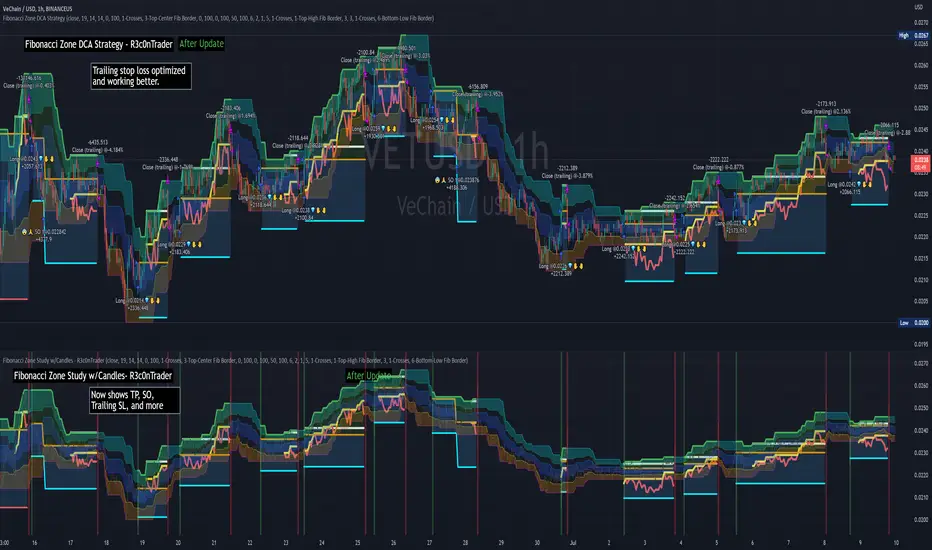
Fibonacci Zone DCA Strategy - R3c0nTraderCredits:
Thank you "eykpunter" for granting me permission to use "Fibonacci Zones" to create this strategy
Thank you "junyou0424" for granting me permission to use "DCA Bot with SuperTrend Emulator" which I used for adding bot inputs, calculations, and strategy
Pre-requisites:
You can use this script without a 3Commas account and see how 3Commas DCA Bot would perform. However, I highly recommend signing up for their free account, going through their training, and testing this strategy with a paper bot. This would give you a base understanding of the settings you will see in this strategy and why you will need to know them.
What can this do?
First off, this is a Long only strategy as I wrote it with DCA in mind. It cannot be used for shorting. Shorting defeats the purpose of a DCA bot which has a goal that is Long a position not Short a position. If you want to short, there are plenty of free scripts out there that do this.
I created this script out of curiosity and I wanted to see how a strategy based on “Fibonacci” levels would work with a 3Commas DCA bot. I came across "eykpunter’s" "Fibonacci Zones" study and in TradingView and I found it to be a very interesting concept. The "Fib Zones" in his study are basically a "Donchian Channel" of 4 Fibonacci lines. These are the High @ 0.236, Center High @ 0.382, Center Low @ 0.618, and Low @ 0.764.
The Fib Zones in this strategy can be used as conditions to open a trade as well as closing a trade. There is also the option to close a trade based on a Target Take Profit (%).
Advanced Fibonacci trading is also supported by specifying additional parameters for Trade Entry and Exit.
For example, for order entry, you can increase the minimum trend strength to open an order via the "minimum ADX value" option. You can also further limit order entry by selecting the option to "Only open trades on bullish +DI" (Positive Directional Index).
Or you can play the contrarian. For example, I would look for "buying the dip" opportunities by doing the following under "Trade Entry Settings":
Set the "Min ADX value to open trade" to zero
Set the option "Open a trade when the price moves" to "1-To the bottom of Downtrend Fib zone" or "2-Higher than the top of the Downtrend Fib zone"
Uncheck option "Only open trades on bullish +DI"
Set the 'Min ADX value to open trade' to Zero
Set the 'Max +DI value to open trade' to a value between 10-20.
For Trade Exit settings, I can use a "Target Take Profit (%)" or one of the High Fib levels to close the trade.
Here's an example result when using a Contrarian-Fibonacci-Zone-DCA strategy:
Explanation of Chart lines and colors on chart
Six Options for Entering a Fibonacci Trade
Open a trade when the price moves:
1-To the bottom of Downtrend Fib zone
2-Higher than the top of the Downtrend Fib zone
3-Higher than the bottom of Ranging Fib Zone
4-Higher than the top of Ranging Fib Zone
5-Higher than the bottom of Uptrend Fib Zone
6-To the top of Uptrend Fib Zone
Three Options for Exiting a Fibonacci Trade
Take profit using:
"Target Take Profit (%)"
"High Fibonacci Border-1"
"High Fibonacci Border-2"
กลยุทธ์ Pine Script®
[blackcat] L3 DMIQLevel: 3
Background
The directional movement index (DMI) is an indicator developed by J. Welles Wilder in 1978 that identifies in which direction the price of an asset is moving. The indicator does this by comparing prior highs and lows and drawing two lines: a positive directional movement line (+DI) and a negative directional movement line (-DI). An optional third line, called the average directional index (ADX), can also be used to gauge the strength of the uptrend or downtrend.
Function
When +DI is above -DI, there is more upward pressure than downward pressure in the price. Conversely, if -DI is above +DI, then there is more downward pressure on the price. This indicator may help traders assess the trend direction. Crossovers between the lines are also sometimes used as trade signals to buy or sell.
The directional movement index (DMI) is a technical indicator that measures both the strength and direction of a price movement and is intended to reduce false signals.
The DMI utilizes two standard indicators, one negative (-DM) and one positive (+DN), in conjunction with a third, the average directional index (ADX), which is non-directional but shows momentum.
The larger the spread between the two primary lines, the stronger the price trend. If +DI is way above -DI the price trend is strongly up. If -DI is way above +DI then the price trend is strongly down.
ADX measures the strength of the trend, either up or down; a reading above 25 indicates a strong trend.
Remarks
Free and Open Source
Alerts are added.
อินดิเคเตอร์ Pine Script®
Leonidas Squeeze Momentum SystemThis indicator is based on LazyBear SQ Momentum Indicator and SQ Plus Indicator.
This indicator is using ADX and Squeeze Momentum Indicator.
When you see the ADX above 0 line and the slop is positive that means the trend is strong
When the ADX is below 0 line and the trend is weak you will see the slop negative and the color gray
When we see the SQ changing the color from Red to Yellow that means the sell pressure is decreasing this could be a potential buy signal
When we see the color changing from blue to dark blue that means the buy pressure is decreasing this could be a a potential sell signal
Bull/Bear divergences supported
Added SQ signal
this signal is an exponential moving average following the SQ main signal useful for filtering fake signals.
This indicator is very powerful but offers many fake signals it is recommended using this indicator with other indicators to confirm the entries
อินดิเคเตอร์ Pine Script®
The Witcher [30MIN] - AlertsHello,
This is the Witcher Bot
This bot is got best performance at BTCUSDTPERP BINANCE FUTURES
this is bot for leverage 1x,
I tried focusing at highest % profitable trades, bot could be optimalised to even higher profit net.
TP: 1.1
SL: 8.2
Stop-loss unfortunelly have to be high to avoid bear/bull traps
The core of this strategy is trend strenght ( MONEY FLOW INDKES)
Strategy can only open position on strong price movment, to avoid wrong decision
Settings are set for highest profitable trades %
Bot using 10 indicators to trigger basic condtition for long and short :
1) ADX - Is one of the most powerful and accurate trend indicators. ADX measures how strong a trend is, and can give valuable information on whether there is a potential trading opportunity.
2) RSI - value helps strategy to stop trade in right time. When RSI is overbought strategy don't open new longs , also when RSI is oversold strategy don't open new shorts
3) TREND STRENGHT
4) JURIK MOVING AVERAGE - The Jurik Moving Average indicator is one of the surest ways to smoothen price curves within a minimum time lag. The indicator offers currency traders one of the best price filters during strong price moves. In this time, when bitcoin price action is so strong, this indicator is necessary.
5) SAR - The parabolic SAR is a technical indicator used to determine the price direction of an asset, as well as draw attention to when the price direction is changing. SAR supporting bot, to not open new trades when the trends are slowly changing
6) TREND INDICATOR
7) MOMENTUM - Indicator istechnical analysis tool used to determine the strength or weakness of a stock's price. Momentum measures the rate of the rise or fall of stock prices. Common momentum indicators include the relative strength index ( RSI ) and moving average convergence divergence ( MACD ).
8) OBV - On-balance volume (OBV) is a technical trading momentum indicator that uses volume flow to predict changes in stock price.
9) FAST MA - like previous ones this is for better view of trends, and correctly define the trends, also Speed_MA are using for predict the future price action.
10) RANGE FILTER - this indicator is for the better view of trends, define trends, that is important for every bull/bear traps which helps a lot becouse of the very variable trends.
I decided to add momentum indicator to strategy, to make a fast-reacting decision on lower timeframes at extremly price volatility
Also bot got additional EMA scalping option, which increase profit net but, in some situation, that could be risky.
For max security I recommend to turn off this option.
Commision are set at standard binancefutures VIP-0 = 0.04%
After converting strategy into study version, bot is ready for automation.
All the ploting color depends of adx value.
Strategy are not Repainting
For the source code I tried to keep as clean as I could
Enjoy
อินดิเคเตอร์ Pine Script®
pandas_taLibrary "pandas_ta"
Level: 3
Background
Today is the first day of 2022 and happy new year every tradingviewers! May health and wealth go along with you all the time. I use this chance to publish my 1st PINE v5 lib : pandas_ta
This is not a piece of cake like thing, which cost me a lot of time and efforts to build this lib. Beyond 300 versions of this script was iterated in draft.
Function
Library "pandas_ta"
PINE v5 Counterpart of Pandas TA - A Technical Analysis Library in Python 3 at github.com
The Original Pandas Technical Analysis (Pandas TA) is an easy to use library that leverages the Pandas package with more than 130 Indicators and Utility functions and more than 60 TA Lib Candlestick Patterns.
I realized most of indicators except Candlestick Patterns because tradingview built-in Candlestick Patterns are even more powerful!
I use this to verify pandas_ta python version indicators for myself, but I realize that maybe many may need similar lib for pine v5 as well.
Function Brief Descriptions (Pls find details in script comments)
bton --> Binary to number
wcp --> Weighted Closing Price (WCP)
counter --> Condition counter
xbt --> Between
ebsw --> Even Better SineWave (EBSW)
ao --> Awesome Oscillator (AO)
apo --> Absolute Price Oscillator (APO)
xrf --> Dynamic shifted values
bias --> Bias (BIAS)
bop --> Balance of Power (BOP)
brar --> BRAR (BRAR)
cci --> Commodity Channel Index (CCI)
cfo --> Chande Forcast Oscillator (CFO)
cg --> Center of Gravity (CG)
cmo --> Chande Momentum Oscillator (CMO)
coppock --> Coppock Curve (COPC)
cti --> Correlation Trend Indicator (CTI)
dmi --> Directional Movement Index(DMI)
er --> Efficiency Ratio (ER)
eri --> Elder Ray Index (ERI)
fisher --> Fisher Transform (FISHT)
inertia --> Inertia (INERTIA)
kdj --> KDJ (KDJ)
kst --> 'Know Sure Thing' (KST)
macd --> Moving Average Convergence Divergence (MACD)
mom --> Momentum (MOM)
pgo --> Pretty Good Oscillator (PGO)
ppo --> Percentage Price Oscillator (PPO)
psl --> Psychological Line (PSL)
pvo --> Percentage Volume Oscillator (PVO)
qqe --> Quantitative Qualitative Estimation (QQE)
roc --> Rate of Change (ROC)
rsi --> Relative Strength Index (RSI)
rsx --> Relative Strength Xtra (rsx)
rvgi --> Relative Vigor Index (RVGI)
slope --> Slope
smi --> SMI Ergodic Indicator (SMI)
sqz* --> Squeeze (SQZ) * NOTE: code sufferred from very strange error, code was commented.
sqz_pro --> Squeeze PRO(SQZPRO)
xfl --> Condition filter
stc --> Schaff Trend Cycle (STC)
stoch --> Stochastic (STOCH)
stochrsi --> Stochastic RSI (STOCH RSI)
trix --> Trix (TRIX)
tsi --> True Strength Index (TSI)
uo --> Ultimate Oscillator (UO)
willr --> William's Percent R (WILLR)
alma --> Arnaud Legoux Moving Average (ALMA)
xll --> Dynamic rolling lowest values
dema --> Double Exponential Moving Average (DEMA)
ema --> Exponential Moving Average (EMA)
fwma --> Fibonacci's Weighted Moving Average (FWMA)
hilo --> Gann HiLo Activator(HiLo)
hma --> Hull Moving Average (HMA)
hwma --> HWMA (Holt-Winter Moving Average)
ichimoku --> Ichimoku Kinkō Hyō (ichimoku)
jma --> Jurik Moving Average Average (JMA)
kama --> Kaufman's Adaptive Moving Average (KAMA)
linreg --> Linear Regression Moving Average (linreg)
mgcd --> McGinley Dynamic Indicator
rma --> wildeR's Moving Average (RMA)
sinwma --> Sine Weighted Moving Average (SWMA)
ssf --> Ehler's Super Smoother Filter (SSF) © 2013
supertrend --> Supertrend (supertrend)
xsa --> X simple moving average
swma --> Symmetric Weighted Moving Average (SWMA)
t3 --> Tim Tillson's T3 Moving Average (T3)
tema --> Triple Exponential Moving Average (TEMA)
trima --> Triangular Moving Average (TRIMA)
vidya --> Variable Index Dynamic Average (VIDYA)
vwap --> Volume Weighted Average Price (VWAP)
vwma --> Volume Weighted Moving Average (VWMA)
wma --> Weighted Moving Average (WMA)
zlma --> Zero Lag Moving Average (ZLMA)
entropy --> Entropy (ENTP)
kurtosis --> Rolling Kurtosis
skew --> Rolling Skew
xev --> Condition all
zscore --> Rolling Z Score
adx --> Average Directional Movement (ADX)
aroon --> Aroon & Aroon Oscillator (AROON)
chop --> Choppiness Index (CHOP)
xex --> Condition any
cksp --> Chande Kroll Stop (CKSP)
dpo --> Detrend Price Oscillator (DPO)
long_run --> Long Run
psar --> Parabolic Stop and Reverse (psar)
short_run --> Short Run
vhf --> Vertical Horizontal Filter (VHF)
vortex --> Vortex
accbands --> Acceleration Bands (ACCBANDS)
atr --> Average True Range (ATR)
bbands --> Bollinger Bands (BBANDS)
donchian --> Donchian Channels (DC)
kc --> Keltner Channels (KC)
massi --> Mass Index (MASSI)
natr --> Normalized Average True Range (NATR)
pdist --> Price Distance (PDIST)
rvi --> Relative Volatility Index (RVI)
thermo --> Elders Thermometer (THERMO)
ui --> Ulcer Index (UI)
ad --> Accumulation/Distribution (AD)
cmf --> Chaikin Money Flow (CMF)
efi --> Elder's Force Index (EFI)
ecm --> Ease of Movement (EOM)
kvo --> Klinger Volume Oscillator (KVO)
mfi --> Money Flow Index (MFI)
nvi --> Negative Volume Index (NVI)
obv --> On Balance Volume (OBV)
pvi --> Positive Volume Index (PVI)
dvdi --> Dual Volume Divergence Index (DVDI)
xhh --> Dynamic rolling highest values
pvt --> Price-Volume Trend (PVT)
Remarks
I also incorporated func descriptions and func test script in commented mode, you can test the functino with the embedded test script and modify them as you wish.
This is a Level 3 free and open source indicator library.
Feedbacks are appreciated.
This is not the end of pandas_ta lib publication, but it is start point with pine v5 lib function and I will add more and more funcs into this lib for my own indicators.
Function Name List:
bton()
wcp()
count()
xbt()
ebsw()
ao()
apo()
xrf()
bias()
bop()
brar()
cci()
cfo()
cg()
cmo()
coppock()
cti()
dmi()
er()
eri()
fisher()
inertia()
kdj()
kst()
macd()
mom()
pgo()
ppo()
psl()
pvo()
qqe()
roc()
rsi()
rsx()
rvgi()
slope()
smi()
sqz_pro()
xfl()
stc()
stoch()
stochrsi()
trix()
tsi()
uo()
willr()
alma()
wcx()
xll()
dema()
ema()
fwma()
hilo()
hma()
hwma()
ichimoku()
jma()
kama()
linreg()
mgcd()
rma()
sinwma()
ssf()
supertrend()
xsa()
swma()
t3()
tema()
trima()
vidya()
vwap()
vwma()
wma()
zlma()
entropy()
kurtosis()
skew()
xev()
zscore()
adx()
aroon()
chop()
xex()
cksp()
dpo()
long_run()
psar()
short_run()
vhf()
vortex()
accbands()
atr()
bbands()
donchian()
kc()
massi()
natr()
pdist()
rvi()
thermo()
ui()
ad()
cmf()
efi()
ecm()
kvo()
mfi()
nvi()
obv()
pvi()
dvdi()
xhh()
pvt()
Trading Made Easy ATR BandsAs always, this is not financial advice and use at your own risk. Trading is risky and can cost you significant sums of money if you are not careful. Make sure you always have a proper entry and exit plan that includes defining your risk before you enter a trade.
Background:
This is my take on two relatively famous indicators that paint the colour of your candles in order to help identify trend direction and smooth out market noise. The Elder Impulse System was designed by Dr . Alexander Elder in his book Come Into My Trading Room and attempts to identify the change of trends and when these trends speed up and slow down (school.stockcharts.com). The system used a 13 period EMA and a MACD histogram, and compared each of these indicators to the previous period. In short, when both the histogram and the EMA were rising, the trend was accelerating to the upside and when both were falling, accelerating to the downside. Conversely, when the indicators were not in alignment, say the MACD falling but the EMA rising, it signaled a slowing down of momentum. The downside of this indicator is that it be can rather jumpy, focusing on a short period EMA for 50% of its calculation, leaving a trader to potentially sit on the sidelines during opportune pull backs to enter winning positions, or exit early when there is still a lot of gas left in the tank.
A similar concept has been employed by John Carter and his organization, SimplerTrading, with the 10X bars indicator. However, here they use the famous Directional Movement Index (DMI) created by J. Welles Wilder as the basis for their bars (www.simplertrading.com). John Carter states that the use of this indicator can lead to getting in earlier on more, bigger, and faster setups. The downside of this indicator is the reliance on the ADX calculations to keep you out of rangebound trades. Anyone who is familiar with the DMI system understands it has unparalleled ability to identify longer term trends, but it is also quite slow, leaving the trader to miss a good portion of the initial runup due to this ADX portion that is very slow to get moving and also slow to signal exits.
In short, both of these systems are designed with one thing in mind: keeping the trader on the right side of the move --- but both suffer from the same issue but on opposite sides of the spectrum. One is too fast and the other is too slow. Ultimately, leaving profits on the table for the trader when such a situation could be avoided.
Here I present my own take on these and have made the “Trading Made Easy ATR Bands”. I name it this because trading is much easier when you trade with the prevailing trend, and this system identifies these periods quite effectively while doing a better job of handling the speed flux of most markets. The base formula uses the DMI as its main calculation and the relationship between the DMI+ and DMI- lines, respectively, like the 10X bars. While the trader can investigate these on their own to understand these more intimately, essentially the DMI+ and DMI- lines are calculating the highs and lows respectively of each bar compared to a period in the past and smoothed with the true range, a measurement of volatility . What this ultimately presents is a picture of uptrends and downtrends, where price is making consistently more highs or more lows over a period of time. Where I have modified this relative to the 10X bars is I have ignored the ADX calculations. Further, values over 25 have been discussed as “strong” momentum, in my calculations, I have sped this up to 20 to get a trader into the move earlier. Second, I have added an additional calculation based around the 21-period exponential moving average calculated against its previous output. This then, like the Elder Impulse System, has two forms of market momentum as its calculation to smooth out noise, but has the benefit of being less jumpy, like the original 10X bar system. I have added a series of exponential moving averages following the Fibonacci sequence from 8-144 as a system of dynamic support and resistance showing the sentiment of both the shorter and longer term market participants. Last, I have added a series of Keltner Channels , from 1X-4X, that encompass the 21 period EMA as a base line. The 21 EMA is a stable in all of John Carter’s work and I do believe he is correct that the market is mostly structured around this line, since it roughly approximates one month of trading data. It is not uncommon to see price expand and contract back to this line over and over again.
Trade Signals:
Strong Bullish Momentum – The system will generate a green bar when the DMI+ line is over the DMI- line, the DMI+ line is equal or greater than 20 and the 21 EMA has increased relative to its last close.
Weak Bullish Momentum – The system will generate a blue bar in several scenarios. First, when the DMI+ line is over the DMI- line but the DMI+ line is not over 20 and the EMA is equal or less than the previous close. It will also print a blue bar if either the DMI or the EMA are not aligned, such as the DMI+ is over the DMI- but not over 20 but the EMA has risen compared to the last bar. Last, it will also print a blue bar if the DMI- is over the DMI+ but the EMA is rising.
Strong Bearish Momentum – The system will generate a red bar when the DMI- line is over the DMI+ line, the DMI- line is equal or greater than 20, and the 21 EMA has fallen relative to its last close.
Weak Bearish Momentum – The system will generate an orange bar in several scenarios. First when the DMI- line is over the DMI+ line but the DMI- line is not over 20 and the EMA is equal or greater than the last bar. It will also print an orange bar if either the DMI or the EMA are not aligned, such as the DMI- is over the DMI+ but not over 20 but the EMA has fallen. Lastly, it will also print an orange bar if the DMI+ line is over the DMI- and the EMA has fallen relative to the last bar.
Uses:
1) Like the Elder Impulse System and 10X Bar systems, these should be used as trade filters only.. It is in the trader’s best interest to trade with the trends and these bars identify these periods but may not always generate the most opportune time to enter a market. For instance, trying to short a market when the market is in a phase of Strong Bullish Momentum would not be wise, and vice versa with trying to open long positions when the market is exhibiting Strong Bearish Momentum. Use multiple forms of evidence to confirm the signals shown before entering any trade and to not take these signals on their without confluence of ideas. A viable system could use the Elder Triple Screen System (for reference, see this decent write up --- www.dailyforex.com) with the Trading Made Easy Bands as your “Tide” or longer term filter, and a further trading plan to establish an entry on a short time frame pull back.
2) Interim Trend Exhaustion – Keltner channels work as moving standard deviations from the 21 EMA . 3X multipliers will encompass 99.7% of price and 4X will encompass 99.9% of price away from the 21 EMA . During a trend it would be a good idea to lock in partial profits when price reaches these outer extrema as it is very highly probable that a retracement back to the mean is approaching. While not part of the system, and not recommended to be used by this system, a mean reversion trader could in theory look for reversals at these extrema points and trade a mean reversion strategy back to the 21EMA, but is a much riskier trade with lower probability of success. A trend trader should look to enter trades when a signal is given within the 1ATR or 2ATR zone as this is when price has not really started accelerating yet and is likely to see continued momentum in that direction.
อินดิเคเตอร์ Pine Script®
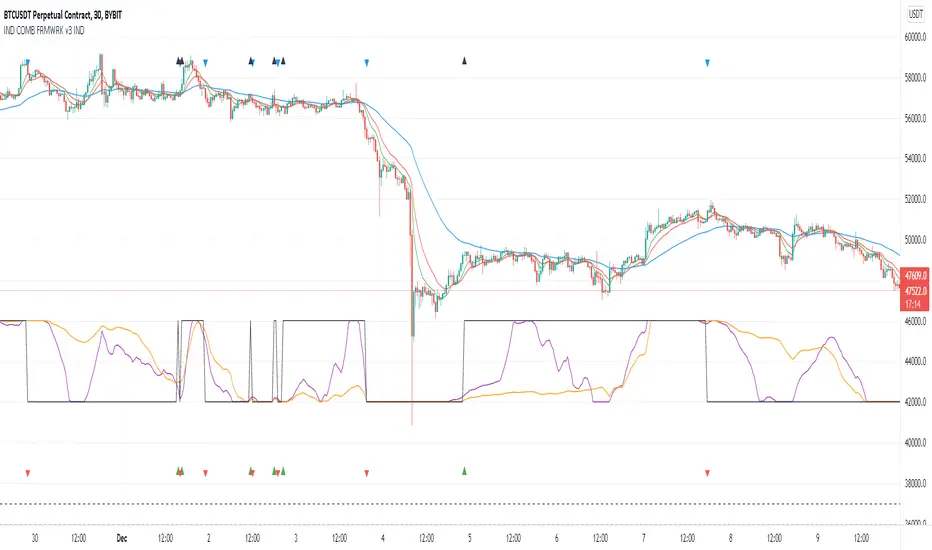
Indicators Combination Framework v3 IND [DTU]Hello All,
This script is a framework to analyze and see the results by combine selected indicators for (long, short, longexit, shortexit) conditions.
I was designed this for beginners and users to facilitate to see effects of the technical indicators combinations on the chart WITH NO CODE
You can improve your strategies according the results of this system by connecting the framework to a strategy framework/template such as Pinecoder, Benson, daveatt or custom.
This is enhanced version of my previous indicator "Indicators & Conditions Test Framework "
Currently there are 93 indicators (23 newly added) connected over library. You can also import an External Indicator or add Custom indicator (In the source)
It is possible to change it from Indicator to strategy (simple one) by just remarking strategy parts in the source code and see real time profit of your combinations
Feel free to change or use it in your source
Special thanks goes to Pine wizards: Trading view (built-in Indicators), @Rodrigo, @midtownsk8rguy, @Lazybear, @Daveatt and others for their open source codes and contributions
SIMPLE USAGE
1. SETTING: Show Alerts= True (To see your entries and Exists)
2. Define your Indicators (ex: INDICATOR1: ema(close,14), INDICATOR2: ema(close,21), INDICATOR3: ema(close,200)
3. Define Your Combinations for long & Short Conditions
a. For Long: (INDICATOR1 crossover INDICATOR2) AND (INDICATOR3 < close)
b. For Short: (INDICATOR1 crossunder INDICATOR2) AND (INDICATOR3 > close)
4. Select Strategy/template (Import strategy to chart) that you export your signals from the list
5. Analyze the best profit by changing Indicators values
SOME INDICATORS DETAILS
Each Indicator includes:
- Factorization : Converting the selected indicator to Double, triple Quadruple such as EMA to DEMA, TEMA QEMA
- Log : Simple or log10 can be used for calculation on function entries
- Plot Type : You can overlay the indicator on the chart (such ema) or you can use stochastic/Percentrank approach to display in the variable hlines range
- Extended Parametes : You can use default parameters or you can use extended (P1,P2) parameters regarding to indicator type and your choice
- Color : You can define indicator color and line properties
- Smooth : you can enable swma smooth
- indicators : you can select one of the 93 function like ema(),rsi().. to define your indicator
- Source : you can select from already defined indicators (IND1-4), External Indicator (EXT), Custom Indicator (CUST), and other sources (close, open...)
CONDITION DETAILS
- There are are 4 type of conditions, long entry, short entry, long exit, short exit.
- Each condition are built up from 4 combinations that joined with "AND" & "OR" operators
- You can see the results by enabling show alerts check box
- If you only wants to enter long entry and long exit, just fill these conditions
- If "close on opposite" checkbox selected on settings, long entry will be closed on short entry and vice versa
COMBINATIONS DETAILS
- There are 4 combinations that joined with "AND" & "OR" operators for each condition
- combinations are built up from compare 1st entry with 2nd one by using operator
- 1st and 2nd entries includes already defined indicators (IND1-5), External Indicator (EXT), Custom Indicator (CUST), and other sources (close, open...)
- Operators are comparison values such as >,<, crossover,...
- 2nd entry include "VALUE" parameter that will use to compare 1st indicator with value area
- If 2nd indicator selected different than "VALUE", value are will mean previous value of the selection. (ex: value area= 2, 2nd entry=close, means close )
- Selecting "NONE" for the 1st entry will disable calculation of current and following combinations
JOINS DETAILS
- Each combination will join wiht the following one with the JOIN (AND, OR) operator (if the following one is not equal "NONE")
CUSTOM INDICATOR
- Custom Indicator defines harcoded in the source code.
- You can call it with "CUST" in the Indicator definition source or combination entries source
- You can change or implement your custom indicator by updating the source code
EXTERNAL INDICATOR
- You can import an external indicator by selecting it from the ext source.
- External Indicator should be already imported to the chart and it have an plot function to output its signal
EXPORTING SIGNAL
- You can export your result to an already defined strategy template such as Pine coders, Benson, Daveatt Strategy templates
- Or you can define your custom export for other future strategy templates
ALERTS
- By enabling show alerts checkbox, you can see long entry exits on the bottom, and short entry exits aon the top of the chart
ADDITIONAL INFO
- You can see all off the inputs descriptions in the tooltips. (You can also see the previous version for details)
- Availability to set start, end dates
- Minimize repainting by using security function options (Secure, Semi Secure, Repaint)
- Availability of use timeframes
-
Version 3 INDICATORS LIST (More to be added):
▼▼▼ OVERLAY INDICATORS ▼▼▼
alma(src,len,offset=0.85,sigma=6).-------Arnaud Legoux Moving Average
ama(src,len,fast=14,slow=100).-----------Adjusted Moving Average
accdist().-------------------------------Accumulation/distribution index.
cma(src,len).----------------------------Corrective Moving average
dema(src,len).---------------------------Double EMA (Same as EMA with 2 factor)
ema(src,len).----------------------------Exponential Moving Average
gmma(src,len).---------------------------Geometric Mean Moving Average
highest(src,len).------------------------Highest value for a given number of bars back.
hl2ma(src,len).--------------------------higest lowest moving average
hma(src,len).----------------------------Hull Moving Average.
lagAdapt(src,len,perclen=5,fperc=50).----Ehlers Adaptive Laguerre filter
lagAdaptV(src,len,perclen=5,fperc=50).---Ehlers Adaptive Laguerre filter variation
laguerre(src,len).-----------------------Ehlers Laguerre filter
lesrcp(src,len).-------------------------lowest exponential esrcpanding moving line
lexp(src,len).---------------------------lowest exponential expanding moving line
linreg(src,len,loffset=1).---------------Linear regression
lowest(src,len).-------------------------Lovest value for a given number of bars back.
mcginley(src, len.-----------------------McGinley Dynamic adjusts for market speed shifts, which sets it apart from other moving averages, in addition to providing clear moving average lines
percntl(src,len).------------------------percentile nearest rank. Calculates percentile using method of Nearest Rank.
percntli(src,len).-----------------------percentile linear interpolation. Calculates percentile using method of linear interpolation between the two nearest ranks.
previous(src,len).-----------------------Previous n (len) value of the source
pivothigh(src,BarsLeft=len,BarsRight=2).-Previous pivot high. src=src, BarsLeft=len, BarsRight=p1=2
pivotlow(src,BarsLeft=len,BarsRight=2).--Previous pivot low. src=src, BarsLeft=len, BarsRight=p1=2
rema(src,len).---------------------------Range EMA (REMA)
rma(src,len).----------------------------Moving average used in RSI. It is the exponentially weighted moving average with alpha = 1 / length.
sar(start=len, inc=0.02, max=0.02).------Parabolic SAR (parabolic stop and reverse) is a method to find potential reversals in the market price direction of traded goods.start=len, inc=p1, max=p2. ex: sar(0.02, 0.02, 0.02)
sma(src,len).----------------------------Smoothed Moving Average
smma(src,len).---------------------------Smoothed Moving Average
super2(src,len).-------------------------Ehlers super smoother, 2 pole
super3(src,len).-------------------------Ehlers super smoother, 3 pole
supertrend(src,len,period=3).------------Supertrend indicator
swma(src,len).---------------------------Sine-Weighted Moving Average
tema(src,len).---------------------------Triple EMA (Same as EMA with 3 factor)
tma(src,len).----------------------------Triangular Moving Average
vida(src,len).---------------------------Variable Index Dynamic Average
vwma(src,len).---------------------------Volume Weigted Moving Average
volstop(src,len,atrfactor=2).------------Volatility Stop is a technical indicator that is used by traders to help place effective stop-losses. atrfactor=p1
wma(src,len).----------------------------Weigted Moving Average
vwap(src_).------------------------------Volume Weighted Average Price (VWAP) is used to measure the average price weighted by volume
▼▼▼ NON OVERLAY INDICATORS ▼▼
adx(dilen=len, adxlen=14, adxtype=0).----adx. The Average Directional Index (ADX) is a used to determine the strength of a trend. len=>dilen, p1=adxlen (default=14), p2=adxtype 0:ADX, 1:+DI, 2:-DI (def:0)
angle(src,len).--------------------------angle of the series (Use its Input as another indicator output)
aroon(len,dir=0).------------------------aroon indicator. Aroons major function is to identify new trends as they happen.p1 = dir: 0=mid (default), 1=upper, 2=lower
atr(src,len).----------------------------average true range. RMA of true range.
awesome(fast=len=5,slow=34,type=0).------Awesome Oscilator is an indicator used to measure market momentum. defaults : fast=len= 5, p1=slow=34, p2=type: 0=Awesome, 1=difference
bbr(src,len,mult=1).---------------------bollinger %%
bbw(src,len,mult=2).---------------------Bollinger Bands Width. The Bollinger Band Width is the difference between the upper and the lower Bollinger Bands divided by the middle band.
cci(src,len).----------------------------commodity channel index
cctbbo(src,len).-------------------------CCT Bollinger Band Oscilator
change(src,len).-------------------------A.K.A. Momentum. Difference between current value and previous, source - source . is most commonly referred to as a rate and measures the acceleration of the price and/or volume of a security
cmf(len=20).-----------------------------Chaikin Money Flow Indicator used to measure Money Flow Volume over a set period of time. Default use is len=20
cmo(src,len).----------------------------Chande Momentum Oscillator. Calculates the difference between the sum of recent gains and the sum of recent losses and then divides the result by the sum of all price movement over the same period.
cog(src,len).----------------------------The cog (center of gravity) is an indicator based on statistics and the Fibonacci golden ratio.
copcurve(src,len).-----------------------Coppock Curve. was originally developed by Edwin Sedge Coppock (Barrons Magazine, October 1962).
correl(src,len).-------------------------Correlation coefficient. Describes the degree to which two series tend to deviate from their ta.sma values.
count(src,len).--------------------------green avg - red avg
cti(src,len).----------------------------Ehler s Correlation Trend Indicator by
dev(src,len).----------------------------ta.dev() Measure of difference between the series and its ta.sma
dpo(len).--------------------------------Detrended Price OScilator is used to remove trend from price.
efi(len).--------------------------------Elders Force Index (EFI) measures the power behind a price movement using price and volume.
eom(len=14,div=10000).-------------------Ease of Movement.It is designed to measure the relationship between price and volume.p1 = div: 10000= (default)
falling(src,len).------------------------ta.falling() Test if the `source` series is now falling for `length` bars long. (Use its Input as another indicator output)
fisher(len).-----------------------------Fisher Transform is a technical indicator that converts price to Gaussian normal distribution and signals when prices move significantly by referencing recent price data
histvol(len).----------------------------Historical volatility is a statistical measure used to analyze the general dispersion of security or market index returns for a specified period of time.
kcr(src,len,mult=2).---------------------Keltner Channels Range
kcw(src,len,mult=2).---------------------ta.kcw(). Keltner Channels Width. The Keltner Channels Width is the difference between the upper and the lower Keltner Channels divided by the middle channel.
klinger(type=len).-----------------------Klinger oscillator aims to identify money flow’s long-term trend. type=len: 0:Oscilator 1:signal
macd(src,len).---------------------------MACD (Moving Average Convergence/Divergence)
mfi(src,len).----------------------------Money Flow Index s a tool used for measuring buying and selling pressure
msi(len=10).-----------------------------Mass Index (def=10) is used to examine the differences between high and low stock prices over a specific period of time
nvi().-----------------------------------Negative Volume Index
obv().-----------------------------------On Balance Volume
pvi().-----------------------------------Positive Volume Index
pvt().-----------------------------------Price Volume Trend
ranges(src,upper=len, lower=-5).---------ranges of the source. src=src, upper=len, v1:lower=upper . returns: -1 source=upper otherwise 0
rising(src,len).-------------------------ta.rising() Test if the `source` series is now rising for `length` bars long. (Use its Input as another indicator output)
roc(src,len).----------------------------Rate of Change
rsi(src,len).----------------------------Relative strength Index
rvi(src,len).----------------------------The Relative Volatility Index (RVI) is calculated much like the RSI, although it uses high and low price standard deviation instead of the RSI’s method of absolute change in price.
smi_osc(src,len,fast=5, slow=34).--------smi Oscillator
smi_sig(src,len,fast=5, slow=34).--------smi Signal
stc(src,len,fast=23,slow=50).------------Schaff Trend Cycle (STC) detects up and down trends long before the MACD. Code imported from
stdev(src,len).--------------------------Standart deviation
trix(src,len) .--------------------------the rate of change of a triple exponentially smoothed moving average.
tsi(src,len).----------------------------The True Strength Index indicator is a momentum oscillator designed to detect, confirm or visualize the strength of a trend.
ultimateOsc(len.-------------------------Ultimate Oscillator indicator (UO) indicator is a technical analysis tool used to measure momentum across three varying timeframes
variance(src,len).-----------------------ta.variance(). Variance is the expectation of the squared deviation of a series from its mean (ta.sma), and it informally measures how far a set of numbers are spread out from their mean.
willprc(src,len).------------------------Williams %R
wad().-----------------------------------Williams Accumulation/Distribution.
wvad().----------------------------------Williams Variable Accumulation/Distribution.
HISTORY
v3.01
ADD: 23 new indicators added to indicators list from the library. Current Total number of Indicators are 93. (to be continued to adding)
ADD: 2 more Parameters (P1,P2) for indicator calculation added. Par:(Use Defaults) uses only indicator(Source, Length) with library's default parameters. Par:(Use Extra Parameters P1,P2) use indicator(Source,Length,p1,p2) with additional parameters if indicator needs.
ADD: log calculation (simple, log10) option added on indicator function entries
ADD: New Output Signals added for compatibility on exporting condition signals to different Strategy templates.
ADD: Alerts Added according to conditions results
UPD: Indicator source inputs now display with indicators descriptions
UPD: Most off the source code rearranged and some functions moved to the new library. Now system work like a little bit frontend/backend
UPD: Performance improvement made on factorization and other source code
UPD: Input GUI rearranged
UPD: Tooltips corrected
REM: Extended indicators removed
UPD: IND1-IND4 added to indicator data source. Now it is possible to create new indicators with the previously defined indicators value. ex: IND1=ema(close,14) and IND2=rsi(IND1,20) means IND2=rsi(ema(close,14),20)
UPD: Custom Indicator (CUST) added to indicator data source and Combination Indicator source.
UPD: Volume added to indicator data source and Combination Indicator source.
REM: Custom indicators removed and only one custom indicator left
REM: Plot Type "Org. Range (-1,1)" removed
UPD: angle, rising, falling type operators moved to indicator library
อินดิเคเตอร์ Pine Script®
Joint Conditions Strategy Suite + TradingConnector alerts bot"Please give us combined alerts with the possibility of having several conditions in place to trigger the alert." - was the top voted request from users under one of the recent blogposts by TradingView.
Ask and you shall receive ;)
TradingView is a great platform, with unmatched set of functionalities, yet this particular combo of features indeed seems not to be in place. Fortunately, TradingView is also very open platform, thanks to PineScript coding language, which enables developing combos like the requried one and plenty of other magic.
I have already published numerous "educational" scripts, showing how to code indicators and alerts with PineScript, but... this is not one of them. This one is for real. READY FOR USE on real markets, also by the non-coding traders. Just take my script, set parameters with dropdowns, backtest the strategy, fire the alerts and execute them.
HOW TO USE IT
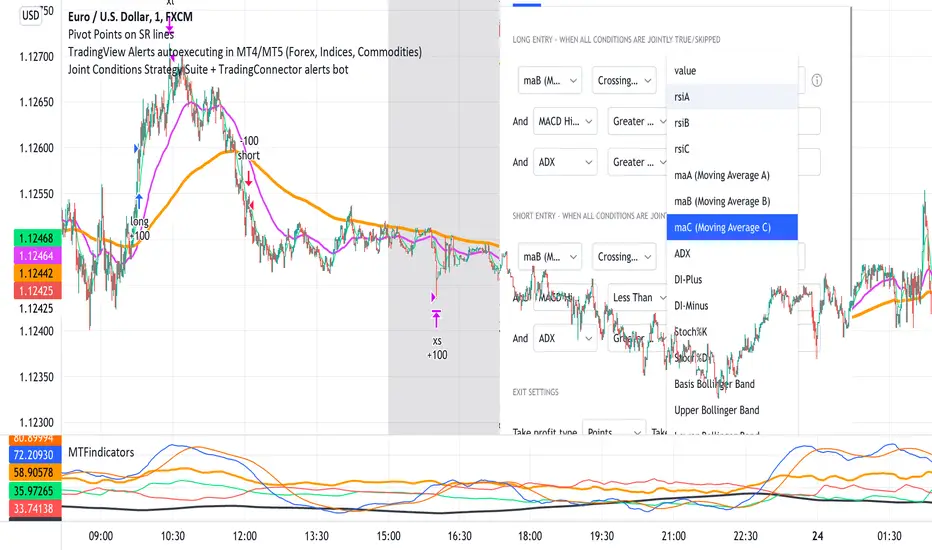
In "Settings" popup I tried to mimic the CreateAlert popup dropdowns for selecting logic. Let's say you want to enter Long position at Stochastic KxD crossover. In first line of Long Entry conditions set "StochK" + "Crossing Up" + "StochD". Last field doesn't matter because in 3rd dropdown something else than "value" was selected. In second line you could set "maB" + "Greater Than" + "maC" to filter out those entries which are in direction of the uptrend. And yeah, add ADX>25 to make sure the market is actually moving: "ADX" + "Greater Than" + "value" + "25". All condition lines must be TRUE (or skipped) for the entry to be triggered. Toghether with an alert.
The same for Short entries. Combinations are limitless.
INDICATORS AND MTF (MULTI-TIMEFRAME)
In those dropdowns you can select candle values like open/close/high/low/ohlc4, but also some most popular indicators, which I have pre-built into this script: RSI, various Moving Averages, ADX-DMI, Stochastic and Bollinger Bands for start. You can configure parameters of those indicators also in "Settings" popup, in "Indicator Definitions" section. What's important, you can use any of these indicators from higher timeframe, setting MTF multiplier. So if you applied this indicator to 1h chart, but want to use rsi(close,14) from 4h chart, set MTF to 4. If you want to use current timeframe indicators, keep MTF at 1, which is a default setting here.
Note for coders: to keep focus of this script on joining conditions, entire logic for those indicators has been moved to external library, also open source. I encourage you to dig into the code and see how it's done. I love the addition of libraries concept in PineScript.
CUSTOM INDICATOR
Following the "openness" spirit of my master - which is TradingView itself - my work is also open, in 2 ways:
1. This script is open source. So you can grab it, modify or add any functionalities you want. I cannot and don't want to stop you from doing that. I'm asking for only one favor - please mention this source script in your credits.
2. You can import the plot (series) from any other indicator on TradingView. In Settings popup of my script, scroll down to "Indicator Definitions" section, and select the series of your choice in the first dropdown. Now it is ready to use in conditions dropdowns on top of the Settings popup.
Let me give you an example of that last scenario. Take another script of mine, "Pivot Points on SR lines DEMO". You can find it in "Indicators & Strategies" library or here: (). Attach it to your chart. Now come back to THIS script, open Settings popup and in "Custom Indicator aka Imported Source" select "Pivot Points on SR lines: ...". The way it works - it detects if a pivot point happened on Support/Resistance line from the past and returns 1 for PivotLow and -1 for Pivot High. Now in first Long Entry condition set: "custom indicator" + "Greater Than" + "value" + "0" and long entries will be marked on every pivot low noticed on Support/Resistance line.
ALERTS
Last but not least - the alerts. This script produces alerts on the entries calculated by strategy logic, as marked on the chart by the backtester. Moreover, syntax of those alerts is already prepared and fully compatible with TradingConnector - alerts executing tool (bot), if you want to auto-execute those trades. Apart from installing the tool, you need to set
up the alerts in TradingView, here is how:
open CreateAlert popup
in first dropdown select "Joint Conditions Strategy Template"
in second dropdown select "alert() function calls only"
And that's all. You only need to set one alert for the whole script, not one for Longs and one for Shorts as it was in the past. Also, you don't need to setup closing alerts, because stop-loss/take-profit/trailing-stop information is embedded in the entry alert so your broker receives it as early as possible. Alerts sent will look like this: "long sl=40 tp=80", which is exactly what TradingConnector expects.
Phew, that's all folks. If you think I should add something to this template (maybe other indicators?) please let me know in comments or via DM. Happy trading!
P.S. Pyramiding is not supported in this script.
Disclaimer : I'm not saying above combination of conditions will make you money. Actually none of this can be considered financial advice. It is only a software tool. Use it wisely, be aware of the risk and do your own research!
กลยุทธ์ Pine Script®
[blackcat] L1 Enhanced DMILevel: 1
Background
The Directional Movement Index (DMI) is an indicator developed by J. Welles Wilder in 1978 that shows the direction in which the price of an asset is moving. The indicator does this by comparing previous highs and lows and drawing two lines: a positive directional movement line (+ DI) and a negative directional movement line (-DI). An optional third line, called the Average Directional Index (ADX), can also be used to measure the strength of the upward or downward trend.
When + DI is above -DI there is more upward pressure than downward pressure in price. Conversely, when -DI is above + DI, there is more downward pressure on the price. This indicator can help traders estimate the direction of the trend. Crossovers between the lines are also sometimes used as trading signals to buy or sell.
Function
This is a blackcat1402 enhanced DMI indicator by counting period number of +DI and -DI relationship, overbought and oversold states are given.
Key Signal
White line --> +DI
Yellow line --> -DI
Fuchsia line --> ADX
Green line --> ADXR, or averaged ADX
red OB label --> overbought
green OS label --> oversold
Remarks
Feedbacks are appreciated.
Readme
In real life, I am a prolific inventor. I have successfully applied for more than 60 international and regional patents in the past 12 years. But in the past two years or so, I have tried to transfer my creativity to the development of trading strategies. Tradingview is the ideal platform for me. I am selecting and contributing some of the hundreds of scripts to publish in Tradingview community. Welcome everyone to interact with me to discuss these interesting pine scripts.
The scripts posted are categorized into 5 levels according to my efforts or manhours put into these works.
Level 1 : interesting script snippets or distinctive improvement from classic indicators or strategy. Level 1 scripts can usually appear in more complex indicators as a function module or element.
Level 2 : composite indicator/strategy. By selecting or combining several independent or dependent functions or sub indicators in proper way, the composite script exhibits a resonance phenomenon which can filter out noise or fake trading signal to enhance trading confidence level.
Level 3 : comprehensive indicator/strategy. They are simple trading systems based on my strategies. They are commonly containing several or all of entry signal, close signal, stop loss, take profit, re-entry, risk management, and position sizing techniques. Even some interesting fundamental and mass psychological aspects are incorporated.
Level 4 : script snippets or functions that do not disclose source code. Interesting element that can reveal market laws and work as raw material for indicators and strategies. If you find Level 1~2 scripts are helpful, Level 4 is a private version that took me far more efforts to develop.
Level 5 : indicator/strategy that do not disclose source code. private version of Level 3 script with my accumulated script processing skills or a large number of custom functions. I had a private function library built in past two years. Level 5 scripts use many of them to achieve private trading strategy.
อินดิเคเตอร์ Pine Script®
Didi's TrendChanges the background according to the DMI trend.
Based on the way the infamous Brazilian trader with over 40 years experience, Master Didi Aguiar reads the Directional Movement Index — one indicators in his setup.
It's read this way:
Only trade on the direction of the trend. Start the trade when accelerating:
Blue = Long trend
Bright Blue = Long trend, accelerating
Purple = Short trend
Bright Purple = Short trend, accelerating
Change from bright to dark color = ADX's bounce, the first signal to exit the trade.
Nor coloured background = no trend.
Use other indicators to confirm your trades.
Not recommended for color blind people :)
-----------------------------------------
Indicador que muda a cor do fundo de acordo com a tendencia.
É baseado na maneira que Didi Aguiar lê o DMI e o ADX .
Lê-se assim:
Fundo azul = Tendencia de compra
Fundo roxo = Tendencia de venda
Cor mais saturada (vibrante) = Tendencia acelerante
Passou de cor mais clara para mais escura = Kick do ADX
Sem coloração de fundo = Sem tendencia
Não é indicado para pessoas que sofrem de daltonismo.
อินดิเคเตอร์ Pine Script®
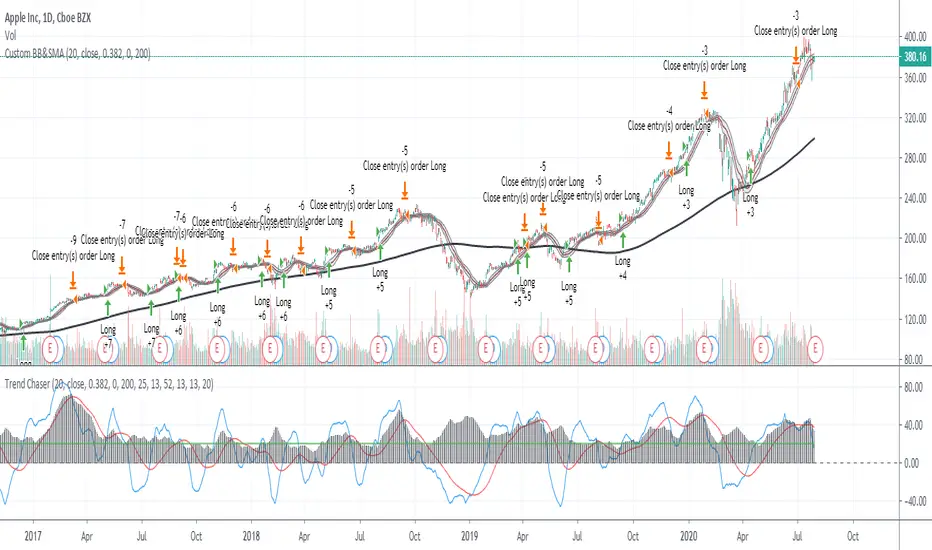
ADX_TSI_Bol Band Trend ChaserThe idea of this script is to be a low risk strategy on trending stocks (or any other trending market), aiming to achieve minimal draw down (e.g. at time of writing AAPL only had ~1.36% draw down, FB ~1.93% draw down and the SPY was 0.80% draw down and all remained profitable).
Testing proved it shouldn't be used in choppy stocks and best period was on daily charts. The back test filter goes back until 2010 so you can obtain 10 years of data.
The strategy utilizes the 200 Moving Average, a Custom Bollinger Band, a TSI with 52 period weighted moving average and ADX strength.
Although back test dates are set to 2010 - 2020, all other filters (moving average, ADX, TSI , Bollinger Band) are not locked so they can be user amended if desired. However the current settings have been tested with manual trading for quite some time to get this combination correct.
Buy signal is given when trading above the 200 moving average + 5 candles have closed above the upper custom Bollinger + the TSI is positive + ADX is above 20.
As back testing proved that this traded better only in tends then some Sell/Short conditions have been removed from the script and this only takes Long orders.
Only requires 2 additional lines of code to add shorting order and then remove the "buy" condition and this could be used for a downward trending stock instead.
Close for either long or short trades is signaled once the TSI crosses in the opposite direction indicating change in trend strength.
Further optimization could be achieved by adding a stop loss, which I may do in the future.
NOTE: This only shows the lower indicators however for visualization you can use my script "CUSTOM BOLLINGER WITH SMA", which is the upper indicators in this strategy.
This is my first attempt at coding a strategy so I'm happy to receive any feedback or hints on how this could be written better from any experienced coders!
NASDAQ:AAPL AMEX:SPY
กลยุทธ์ Pine Script®
RSI and A/D StrengthThis is an edit of Chris Moody's EMA of RSI script see the original here:
The edited version has an accumulation distribution line as well as well as two SMAs
If you want a detailed look at how I use ADX and DI along with it to enter/exit please see the following video and article
youtu.be
bitcointradingtoday.com
อินดิเคเตอร์ Pine Script®
Intervalo de la confianza T.JODEN V2This tool is completely free to use.
En español mas abajo para leer.
"Bitcoin Tower Trading Learning BTTL". This is my YouTube channel.
This confidence interval is calculated using VWMA-10 instead of the standard confidence interval, which in statistics uses the moving average (SMA).
Using VWMA places more emphasis on its movement in relation to volume.
There are several timeframes for the confidence interval, and users don't have to pay extra for the number of indicators.
The 10-period confidence interval is most effective on 1-hour and 4-hour timeframes for Bitcoin. However, it is always recommended to use ADX and its Di+/D- for greater entry confidence. This is not investment or trading advice. Try it out, and if you find it effective, enjoy it.
Stay tuned to YouTube, where I'll let you know when a new project will be released to the public, because I'm still studying Pinscript and developing new projects.
Este trabajo es totalmente gratis su uso.
"Bitcoin Tower Trading Learning BTTL". Este es mi canal en YOUTUBE.
Este Intervalo de la confianza es calculado con VWMA-10 en ves del normal Intervalo de la confianza que en estadistica se usa la MEDIA MOVIL en ingles sma.
Usando VWMA se le pone mas infacis a su movimiento con su volumen.
Hay varias temporalidades del Intervalo de la confianza cual los usiarios no tienen que pagan un dinero extra por cantidad de indicadores.
EL intervalo de la confianza temporalidad de 10 es mas efectivo en temporalidad de 1 hora y 4 horas en BITCOIN. Pero se recomiendo siempre usar ADX y su Di+ D- para tener mas seguridad en entrada.
En ningun momento es consejo de inversion ni de trading. Pruevelo y si mira que es efectivo para su uso disfrutelo.
Mantengase en sintonia en YOUTUBE que alli le dire cuando un nuevo trabajo sera puesto en publico uso, porque sigo estudiando pinescript y elavorando nuevos trabajos.
อินดิเคเตอร์ Pine Script®
GCM Apex Predator AlgoTitle: GCM Apex Predator Algo
Overview
The GCM Apex Predator is a high-performance, multi-engine trading system designed for traders who demand precision and clarity. Whether you are a fast-paced scalper or a patient swing trader, this algorithm adapts to market conditions using a sophisticated "Apex Score" momentum engine combined with institutional-grade volume and trend filters.
Key Features
• Triple Engine Logic: Switch seamlessly between Scalper Mode (Fast), Trend Mode (Swing), or a Hybrid setup that captures both micro-moves and macro-trends.
• Apex Score Momentum: A proprietary loop-based engine that calculates the "persistence" of price action. It filters out "fake" moves by ensuring momentum is backed by structural strength.
• Institutional Filters: Includes built-in ADX Trend Power and Relative Volume filters to keep you out of "chop" and only in high-probability trades.
• Dynamic Risk Management: Automatically calculates and draws Entry, Stop Loss (SL), and Take Profit (TP) zones using ATR-based volatility, giving you a professional "desk" feel.
• Corporate Dashboard: A real-time HUD (Heads-Up Display) that monitors Trend Bias, ADX Power, Apex Momentum, and VWAP positioning at a glance.
How to Use
1. Select Your Mode: Use the "Scalper Mode" for lower timeframes (1m, 5m) or "Trend Mode" for higher timeframes (1h, 4h).
2. The "Sniper" Signal: Look for the Gold Circle symbols. These represent "Sniper" entries where all engines (Trend, Volume, and Apex) align for a high-conviction move.
3. Market Structure: Pay attention to the dashed reversal lines. These project potential structural shifts based on fast-reversal HMA logic.
Alerts
This indicator is fully optimized for Any alert() function call. You can set one single alert to receive detailed notifications like:
• 🎯 SNIPER LONG: BTCUSD @ 65000
• ⚡ SCALP BUY: EURUSD @ 1.0850
Disclaimer
Trading involves significant risk. This tool is for educational and technical analysis purposes. Past performance does not guarantee future results.
อินดิเคเตอร์ Pine Script®
Core IC 2.0
## 📌 NIFTY Weekly Option Seller — Core Regime & Risk Framework
This indicator is designed for **systematic weekly option selling on NIFTY**, focused on **Iron Condors (IC), Put Credit Spreads (PCS), and Call Credit Spreads (CCS)**.
It is **not a scalping tool** and **not a signal generator**.
Instead, it provides a **structured decision framework** to help option sellers decide:
* *What structure to deploy* (IC / PCS / CCS)
* *How aggressive to be* (position size & distance)
* *When to adjust* (defend / harvest / regime change)
---
## 🔍 What the Indicator Does
### 1️⃣ Market Regime Detection
The script continuously evaluates the market and classifies it into one of three regimes:
* **IC (Range / Mixed)** – neutral, mean-reverting conditions
* **PCS (Trend Up)** – bullish trend continuation
* **CCS (Trend Down)** – bearish trend continuation
Regime selection is based on:
* EMA structure
* ADX (trend strength)
* VWAP positioning
* Higher timeframe (daily) trend alignment
---
### 2️⃣ Independent Conviction Scores
The indicator computes **three independent scores (0–5)**:
```
IC / PCS / CCS
```
These scores represent **conviction strength**, not trade signals.
* Higher score = stronger suitability for that structure
* All three scores are always visible for transparency
Only **one active score** (based on the current regime) is used for:
* Position sizing
* Strike distance suggestions
* Risk management logic
---
### 3️⃣ Risk-First Position Guidance
Based on the active score, the indicator suggests:
* **Position Size** (100% / 50% / 25%)
* **Short strike distance** (ATR-based, dynamic)
* **Defend / Harvest conditions**
* **Regime change alerts**
This helps traders remain **consistent and disciplined**, especially during volatile weeks.
---
### 4️⃣ Visual Decision Panel
A compact panel displays all key information at a glance:
* Regime (IC / PCS / CCS)
* ATR & ADX
* Suggested size
* Suggested short distance
* IC / PCS / CCS scores
* Key reference levels (H3 / L3, VWAP)
No guesswork, no over-trading.
---
## 🕒 Recommended Usage
* **Best timeframe:** 1H or 4H
* **Ideal style:** End-of-day or limited-check traders
* **Designed for:** Weekly option sellers (not intraday scalpers)
Adjustments are intended to be made **at fixed checkpoints**, not every candle.
---
## ⚠️ Important Notes
* This is **not financial advice**
* The indicator does **not place trades**
* Works best when combined with:
* Defined stop-loss rules
* Fixed risk-reward discipline
* Proper position sizing
---
## 🎯 Who This Is For
✔ Rule-based option sellers
✔ Traders focused on consistency over excitement
✔ Professionals who value structure and risk control
❌ Not for discretionary scalpers
❌ Not for beginners without options knowledge
อินดิเคเตอร์ Pine Script®
Empyrean - Strat 1minGood for bot trading. 1min TF, with 15min confluence. Setting are here
22
Min Pivot Size x ATR
0.1
Enable TF1
Resolution TF1
15
Use SMA
SmaLen
23
ADX Length
21
ADX Threshold
20
ATR Baseline Length
2
TP * ATR
5.5
SL * ATR
1.5/3
กลยุทธ์ Pine Script®
ZLEMA FusionZLEMA Fusion - Advanced Zero-Lag Momentum & Trailing Stop System
A sophisticated overlay indicator combining the power of Zero Lag EMA (ZLEMA) with ATR-based Moving Stop (MOST) for precision trend following and dynamic support/resistance tracking.
Core Components:
1. ZLEMA (Zero Lag Exponential Moving Average)
Eliminates lag inherent in traditional EMAs
Provides faster response to price changes
Customizable length for different trading styles
Smooth, responsive trend line
2. MOST (Moving Stop - ATR Trailing Stop)
Dynamic ATR-based trailing stop system
Automatically adjusts to market volatility
Never moves backward - only trails in favourable direction
Green line = Uptrend support | Red line = Downtrend resistance
Customizable ATR multiplier and lookback period
Signal Generation:
BUY (⇑): When ZLEMA crosses above MOST
SELL (⇓): When ZLEMA crosses below MOST
Clean visual arrows with no label boxes
Signals trigger on candle close only (no repainting)
Advanced Features:
✅ Signal Cooldown System - Prevents signal spam with configurable minimum bars between signals
✅ ADX Trend Strength Filter - Optional filter to trade only in strong trends
✅ Higher Timeframe ZLEMA Confirmation - Multi-timeframe trend alignment for higher probability setups
✅ Background Color Coding - Quick visual trend identification (Green = Uptrend, Red = Downtrend)
✅ Alert System - Built-in alerts for buy and sell signals
Fully Customizable:
ZLEMA length
ATR period and multiplier
MOST lookback period
Signal cooldown bars
ADX filter threshold
Higher timeframe settings
Visual display options
Best Used For:
Index trading
Swing trading
Trend following strategies
Dynamic support/resistance identification
Entry/exit timing
Optimized for Indian Markets - Calibrated for Nifty, Bank Nifty, and other NSE instruments.
⚠️ Important Notes:
This indicator is for educational purposes
No repainting - all signals confirmed at candle close
Use proper risk management
Combine with your trading plan and additional confirmation
อินดิเคเตอร์ Pine Script®
MA-trix Laboratory [DAFE]MA-trix Laboratory : The Ultimate Moving Average & Trend Following Engine
55+ Algorithms. Dual/Triple MA Systems. Advanced Signal Filtering. Quantum Smoothing. This is not just a moving average; it is the definitive toolkit for forging your perfect trend.
█ PHILOSOPHY: WELCOME TO THE LABORATORY
The moving average is the cornerstone of technical analysis. It is also, in its standard form, an obsolete, one-dimensional tool. A simple EMA or SMA is a blunt instrument in a market that demands surgical precision. It lags, it whipsaws, and it fails to adapt to the market's ever-changing character.
The MA-trix Laboratory was not created to be another moving average. It was engineered to be the final word on moving averages—a comprehensive, institutional-grade research and execution environment. This is not an indicator; it is a powerful, interactive sandbox where you, the trader, can move beyond the static "one-size-fits-all" approach. Here, you can experiment, test, and forge a moving average system that is perfectly synchronized with your specific market, timeframe, and analytical style.
We have deconstructed the very concept of "average" and rebuilt it from the ground up, creating a library of over 55 distinct mathematical algorithms —from timeless classics to proprietary quantum models—all housed within a single, unified, and infinitely configurable engine.
█ WHAT MAKES THIS A "LABORATORY"? THE CORE INNOVATIONS
This tool stands in a class of its own, offering a suite of features that collectively create an unparalleled analytical experience.
The 55+ Algorithm MA Core: This is the heart of the Laboratory. You are not limited to one or two MA types. You have a vast library of over 55 unique mathematical engines at your command, from classical SMAs to advanced adaptive algorithms like KAMA and FRAMA, to proprietary DAFE models like the "DAFE Flux Reactor" and "DAFE Quantum Step."
Multi-MA Architecture: Seamlessly switch between Single, Dual, and Triple MA operational modes. Build classic two-line crossover systems, three-line trend alignment confirmations, or beautiful, flowing ribbons with just a single click.
Advanced Post-Smoothing Engine: In a revolutionary step, you can apply a second layer of signal processing to your chosen MA. Select from a suite of over 20 professional-grade noise filters —including Ehlers' SuperSmoother, Kalman Filters, and the proprietary "DAFE Phase-Zero"—to surgically remove noise from your MA line after it has been calculated, achieving unprecedented smoothness without significant lag.
The Institutional Signal Filtering Suite: A signal is only as good as its filter. The Laboratory includes a powerful, multi-domain filter engine that acts as an intelligent gatekeeper for your signals. You can require signals to be confirmed by any combination of:
📦 Volume: Require a surge in volume to validate a crossover.
🌊 Volatility: Only take signals during low-volatility "squeeze" conditions or high-volatility expansions.
💪 Trend: Use the ADX to ensure you are only taking signals in the direction of a strong, established trend.
🚀 Momentum: Use RSI, MACD, or ROC to confirm that momentum is on your side.
Integrated Performance Engine: How do you know which of the 55+ algorithms is best? You test it. The built-in Performance Dashboard is a comprehensive backtesting engine that tracks every trade generated by your configuration, providing real-time data on Win Rate, Profit Factor, Net P&L, and Max Drawdown.
█ THE ARSENAL: A DEEP DIVE INTO THE ALGORITHMIC CORE
This is your library of mathematical DNA. The 55+ MA types are grouped into distinct families, each with a unique philosophy.
THE ALGORITHM FAMILIES
The Classics (SMA, EMA, WMA, etc.): The foundational building blocks. Simple, reliable, and universally understood. EMA for responsiveness, SMA for smoothness.
The Low-Lag Warriors (DEMA, TEMA, Hull MA, ZLEMA): A family of MAs engineered specifically to combat the inherent lag of classical averages. The Hull MA is a standout, offering a remarkable balance of extreme smoothness and near-zero lag.
The Adaptive Geniuses (KAMA, VIDYA, FRAMA, Volatility Adjusted MA): These are "smart" MAs. They contain internal logic that allows them to automatically change their speed based on market conditions. They will tighten up in fast-moving trends and loosen in sideways chop, intelligently filtering out noise.
The DSP & Quantitative Masters (Gaussian, Ehlers, Butterworth, Laguerre): These algorithms are born from the world of digital signal processing and advanced mathematics. They use sophisticated techniques like bell-curve weighting, non-linear feedback loops, and frequency filtering to separate the true trend "signal" from market "noise" with unparalleled precision.
The DAFE Proprietary Engines (The "Black Ops" MAs): The crown jewels of the Laboratory. These are custom-built, proprietary algorithms you will not find anywhere else:
DAFE Flux Reactor: A volatility-thermodynamic MA that adapts its alpha using a sigmoid function on Bollinger Band width, creating explosive responsiveness during volatility breakouts.
DAFE Tensor Flow: A multi-vector MA that uses a weighted average of the OHLC data (a "tensor") before applying Hull smoothing, creating an incredibly robust center of gravity.
DAFE Quantum Step: A non-linear, stepped MA that only moves if price exceeds a volatility-based quantum threshold, effectively ignoring all insignificant noise.
DAFE Gravity Well: An institutionally-focused MA that weights its calculation by both time (recency) and volume, pulling the average towards zones of heavy market participation.
THE POST-SMOOTHING FILTERS
This is a second layer of refinement. After your primary MA is calculated, you can pass it through one of over 20 advanced filters to achieve an even higher degree of clarity.
The Ehlers Filters (SuperSmoother, 2-Pole, 3-Pole): A suite of brilliant DSP filters for surgical noise removal.
The Kalman Filter: A predictive filter from robotics and aerospace engineering that provides an "optimal estimate" of the MA's true position.
DAFE Proprietary Smoothers:
DAFE Phase-Zero: Uses a de-trending feedback loop to achieve near-zero lag smoothing.
DAFE Spectral Smooth: A frequency-domain filter that removes jitter while preserving the primary trend.
█ OPERATIONAL MODES & SIGNAL GENERATION
The Laboratory is designed for ultimate flexibility.
Modes: Instantly switch between Single, Dual, and Triple MA modes. Each mode can be a standard line display or a beautiful, flowing Ribbon .
Signal Logic: You have complete control over what constitutes a "signal." Choose from nine different logic modes, including classic Price Cross , Dual MA Cross , Triple MA Alignment , or even advanced logic like Slope Change and Sequential Cross .
The Filter Gauntlet: Before a signal is plotted, it can be passed through the four-stage filtering suite. You can demand that a simple EMA crossover is also confirmed by high volume, ADX trend strength, and bullish RSI—all at the same time. This transforms a basic signal into a high-conviction, multi-factor setup.
█ THE MASTER DASHBOARD: YOUR MISSION CONTROL
The comprehensive dashboard is your unified command center for analysis and performance tracking.
Engine Status: See the currently selected Operation Mode and a detailed breakdown of the type and length of each active MA.
Market Dynamics: Get an at-a-glance view of the current Trend Status, Momentum intensity (based on MA slope), and the percentage deviation of price from your primary MA.
Filter Readout: If filters are enabled, the dashboard provides a live status for each active filter (Volume, Volatility, Trend, Momentum), showing you a "PASS" or "BLOCK" status in real-time.
Performance Readout: When enabled, this section provides a full breakdown of your backtesting results, including Trade Count, Win Rate, Profit Factor, Net P&L, and Max Drawdown.
█ DEVELOPMENT PHILOSOPHY
The MA-trix Laboratory was born from a deep respect for the moving average and a relentless desire to push its boundaries into the 21st century. We believe that in modern markets, static tools are obsolete. The future of trading lies in adaptation and customization. This indicator is for the serious trader, the tinkerer, the scientist—the individual who is not content with a black box, but who seeks to understand, test, and refine their edge with surgical precision. It is a tool for forging your own alpha, not just following someone else's.
"I don't think traders can follow rules for very long unless they reflect their own trading style. Eventually, a breaking point is reached and the trader has to quit or change, or find a new set of rules he can follow. This seems to be part of the process of evolution and growth of a trader."
█ DISCLAIMER AND BEST PRACTICES
THIS IS A TOOL, NOT A STRATEGY: This indicator provides a sophisticated trend and signal generation framework. It must be integrated into a complete trading plan that includes risk management, position sizing, and your own contextual analysis.
TEST, DON'T GUESS: The power of this tool is its adaptability. Use the Performance Dashboard to rigorously test different algorithms, settings, and filters on your chosen asset and timeframe. Find what works, and build your strategy around that data.
START SIMPLE: The possibilities can be overwhelming. Begin with a classic Dual MA mode (e.g., EMA 20/50) with no filters. Once you are comfortable, begin experimenting with more advanced MA types and layering on filters one by one.
RISK MANAGEMENT IS PARAMOUNT: All trading involves substantial risk. The backtesting results are hypothetical and do not account for slippage or psychological factors.
Never risk more capital than you are prepared to lose.
— Ed Seykota, Market Wizard
The MA-trix Laboratory is designed to be the ultimate tool for that evolution, allowing you to discover and codify the rules that truly fit you.
Taking you to school. - Dskyz, Don't be average. Trade with MA-trix. Trade with DAFE
อินดิเคเตอร์ Pine Script®
Lanovyx# Lanovyx — Setup Window Confluence System
## The Problem This Solves
Traditional confluence indicators require all conditions to align on the exact same bar: stochastic must be oversold AND price must touch support AND divergence must form — all simultaneously. In real markets, this rarely happens. Price touches VWAP -2σ, but stochastic doesn't reach oversold until 3 bars later. The opportunity is missed.
**Lanovyx solves this with the Setup Window methodology.**
---
## Core Innovation: Setup Windows
Instead of requiring simultaneous conditions, Lanovyx separates trading signals into two phases:
**Phase 1 — Context Event (Setup Activation)**
When a meaningful event occurs, it "opens a window" that stays active for a configurable number of bars:
- Price touches VWAP ±2σ or ±3σ band → window opens
- Price tests Previous Day High/Low → window opens
- Stochastic divergence forms → window opens
- Opening Range breakout occurs → window opens
- Price reaches Support/Resistance level → window opens
Each event adds to a cumulative "setup score" (capped at 8). Higher scores indicate stronger context.
**Phase 2 — Trigger (Signal Generation)**
Within the active window, when stochastic conditions confirm, a signal fires. The trigger doesn't need to occur on the same bar as the context — it just needs to occur while the window is open.
This two-phase approach captures setups that traditional indicators miss entirely.
---
## Why Stochastic + VWAP Confluence Works
**VWAP (Volume-Weighted Average Price)** tells us where institutional money has transacted. The standard deviation bands identify statistical extremes:
- Price at VWAP -2σ is extended to the downside (potential mean reversion long)
- Price at VWAP +2σ is extended to the upside (potential mean reversion short)
**Stochastic Oscillator** measures momentum exhaustion. When price reaches a VWAP extreme AND stochastic shows momentum reversing, we have confluence of:
1. Price extension (VWAP bands)
2. Momentum exhaustion (Stochastic)
3. Context validation (Setup Window score)
The multi-lane stochastic (14/21/55 periods) adds timeframe confluence — when fast, medium, and slow stochastics align, the signal is stronger.
---
## Five Signal Families
Each family targets a specific market condition:
### 1. Trend Entry (T) — Blue Labels
**When:** Stochastic pulls back to 25-55 zone (longs) or 45-75 zone (shorts) during established trend
**Logic:** In trending markets, pullbacks to the "value zone" offer low-risk entries with trend
**Best for:** Trending days with clear directional bias
### 2. Mean Reversion (R) — Green/Red Labels
**When:** Stochastic exits oversold (<20) or overbought (>80) with active setup window
**Logic:** At VWAP extremes with momentum exhaustion, price tends to revert to mean
**Best for:** Range-bound, choppy markets
**Requires:** Active setup window (context event must have occurred)
### 3. Breakout (B) — Orange Labels
**When:** Stochastic lanes compress ("coil") then expand, crossing the 50 midline
**Logic:** Compression precedes expansion; breakout from tight range signals new trend
**Best for:** Transition days, post-squeeze moves
### 4. Momentum (M) — Green/Red Labels
**When:** Stochastic crosses 50 from extreme zone (<25 or >75) within lookback period
**Logic:** Catches V-shaped reversals where regime detection lags the move
**Best for:** Fast reversals, news-driven moves
### 5. Counter-Signal / FADE (C) — Purple Labels
**When:** A signal fires and immediately fails (stochastic reverses sharply against it)
**Logic:** Failed signals often lead to strong moves in the opposite direction (trapped traders)
**Confidence gating:** High-confidence fades generate signals; low-confidence show warnings only
---
## Institutional Key Levels
Lanovyx incorporates levels that institutional traders use:
- **PDH/PDL** (Previous Day High/Low) — Major support/resistance where stops cluster
- **PDC** (Previous Day Close) — Settlement price, gap reference
- **ORB** (Opening Range) — First 15 minutes high/low, breakout trigger
- **IB** (Initial Balance) — First 60 minutes range, institutional benchmark
These levels automatically activate setup windows when price interacts with them, adding to the setup score.
---
## Filtering System
**ADX Filter:** In strong trends (ADX > 25), blocks counter-trend mean reversion signals to avoid fighting momentum.
**HTF Bias Filter:** Optional alignment with higher timeframe (e.g., 1-hour) EMAs. Can block or demote signals that oppose the larger trend.
**Regime Detection:** Classifies market as Uptrend, Downtrend, Sideways, or Squeeze using EMA alignment and market structure (HH/HL/LH/LL patterns).
---
## How to Use
1. **Wait for Setup** — Watch for context events (VWAP band touch, key level test, divergence)
2. **Check the Score** — Higher setup scores indicate stronger context (visible in debug mode)
3. **Wait for Trigger** — Let stochastic confirm within the window
4. **Confirm Regime** — Ensure signal type matches market condition
5. **Manage Risk** — Use the ATR-based stop/target levels shown after signals
**Strong signals (★)** appear when multiple confluence factors align — these are highest probability setups.
---
## Settings Overview
| Setting | Default | Purpose |
|---------|---------|---------|
| Setup Window | 10 bars | How long context events stay active |
| Entry Zone | 25-55 | Stochastic zone for trend pullback entries |
| OS/OB Levels | 20/80 | Stochastic extremes for mean reversion |
| Stop Loss | 1.5 ATR | Risk management distance |
| Target 1 | 2.0 ATR | First profit target (1.33:1 R:R) |
Recommended timeframes: 5-minute and 15-minute charts.
---
## Disclaimer
This indicator is for educational purposes only and does not constitute financial advice. Past performance does not guarantee future results. Always use proper risk management and never risk more than you can afford to lose. No indicator can predict the future — use this as one input in your trading decision process, not as a standalone system.
อินดิเคเตอร์ Pine Script®
Predictive Candle and Accuracy CoreThis Predictive Candle – Accuracy Core indicator is designed to project the likely direction and size of the next candle based on market microstructure, volatility, momentum, and volume dynamics. It calculates a delta-based volume imbalance, RSI, EMA distances, ATR, and ADX to assess both the strength and trend of the market. The script applies a market regime filter to allow predictions only when trends are strong and aligned, then computes weighted bullish and bearish scores, normalizes them into probabilities, and self-measures its historical accuracy. Using this, it projects the next candle’s body and wicks, color-coded green or red for bullish or bearish, with a confidence percentage label. The projection adjusts dynamically for volatility, ADX strength, and prediction accuracy, providing traders with a quantitative, adaptive visual cue for potential price movement without repainting.
อินดิเคเตอร์ Pine Script®