A Multi 10 indicatorREAD NOTE BEFORE APPLYING or you may think indicator doesnt work.
This indicator is a revise of another i made and contains 10 Optional Indicators allowing you to load more then 3 indicators at once if you so choose and dont pay for the platform!
Hopefully someone will find use for this script besides me :) I dont suggest turning all on at once because it
will not look right. Alot will overlap if you wish but i only use the Session and trend bar at once in
conjuction with a Oscillator setting like MacD , RSI , Stoch , Aroon or CCI .
In the chart you see i only have a few indicators active ENJOY!!
---------- NOTE ----------- ( Everything is OFF by default and indicator SHOULD show up BLANK when loaded) ------------ NOTE -------------
(Can turn EVERYTHING on AND change any values in the format tab once indicator loads)
NY session, Aussie session, Asian session, and Europe market sessions.
MacD Split Colored , aroon oscillator
CCI Oscillator , classic aroon
RSI Oscillator , Elliot wave
Stoch RSI Oscillator
Aroon Oscillator
My own Trend bar
---------- NOTE ----------- ( Everything is OFF by default and indicator SHOULD show up BLANK when loaded) ------------ NOTE -------------
(Can turn EVERYTHING on AND change any values in the format tab once indicator loads) CODE probably looks messey but this is something i made for me so i didnt really care lol
ค้นหาในสคริปต์สำหรับ "CCI"

TKE INDICATOR by KıvanÇ fr3762TKE INDICATOR is created by Dr Yasar ERDINC (@yerdinc65 on twitter )
It's exactly the arithmetical mean of 7 most commonly used oscillators which are:
RSI
STOCHASTIC
ULTIMATE OSCILLATOR
MFI
WIILIAMS %R
MOMENTUM
CCI
the calculation is simple:
TKE=(RSI+STOCHASTIC+ULTIMATE OSCILLATOR+MFI+WIILIAMS %R+MOMENTUM+CCI)/7
Buy signal: when TKE crosses above 20 value
Oversold region: under 20 value
Overbought region: over 80 value
Another usage of TKE is with its EMA ,
You can add the EMA line of TKE in the settings menu by clicking the "Show EMA Line" button:
the default value is defined as 5 bars of EMA of the TKE line,
Go long: when TKE crosses above EMALine
Go short: when TKE crosses below EMALine

BUBD+ - Bats Ultimate Bullish Divergence DetectorBUBD checks for price divergence from oscillators across 6 different oscillators - MACD, CCI (Vol. weighted), RSI, Stochastic RSI, Money Flow and Relative Vigor index. Use it to find good entry spots for longs and also to find downtrend reversals. If this gets popular I will release a Bearish divergence indicator as well.
Please check your stock/crypto across all time frames to get a hint of any developing "Bullish" divergences.
In case you get mixed signals -
Blue - RSI
Purple - RVI
Yellow - CCI
Green - MACD
Lime light green - MFI
Orange - Stoch RSI
Dont get confused by signals appearing on top and bottom all are bullish indicators. If you see a signal go to the respective oscillator to check the developing trend.

Volume RSIThis is a script about the RSI for the Volume Trend, with this indicator we can help us to watch the force of a volume trend (not price). Some times this can help us to clarify the change of the direction.
This is a continuation of the:
Volume Spread Graph
Volume CCI
Volume Trend Oscillator
ideas, comments and suggestions (or corrections).They are always welcome

Absorption Pro V4This indicator detects absorption-style reversal setups and scores them with a multi-factor model.
It builds key levels from ZigZag/Fibonacci and round numbers across multiple timeframes, then flags potential absorption candles using volume and a delta-proxy filter plus strict candle-structure rules. Signals are validated with trend context (MA/SMMA/EMA/ATR), VWAP positioning, and optional momentum/volatility filters (RSI, Stoch, CCI, MACD, ADX, Volume Profile). Only score-threshold crosses can trigger long/short markers and alerts (defaults tuned for NQ).

eXquTrading FIB (Auto)eXquTrading FIB (Auto) — EMA144/169 Cloud + 8X Score + Auto Fibonacci (Single Set)
This indicator uses the EMA144/169 Cloud to define the market regime (LONG/SHORT/NEUTRAL), then generates BUY/SELL signals based on an 8-factor scoring system, while automatically drawing one Fibonacci set and extending it to the right so labels remain readable.
Features
Trend Regime (EMA144/169 Cloud):
Above cloud = LONG, below cloud = SHORT, inside cloud = NEUTRAL
8X Score Signals: confirmations from RSI, MACD, Stoch, Momentum, Volume, MFI, CCI, OBV(EMA)
Noise-reduction filters:
ATR-based cloud distance filter (reduces chasing signals)
ATR-based impulse candle filter (blocks oversized candles)
Cooldown (limits back-to-back signals)
Auto Fibonacci (Single Set):
Rebuilds on trend flip / fib invalidation / (optional) when a signal appears and no fib exists
Levels: -1.618, -1, -0.382, 0, 0.382, 0.5, 0.618, 1
Fib lines extend to the right on every bar (labels stay clean)
Settings (Quick tips)
Increase Minimum Confirmations (Score) → fewer but cleaner signals
Tighten ATR filters in choppy markets, loosen slightly in strong trends
Increase Right Pad Bars to keep right-side labels readable
Repaint / Execution Mode
Default: bar close only (more reliable)
Optional “Early Signal (Repaint Risk)” enables intrabar signals (faster, but may repaint)
Alerts
8X SCALP BUY
8X SCALP SELL
Disclaimer
For analysis/educational purposes only. Not financial advice. Always test settings on your own symbols and timeframes.

Apex Wallet - Lorentzian Classification: Adaptive Signal SuiteOverview The Apex Wallet Lorentzian Classification is a high-performance signal engine that utilizes an adaptive multi-feature approach to identify high-probability entry points. It synthesizes five distinct technical features—RSI, CCI, ADX, MFI, and ROC—to calculate a weighted trend bias.
Dynamic Adaptation The core strength of this indicator is its ability to automatically recalibrate its internal periods based on your selected Trading Mode.
Scalping: Uses ultra-fast periods (e.g., RSI 7, ADX 10) for quick reaction on 1m to 5m charts.
Day-Trading: Balanced settings (e.g., RSI 14, ADX 14) optimized for 15m to 1h timeframes.
Swing-Trading: Smooth, long-term filters (e.g., RSI 21, ADX 20) to capture major market shifts.
Logic & Signal Flow
Feature Extraction: The script calculates five momentum and volatility features using the current close price.
Signal Summation: Each feature contributes to a global signal score based on established technical thresholds.
EMA Smoothing: The raw signal is processed through an EMA filter to eliminate market noise and false breakouts.
Execution: Clear BUY and SELL labels are printed directly on the chart when the smoothed score crosses specific conviction levels.
Key Features:
Zero-Configuration: No need to manually adjust lengths; simply pick your trading style.
Clean Visuals: High-fidelity labels (BUY/SELL) with integrated alert conditions for automation.
Prop-Firm Ready: Ideal for traders needing fast confirmation for high-conviction trades.

Hash Ember StackOverview
Hash Ember Stack is a multi-period momentum visualizer that displays a structured view of market pressure across ten different lookback windows. It is designed to help operators assess how momentum behaves across short-term, intermediate, and long-term horizons using a unified ribbon-stack format.
The tool does not generate trading entries by itself; instead, it organizes momentum data so traders can better understand how multiple timeframes align or diverge.
Conceptual Framework
The indicator calculates momentum using one of three oscillator families:
RSI – measures velocity and magnitude of price movement
Stochastic – compares close relative to recent range
CCI – measures deviation from the average price
Each oscillator is normalized into a comparable 0–100 scale so all periods can share the same heatmap color logic. This creates a consistent visual framework regardless of which momentum type is selected.
The ten lookback periods range from very short (fast response) to very long (structural regime). Displaying them together helps illustrate momentum compression, expansion, clustering, or divergence across timeframes.
Ribbon Structure & Visual System
Each period is represented as a horizontal band (“ribbon”) with:
A fixed vertical height for readability
A heat-mapped color derived from momentum value
Optional spacing between ribbons to improve separation
The color system transitions from green (momentum weakness), through neutral tones, into red (momentum strength). These colors do not predict price direction; they simply map oscillator values into a standardized visual gradient.
Labels may be shown on the right side to indicate each ribbon’s lookback period.
Extreme Condition Detection (Optional)
The indicator can highlight situations where several momentum periods reach extreme conditions at the same time.
Oversold status is defined by user-selected thresholds
Overbought status uses an upper threshold
A fluorescent cross is plotted when a minimum number of ribbons meet these definitions
These markers do not produce trading signals; they are intended only to highlight statistically uncommon clustering of extreme momentum readings.
Inputs & Controls
Momentum Type – Selects which oscillator family is used
Smoothing – Applies an SMA to reduce noise
Ten customizable lookback periods – Short to macro momentum
Ribbon Height & Gap – Adjusts layout density
Period Labels – Enables lookback annotations
Extreme Signal Settings – Thresholds and minimum ribbon count
Signal Position – Above or below the ribbon stack
Intended Use
Hash Ember Stack is suitable for:
Identifying how different time horizons align
Visualizing periods of momentum compression and expansion
Contextualizing reversals or trend continuation environments
Supporting discretionary or systematic analysis workflows
The indicator is not a strategy and does not perform backtesting or place trades. It provides structured momentum context that operators can integrate into their own decision-making frameworks.

MINI Lead Osc v2_ CCI_ Impulse_ REG🔹 MINI Lead Osc v2 — Momentum, Impulse & Early Reversal Tool
MINI Lead Osc v2 is a leading momentum oscillator designed to detect early shifts in market strength, impulse exhaustion, and potential reversals before they become obvious on price.
This indicator is part of the ICT Suite ecosystem and is engineered to work in confluence with:
Regression SuperTrend (WAIT)
Liquidity Oscillator (Structure & Bias)
Used together, they form a complete top-down trading framework.
⚙️ Core Logic
MINI Lead Osc v2 blends multiple engines into a single clean signal:
• CCI + RSI slope momentum
• ATR volatility shift
• Pivot-based divergence detection
• Adaptive Sensitivity+ engine
• Regression channel (linreg + RMSE bands)
The output is a normalized lead line that reacts before classic lagging indicators.
🚀 What This Indicator Is Best For
✔ Early trend continuation signals
✔ Detecting impulse starts, weakness, and distribution
✔ Filtering noise during ranges
✔ Momentum confirmation for pullback entries
✔ Spotting divergence without repainting
This is not a standalone “buy/sell spam” indicator — it is a decision-quality tool.
🔁 How to Use (Recommended Setup)
For best results, use MINI Lead Osc v2 together with:
1️⃣ Regression SuperTrend (WAIT)
→ Defines dominant trend & market regime
→ Filters counter-trend signals
2️⃣ Liquidity Oscillator (Structure)
→ Confirms break → pullback → continuation logic
→ Adds HTF bias & session context
3️⃣ MINI Lead Osc v2 (this script)
→ Times entries
→ Detects early momentum shifts
→ Confirms impulse quality
📌 Trade only when all three align.
🧠 Important Notes
• Signals are non-repainting (bar-close confirmed)
• Designed for discretionary trading, not automation
• Works best on 5m – 15m – 1h timeframes
• Crypto, Futures, and FX friendly
⚠️ Disclaimer
This indicator is for educational and analytical purposes only.
It does not constitute financial advice.
Always manage risk and confirm with price action.

Multi Asset & Multi Timeframe Trend DashboardOverview
The Multi-Asset & Multi-Timeframe Trend Dashboard is a comprehensive visual data terminal designed to provide a bird's-eye view of market sentiment across five different assets and seven distinct timeframes simultaneously. By consolidating 10 core technical indicators into a single table, it eliminates the need for "chart hopping" and helps traders identify high-probability trend alignment.
How It Works
The dashboard evaluates each asset based on a Scoring System ($-10$ to $+10$). For every timeframe, the script analyzes the following 10 conditions:
Trend: EMA 20 > EMA 50Macro
Trend: EMA 50 > EMA 200
Position: Price > EMA 200
MACD: MACD Line > Signal Line
MACD Momentum: MACD Histogram > 0
RSI Momentum: RSI(14) > RSI SMA(14)
RSI Level: RSI(14) > 50
Stochastics: Stoch K > D
CCI: Commodity Channel Index > 0
Awesome Oscillator: AO > 0
Visual Logic & Features
Indicator Dots (■): Represent the 10 individual technical conditions. Green indicates a bullish state; Red indicates a bearish state.
Trend Arrows (▲/▼): Displays the aggregate directional bias of a timeframe based on the sum of the 10 dots.
Neutral State (✖): If indicators are split 50/50 (Score of 0), a grey cross is displayed to indicate total market indecision.
"ALL" Column: A macro-summary that aggregates scores across all four primary timeframes.
Volatility Marker (•): A dot appearing next to the symbol name indicates that current ATR is higher than the historical average (user-defined threshold).
Market Status Color: The symbol name background turns Green if the market is currently open and active, and Red if it is closed or stagnant.
Technical Implementation
This script utilizes request.security calls to fetch data across timeframes. To ensure performance and prevent repainting issues, all security calls are handled using the barstate.islast flag to only render the dashboard on the most recent bar.
How to Use
Alignment Trading: Look for "Full House" scenarios where all arrows (15m through Daily) are the same color.
Scalping Bias: Use the "Mini Timeframes" (1m, 3m, 5m) to find entries that align with the higher timeframe trend shown in the main table.
Volatility Filter: Only take trades when the volatility marker (•) is active to ensure there is enough "power" in the move.

EDUVEST Lorentzian ClassificationEDUVEST Lorentzian Classification - Machine Learning Signal Detection
━━━━━━━━━━━━━━━━━━━━━━━━━━━━━━━━━━━━━━━━━━━━━━━━
█ ORIGINALITY
This indicator enhances the original Lorentzian Classification concept by jdehorty with EduVest's visual modifications and alert system integration. The core innovation is using Lorentzian distance instead of Euclidean distance for k-NN classification, providing more robust pattern recognition in financial markets.
━━━━━━━━━━━━━━━━━━━━━━━━━━━━━━━━━━━━━━━━━━━━━━━━
█ WHAT IT DOES
- Generates BUY/SELL signals using machine learning classification
- Displays kernel regression estimate for trend visualization
- Shows prediction values on each bar
- Provides trade statistics (Win Rate, W/L Ratio)
- Includes multiple filter options (Volatility, Regime, ADX, EMA, SMA)
━━━━━━━━━━━━━━━━━━━━━━━━━━━━━━━━━━━━━━━━━━━━━━━━
█ HOW IT WORKS
【Lorentzian Distance Calculation】
Unlike Euclidean distance, Lorentzian distance uses logarithmic transformation:
d = Σ log(1 + |xi - yi|)
This provides:
- Better handling of outliers
- More stable distance measurements
- Reduced sensitivity to extreme values
【Feature Engineering】
The classifier uses up to 5 configurable features:
- RSI (Relative Strength Index)
- WT (WaveTrend)
- CCI (Commodity Channel Index)
- ADX (Average Directional Index)
Each feature is normalized using the n_rsi, n_wt, n_cci, or n_adx functions.
【k-Nearest Neighbors Classification】
1. Calculate Lorentzian distance between current bar and historical bars
2. Find k nearest neighbors (default: 8)
3. Sum predictions from neighbors
4. Generate signal based on prediction sum (>0 = Long, <0 = Short)
【Kernel Regression】
Uses Rational Quadratic kernel for smooth trend estimation:
- Lookback Window: 8
- Relative Weighting: 8
- Regression Level: 25
【Filters】
- Volatility Filter: Filters signals during extreme volatility
- Regime Filter: Identifies market regime using threshold
- ADX Filter: Confirms trend strength
- EMA/SMA Filter: Trend direction confirmation
━━━━━━━━━━━━━━━━━━━━━━━━━━━━━━━━━━━━━━━━━━━━━━━━
█ HOW TO USE
【Recommended Settings】
- Timeframe: 15M, 1H, 4H, Daily
- Neighbors Count: 8 (default)
- Feature Count: 5 for comprehensive analysis
【Signal Interpretation】
- Green BUY label: Long entry signal
- Red SELL label: Short entry signal
- Bar colors: Green (bullish) / Red (bearish) prediction strength
【Trade Statistics Panel】
- Winrate: Historical win percentage
- Trades: Total (Wins|Losses)
- WL Ratio: Win/Loss ratio
- Early Signal Flips: Premature signal changes
【Filter Recommendations】
- Enable Volatility Filter for ranging markets
- Enable Regime Filter for trend confirmation
- Use EMA Filter (200) for higher timeframes
━━━━━━━━━━━━━━━━━━━━━━━━━━━━━━━━━━━━━━━━━━━━━━━━
█ CREDITS
Original Lorentzian Classification concept and MLExtensions library by jdehorty.
Enhanced with visual modifications and alert integration by EduVest.
License: Mozilla Public License 2.0

Multi Asset + Multi Timeframe DashboardMulti Asset + Multi Timeframe Dashboard
Overview
This indicator is a multi-asset, multi-timeframe trend dashboard designed to provide a fast, structured overview of market direction across several instruments and timeframes at once.
It combines five major assets with four configurable higher timeframes, evaluating each using a fixed set of 10 widely used technical indicators. The results are aggregated into a clear overall trend arrow, allowing traders to quickly assess alignment or divergence without chart clutter.
What This Indicator Does
For each symbol and timeframe, the script evaluates the following technical components:
EMA trend structure (20 / 50 / 200)
MACD line direction
MACD histogram polarity
RSI relative to its moving average
RSI above/below 50
Stochastic K vs D
Commodity Channel Index (CCI)
Awesome Oscillator (AO)
Each component contributes a bullish (+1), bearish (−1), or neutral (0) score.
All scores are aggregated into a single overall trend direction, displayed as:
▲ Uptrend
▼ Downtrend
✖ Neutral / Mixed
This process is repeated across four independent timeframes, giving a compact, multi-timeframe trend overview per asset.
Key Features
Multi-Asset Dashboard
Monitor multiple markets simultaneously from a single table.
Multi-Timeframe Analysis
Four independently selectable timeframes per symbol.
Indicator Aggregation Logic
Combines multiple classic indicators into a single directional signal.
Non-Intrusive Display
Table-based output keeps the chart clean and readable.
Who This Indicator Is For
This tool is designed for traders who want:
A high-level trend overview across assets
Multi-timeframe confirmation
Clear directional signals without stacking many indicators
Immediate notification of meaningful trend changes
It is not a standalone trading system, but a decision-support and market-context tool.
Usage Notes
The table display is optimized for 1-minute to 5-minute charts due to TradingView table rendering limits.
The indicator is intended for analysis and alerting, not automated execution.
All logic is transparent and based on well-known technical indicators.
Disclaimer
This indicator is provided for educational and informational purposes only.
It does not constitute financial advice. Always combine it with proper risk management and independent analysis.

TrendSurfer Lite TrendSurfer Lite ⚡
Advanced Multi-Signal Trading Indicator for Precision Market Analysis
TrendSurfer Pro LITE is a comprehensive trading system combining multiple technical analysis tools into one powerful indicator. Designed for traders seeking high-probability setups with customizable filters.
Key Features:
📊 Core Signals
Triangle Signals (▲▼): Volume-weighted momentum entries with 10-level volume scoring
Master Trend System (△▽): Multi-EMA confirmation with RSI validation
Order Blocks (🟩🟥): Smart money institutional zones with rejection detection
Take Profit System (🎯): 8-indicator confluence system (RSI, Stochastic, Supertrend, CCI, MACD, BB, EMA Cross, Price Action)
🎯 Rejection Signals
Master Trend Rejections: Dynamic support/resistance from trend lines
EMA750 Rejections (White "R"): Major trend filter bounces
VWAP Rejections (Pink "W"): Institutional level reactions
Butterworth Filter Rejections (🟡): Advanced smoothing algorithm reversals
Session Rejections (⚡): Tokyo/London/NY session high/low bounces
Session Midline Rejections (Orange "M"): Half-range mean reversion
🌍 Session Analysis
Tokyo Session (💴): Asian market range with automatic extensions
London Session (💶): European volatility zones
New York Session (💵): US market key levels
Auto-adjusting timezone with UTC offset support
🔧 Advanced Filters
EMA750 Master Filter: Global trend alignment for all signals
VWAP Filter: Institutional bias confirmation
Yellow Box Filter (🟨): Consolidation zone proximity detection
3 Time Filters: Customizable trading windows with visual backgrounds
Volume Filter: Signal strength validation (6-10 scale)
📈 Visual Tools
VWAP Purple Candles: Special candle coloring for VWAP crosses above EMA750
Stochastic-based Candle Colors: Overbought/oversold visual cues
Previous Day Close Line: Key reference level
Master Trend Table: Real-time multi-indicator dashboard
⚙️ Customization
Full color customization for all elements
Adjustable line thickness and transparency
Configurable alert system for every signal type
19 independent alert conditions
Best For:
Intraday scalping and swing trading
Multi-timeframe analysis
Confluence-based trading strategies
Institutional level detection
Version 1.0 | Clean interface | Maximum flexibility | Professional-grade signals

AIO Oscillator SuiteOverview
The AIO Oscillator Suite is a comprehensive, all-in-one technical analysis tool designed to declutter your chart and streamline your workflow. Instead of constantly adding, removing, and re-configuring different oscillators, this script allows you to switch between 30+ of the most popular and effective momentum, trend, and volatility indicators from a single dropdown menu.
Whether you are a trend follower, a mean-reversion trader, or a volatility analyst, this suite provides instant access to the tools you need without consuming multiple indicator slots on your chart.
Features & Included Indicators
This suite includes a vast array of oscillators, meticulously coded to match standard calculations. You can instantly toggle between:
Momentum & Trend : RSI, Stochastic, Stoch RSI, MACD, PPO, TSI, Williams %R, Momentum (ROC), Ultimate Oscillator, CMO, Connors RSI.
Volatility : ATR, Bollinger %b, Choppiness Index.
Volume-Based : Money Flow Index (MFI), Chaikin Money Flow (CMF), Chaikin Oscillator, Force Index, Ease of Movement (EOM), OBV Oscillator, ADX/DMI.
Advanced/Specialized : TRIX, KST, Aroon, Fisher Transform, Cyber Cycle, Vortex, Balance of Power (BOP), Relative Vigor Index (RVI), Detrended Price Oscillator (DPO).
How It Works
Dynamic Plotting: The script intelligently adjusts the plotting style based on your selection. It automatically renders upper/lower bands (e.g., 70/30 for RSI), midlines (0 lines for MACD), histograms, or signal lines depending on the specific requirements of the chosen indicator.
Clean Interface: To keep your chart pristine, all input parameters (lengths, sources, smoothing factors) are hidden from the status line. You only see the current value of the indicator, ensuring a distraction-free analysis environment.
Customization: Every indicator retains its full set of customizable settings. You can tweak lengths, smoothing types (RMA, SMA, EMA, WMA), and sources within the settings menu.
Level Overrides: By default, the script uses standard levels for each indicator (e.g., 70/30 for RSI, 100/-100 for CCI). However, you can enable the "Override Default Levels" option in the settings to manually define your own Upper, Lower, and Midline values for any indicator.
How to Use
Add the indicator to your chart.
Open the Settings menu.
Under the "Main Settings" group, use the dropdown menu to select your desired indicator (default is RSI).
Adjust the specific parameters for that indicator in the sections below if necessary.
(Optional) To set custom overbought/oversold levels, check the "Override Default Levels?" box and enter your preferred values.
Benefits for Traders
Efficiency: Save time by not having to search for and load different scripts for every analysis technique.
Space Saving: TradingView limits the number of indicators per chart based on your plan. This script counts as only one indicator but functions as thirty.
Comparative Analysis: Quickly cycle through different oscillators to confirm signals. For example, if you see a divergence on RSI, you can instantly check if the same divergence exists on the Stochastic or TSI without leaving the screen.
Disclaimer
This tool is for informational and educational purposes only. It does not constitute financial advice or a recommendation to trade. Technical indicators should be used as part of a comprehensive trading strategy. Past performance is not indicative of future results. Always practice proper risk management.
Open Source
The code is published as open-source to allow the community to verify calculations, learn from the logic, and customize it further if needed.

CycleForecasterCycleForecaster is a sophisticated multi-oscillator confluence indicator designed to identify market cycles and potential reversal zones through the combination of five powerful technical oscillators. This indicator has been carefully enhanced for TradingView with modern visual aesthetics and additional features.
⚡ Key Features
🎯 Multi-Oscillator Confluence Engine
Combines RSI, Fisher Transform, CCI, MACD, and Stochastic oscillators
Normalizes all oscillators to a unified scale for accurate comparison
Weighted composite calculation for balanced signal generation
🔄 Adaptive Cycle Detection
Automatically identifies cycle peaks and troughs
Tracks and learns from historical cycle lengths
Forecasts expected future cycle turning points
Dynamic percentile-based threshold calculation
📊 Confluence Scoring System
Counts bullish/bearish signals across all oscillators
Configurable confluence threshold (default: 3/5 oscillators must agree)
Filters noise by requiring multi-indicator confirmation
🎨 Premium Visual Design
5 built-in color themes: Neon, Classic, Ocean, Sunset, Matrix
Gradient fills for intuitive overbought/oversold visualization
Momentum histogram for acceleration/deceleration analysis
Professional real-time information panel
📈 How It Works
Oscillator Normalization: Each oscillator is normalized to a -1 to +1 scale, allowing for direct comparison and combination.
Composite Calculation: A weighted average of all normalized oscillators creates a single composite line that represents the overall market cycle position.
Cycle Detection: The indicator identifies peaks and troughs using configurable thresholds, either through automatic percentile calculation or manual settings.
Forecasting: Based on detected cycles, the indicator calculates average cycle length and projects expected future turning points.
Confluence Confirmation: Signal strength is validated by counting how many individual oscillators agree with the overall reading.

Nuh's Complete Multi-Timeframe Dashboard v4.0Nuh's Complete Multi-Timeframe Dashboard v4.0 - Unified Power System
Professional Multi-Timeframe Technical Analysis Dashboard
Nuh's Complete Multi-Timeframe Dashboard v4.0 represents a comprehensive trading analysis system that unifies 20 powerful technical indicators across up to 6 customizable timeframes into a single, intelligent dashboard. This advanced indicator combines trend analysis (EMA, Alpha Trend, SuperTrend, ADX, DI), momentum oscillators (RSI, Stochastic RSI, MACD, CCI, Williams %R, WaveTrend, KST), volume indicators (OBV, CMF, Volume Analysis, MFI), and volatility measures (Squeeze Momentum, Bollinger Bands, ATR, Williams VIX Fix) to provide traders with a holistic market perspective. Each indicator can be independently enabled or disabled, allowing complete customization based on your trading strategy and preferences.
The revolutionary Weighted Power System is the core innovation of this dashboard, transforming raw indicator signals into actionable market power scores. Unlike traditional dashboards that simply count bullish or bearish signals, this system applies sophisticated weighting to each indicator based on your chosen preset (Balanced, Trend Focus, Momentum Focus, Volume Focus) or custom weights. It then combines these weighted signals across multiple timeframes—with timeframe-specific weighting for scalping, day trading, or swing trading styles—to calculate an Overall Market Power score. This provides you with clear percentage-based bullish and bearish power readings, eliminating guesswork and enabling confident trade decisions backed by mathematical confluence.
Built for serious traders who demand precision and flexibility, the dashboard features a fully customizable display with 20 indicator rows that can be reordered to match your preferences, color-coded gradient visualization for instant market sentiment recognition, and integrated Wundertrading-compatible alerts for automated trading. The system supports both legacy count-based alerts and modern power-threshold alerts, allowing you to receive notifications when market conditions meet your specified confluence requirements. Whether you're scalping on lower timeframes or swing trading on higher timeframes, this professional-grade tool adapts to your trading style while maintaining clean, readable visualization that won't clutter your charts.

A-Share Broad-Based ETF Dual-Core Timing System1. Strategy Overview
The "A-Share Broad-Based ETF Dual-Core Timing System" is a quantitative trading strategy tailored for the Chinese A-share market (specifically for broad-based ETFs like CSI 300, CSI 500, STAR 50). Recognizing the market's characteristic of "short bulls, long bears, and sharp bottoms," this strategy employs a "Left-Side Latency + Right-Side Full Position" dual-core driver. It aims to safely bottom-fish during the late stages of a bear market and maximize profits during the main ascending waves of a bull market.
2. Core Logic
A. Left-Side Latency (Rebound/Bottom Fishing)
Capital Allocation: Defaults to 50% position.
Philosophy: "Buy when others fear." Seeks opportunities in extreme panic or momentum divergence.
Entry Signals (Triggered by any of the following):
Extreme Panic: RSI Oversold (<30) + Price below Bollinger Lower Band + Bullish Candle Close (Avoid catching falling knives).
Oversold Bias: Price deviates more than 15% from the 60-day MA (Life Line), betting on mean reversion.
MACD Bullish Divergence: Price makes a new low while MACD histogram does not, accompanied by strengthening momentum.
B. Right-Side Full Position (Trend Following)
Capital Allocation: Aggressively scales up to Full Position (~99%) upon signal trigger.
Philosophy: "Follow the trend." Strike heavily once the trend is confirmed.
Entry Signals (All must be met):
Upward Trend: MACD Golden Cross + Price above 20-day MA.
Breakout Confirmation: CCI indicator breaks above 100, confirming a main ascending wave.
Volume Support: Volume MACD Golden Cross, ensuring price increase is backed by volume.
C. Smart Risk Control
Bear Market Exhaustion Exit: In a bearish trend (MA20 < MA60), the strategy does not "hold and hope." It immediately liquidates left-side positions upon signs of rebound exhaustion (breaking below MA20, touching MA60 resistance, or RSI failure).
ATR Trailing Stop: Uses Average True Range (ATR) to calculate a dynamic stop-profit line that rises with the price to lock in profits.
Hard Stop Loss: Forces a stop-loss if the left-side bottom fishing fails and losses exceed a set ATR multiple, preventing deep drawdowns.
3. Recommendations
Target Assets: High liquidity broad-based ETFs such as CSI 300 ETF (510300), CSI 500 ETF (510500), ChiNext ETF (159915), STAR 50 ETF (588000).
Timeframe: Daily Chart.

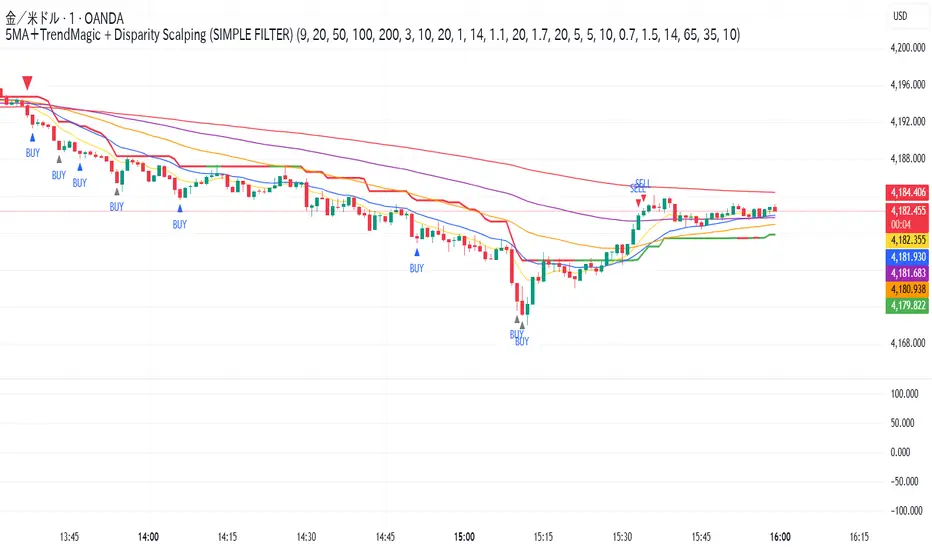
5MA+TrendMagic + Disparity Scalping (SIMPLE FILTER)5MA + Trend Filter + Disparity Scalping
This multi-purpose indicator combines a five-EMA trend structure, a volatility-based trend filter, and an ultra-fast scalping module to detect both trend continuation and sharp reversal opportunities.
It is suitable for scalping, day trading, and trend-following strategies.
🔹 Main Components
1️⃣ Five-EMA Trend Structure
Displays 9 / 20 / 50 / 100 / 200 EMA levels
Helps identify short-term and long-term market direction
Useful for support and resistance during trending markets
2️⃣ Volatility-Driven Trend Filter
Uses CCI and ATR to form a dynamic trailing line
The line switches color based on momentum direction
Can act as a trailing stop or trend confirmation filter
Helps avoid counter-trend entries
3️⃣ High-Volatility GOLD Signal
Detects sudden volatility expansions using ATR, Bollinger metrics, and volatility comparison (HV vs RV)
Marks rapid breakout situations with potential continuation setups
Available for all assets, optimized for highly volatile markets
4️⃣ Ultra-Fast Disparity Scalper
Measures price deviation from EMA5 and EMA10
Confirms exhaustion using RSI + momentum prediction from a custom RVI model
Generates early BUY/SELL reversal markers
Detects momentum shifts before price fully reacts
5️⃣ Simple Overheat Filter
Prevents trades in extremely overbought/oversold zones
Gray-colored signals indicate unsafe trades to avoid
🎯 Best Use Cases
Catching early reversals during fast movement
Identifying strong trend continuation after volatility expansion
Avoiding low-probability scalps in overheated conditions
Applying EMA structure for confluence with price action
⚠️ Note
This indicator is a decision-support tool, not a standalone signal generator.
For best precision, combine with:
Market structure
Volume analysis
Support / resistance levels
🏷️ Short Description (for compact field)
Multi-function tool combining 5EMA structure, volatility-based trend filtering, and ultra-fast reversal scalping using RSI + custom RVI momentum. Ideal for both trend continuation and rapid reversals.
⭐ Silver HUD v15.1 — Full Notes Version (3-Column HUD)Silver HUD v15.1 is a comprehensive Pine Script v5 indicator designed for micro silver futures (SIL) trading on TradingView. It overlays a 3-column HUD table displaying real-time analysis across multiple engines including trend, flow, momentum, pullback, turbo (breakout), divergence, volume, and 2H structure. The system generates weighted BUY/SELL scores and final signals with risk warnings, optimized for 5m charts with 30m support/resistance levels.
Core Components
Support/Resistance & Trade Levels
Pulls 30m lowest low (support) and highest high (resistance) for entry/stop/TP calculation. Entry defaults to support, stop loss at support - 0.10, with ATR-based TPs (1x/2x/3x). Risk per lot factors SIL contract specs (1000oz, $5/tick). Alerts when price nears support within 0.05.
Multi-Engine Analysis
TREND: EMA20/50 + VWAP direction (UP/DOWN/MIXED).
FLOW: CCIOBV (CCI+OBV) + QQE momentum sync.
MOMENTUM: RSI/MFI >55 (UP) or <45 (DOWN).
PB (Pullback): EMA20 deviation (-0.4% to +1.2% = OK; flags CHASE/DEEP).
TURBO: ATR percentile + BB width squeeze for BREAKOUT/EXHAUST.
Scores weight flow (30%), momentum (25%), PB (25%), trend/turbo (10-20%). BUY ≥75, SELL ≥72 triggers raw signals.
Advanced Features
2H Structure: Detects HH/HL/LL/LH swings for macro bias (UP/DOWN/MIXED).
SELL System: Distinguishes SELL-ALERT (exhaustion) vs full SELL-REVERSAL (multi-condition bear flip).
Divergence & Volume: RSI-based bear/bull div on swing highs/lows; surge detection (>2x vol MA or 80th percentile).
Final Signal: Combines raw scores with filters (no DEEP PB for BUY, 2H tiebreaker); RISK flags conflicts like div or trend mismatches.
HUD Display & Usage
Renders a bottom-right table with metric, status (color-coded), and Chinese explanations. Stars rate scores (★★★★★=90+). Ideal for high-frequency SIL traders monitoring multi-timeframe confluence on 5m charts.

Multi Condition Stock Screener & Alert SystemMulti Condition Stock Screener & Strategy Builder
This script is a comprehensive Stock Screener and Strategy Builder designed to scan predefined groups of stocks (specifically focused on BIST/Istanbul Stock Exchange symbols) or a custom list of symbols based on user-defined technical conditions.
It allows users to combine multiple technical indicators to create complex entry or exit conditions without writing code. The script iterates through a list of symbols and triggers alerts when the conditions are met.
Key Features
• Custom Strategy Building: Users can define up to 6 separate conditions. • Logical Operators: Conditions can be linked using logical operators (AND / OR) to create flexible strategies. • Predefined Groups: Includes 14 groups of stocks (covering BIST symbols) for quick scanning. • Custom Scanner: Users can select the "SPECIAL" group to manually input up to 40 custom symbols to scan. • Directional Scanning: Capable of scanning for both Buy/Long and Sell/Short signals. • Alert Integration: Generates JSON-formatted alert messages suitable for webhook integrations (e.g., sending notifications to Telegram bots).
Supported Indicators for Conditions
The script utilizes built-in ta.* functions to calculate the following indicators:
• MA (Moving Average): Supports EMA, SMA, RMA, and WMA. • RSI (Relative Strength Index) • CCI (Commodity Channel Index) • ATR (Average True Range) • BBW (Bollinger Bands Width) • ADX (Average Directional Index) • MFI (Money Flow Index) • MOM (Momentum)
How it Works
The script uses request.security() to fetch data for the selected group of symbols based on the current timeframe. It evaluates the user-defined logic (Condition 1 to 6) for each symbol.
• Comparison Logic: You can compare an indicator against a value (e.g., RSI > 50 ) or against another indicator (e.g., MA1 CrossOver MA2 ). • Signal Generation: If the logical result is TRUE based on the "AND/OR" settings, a visual label is plotted on the chart, and an alert condition is triggered.
Alert Configuration
The script produces a JSON output containing the Ticker, Signal Type, Period, and Price. This is optimized for users who want to parse alerts programmatically or send them to external messaging apps via webhooks.
Disclaimer This tool is for informational purposes only and does not constitute financial advice. Since it uses request.security across multiple symbols, please allow time for the script to load data on the chart.

QLC v8.4 – GIBAUUM BEAST + ANTI-FAKEOUTQLC v8.4 – GIBAUUM BEAST + ANTI-FAKEOUT
QLC v8.4 — Gibauum Beast Edition (Self-Adaptive Lorentzian Classification + Anti-Fakeout
The most powerful open-source Lorentzian / KNN strategy ever released on TradingView.
Key Features
• True Approximate Nearest Neighbors using Lorentzian Distance (extremely robust to outliers)
• 5 hand-picked, z-score normalized features (RSI, WaveTrend, CCI, ADX, RSI)
• Real-time self-learning engine — the indicator tracks its own past predictions and automatically adjusts Lorentzian Power and number of neighbors (k) to maximize live accuracy
• Live Win-Rate calculation (last 100 strong signals) shown on dashboard
• Super-aggressive early entries on extreme predictions (|Pred| ≥ 12)
• Smart dynamic exits with Kernel + ATR trailing
• Powerful Anti-Fakeout filter — blocks entries on massive volume spikes (stops almost all whale dumps and liquidation cascades)
• SuperTrend + low choppiness + volatility filters → only trades in strong trending regimes
• Beautiful huge arrows + “GOD MODE” label when conviction is nuclear
Performance (real-time monitored on BTC, ETH, SOL 15m–4h)
→ Average live win-rate 74–84 % after the first few hours of adaptation
→ Almost zero false breakouts thanks to the volume-spike guard
Perfect for scalping, day trading and swing trading crypto and major forex pairs.
No repainting | Bar-close confirmed | Works on all timeframes (best 15m–4h)
Enjoy the beast.

Global Macro IndexGlobal Macro Index
The Global Macro Index is a comprehensive economic sentiment indicator that aggregates 23 real-time macroeconomic data points from the world's largest economies (US, EU, China, Japan, Taiwan). It provides a single normalized score that reflects the overall health and momentum of the global economy, helping traders identify macro trends that drive asset prices.
⚠️ Important: Timeframe Settings
This indicator is designed exclusively for the 1W (weekly) timeframe. The indicator is hardcoded to pull weekly data and will not function correctly on other timeframes.
What It Measures
The indicator tracks normalized Trend Power Index (TPI) values across multiple economic categories:
United States (7 components)
Business Confidence Index (BCOI) - Business sentiment and outlook
Composite Leading Indicator (CLI) - Forward-looking economic indicators
Consumer Confidence Index (CCI) - Consumer sentiment and spending intentions
Terms of Trade (TOT) - Import/export price relationships
Manufacturing Composite - Combines business confidence, production, and new orders
Comprehensive Economic Composite - Broad aggregation including employment, business activity, and regional indicators
Business Inventory (BI) - Stock levels and supply chain health
European Union (10 components)
Sentiment Survey (SS) - Overall economic sentiment
Business Confidence Index - EU business outlook
Economic Sentiment Indicator (ESI) - Combined confidence metrics
Manufacturing Production (MPRYY) - Industrial output year-over-year
New Orders - Germany, France, Netherlands, Spain manufacturing orders
Composite Leading Indicators - Germany, France forward-looking metrics
Business Climate Index (BCLI) - France business conditions
Asia (6 components)
New Orders - China, Japan, Taiwan manufacturing demand
Composite Leading Indicators - China, Japan economic momentum
The Formula
The indicator calculates a weighted average of normalized TPI scores:
Global Macro Index = (1/23) × Σ
Each of the 23 economic indicators is:
Converted to a Trend Power Index (TPI) using 4-day Bitcoin normalization
Weighted equally (1/23 ≈ 4.35% each)
Summed and smoothed with a 1-period SMA
The result is a single oscillator that ranges typically between -1 and +1, with extreme readings beyond ±0.6.
Z-Score Signal System
The indicator includes an optional Z-Score overlay that identifies extreme macro conditions:
Calculation:
Z-Score = (Current Value - 50-period Mean) / Standard Deviation
Smoothed with 35-period Hull Moving Average
Inverted for intuitive interpretation
Signals:
Green background (Z-Score ≥ 2) = Extremely positive macro conditions, potential overbought
Red background (Z-Score ≤ -2) = Extremely negative macro conditions, potential oversold
These extreme readings occur approximately 5% of the time statistically
How to Use It
Interpreting the Main Plot (Red Line):
Above 0 = Positive macro momentum, risk-on environment
Below 0 = Negative macro momentum, risk-off environment
Above +0.6 = Strong expansion, bullish for equities and crypto
Below -0.6 = Severe contraction, bearish conditions
Trend direction = More important than absolute level
Z-Score Signals:
Z ≥ 2 (Green) = Macro sentiment extremely positive, consider taking profits or preparing for pullback
Z ≤ -2 (Red) = Macro sentiment extremely negative, potential buying opportunity for contrarians
Works best as a regime filter, not precise timing tool
Best Practices:
Use as a macro regime filter for other strategies
Combines well with liquidity indicators and price action
Leading indicator for risk assets (equities, Bitcoin, emerging markets)
Lagging indicator - confirms macro trends rather than predicting reversals
Watch for divergences: price making new highs while macro weakens (bearish) or vice versa (bullish)
Settings
Show Zscore Signals: Toggle green/red background shading for extreme readings
Overlay Zscore Signals: Display Z-Score signals on the price chart as well as the indicator panel
Reference Lines
0 (gray) = Neutral macro conditions
+0.6 (green) = Strong positive threshold
-0.6 (red) = Strong negative threshold
Data Sources
Real-time economic data from TradingView's ECONOMICS database, including:
OECD leading indicators
Manufacturing PMIs and new orders
Consumer and business confidence surveys
Trade and inventory metrics
Regional economic sentiment indices
Notes
This is a macro trend indicator, not a day-trading tool. Economic data updates weekly and reflects the aggregate health of global growth. Best used on weekly timeframes to identify favorable or unfavorable macro regimes for risk asset allocation.
The indicator distills complex global economic data into a single actionable score, answering: "Is the global economy expanding or contracting right now?"

Super momentum DBSISuper momentum DBSI: The Ultimate Guide
1. What is this Indicator?
The Super momentum DBSI is a "Consensus Engine." Instead of relying on a single line (like an RSI) to tell you where the market is going, this tool calculates 33 distinct technical indicators simultaneously for every single candle.
It treats the market like a democracy. It asks 33 mathematical "voters" (Momentum, Trend, Volume, Volatility) if they are Bullish or Bearish.
If 30 out of 33 say "Buy," the score is high (Yellow), and the trend is extremely strong.
If only 15 say "Buy," the score is low (Teal), and the trend is weak or choppy.
2. Visual Guide: How to Read the Numbers
The Scores
Top Number (Bears): Represents Selling Pressure.
Bottom Number (Bulls): Represents Buying Pressure.
The Colors (The Traffic Lights)
The colors are your primary signal. They tell you who is currently winning the war.
🟡 YELLOW (Dominance):
This indicates the Winning Side.
If the Bottom Number is Yellow, Bulls are in control.
If the Top Number is Yellow, Bears are in control.
🔴 RED (Weakness):
This appears on the Top. It means Bears are present but losing.
🔵 TEAL (Weakness):
This appears on the Bottom. It means Bulls are present but losing.
3. Trading Strategy
Scenario A: The "Strong Buy" (Long Entry)
The Setup: You are looking for a shift in momentum where Buyers overwhelm Sellers.
Watch the Bottom Number: Wait for it to turn Yellow.
Confirm Strength: Ensure the score is above 15 and rising (e.g., 12 → 18 → 22).
Check the Top: The Top Number should be Red and low (below 10).
Trigger: Enter on the candle close.
Scenario B: The "Strong Sell" (Short Entry)
The Setup: You are looking for Sellers to crush the Buyers.
Watch the Top Number: Wait for it to turn Yellow.
Confirm Strength: Ensure the score is above 15 and rising.
Check the Bottom: The Bottom Number should be Teal and low.
Trigger: Enter on the candle close.
Scenario C: The "No Trade Zone" (Choppy Market)
The Setup: The market is confused.
Visual: Top is Red, Bottom is Teal.
Meaning: NOBODY IS WINNING. There is no Yellow number.
Action: Do not trade. This usually happens during lunch hours, weekends, or right before big news. This filter alone will save you from many false breakouts.
4. What is Inside? (The 33 Indicators)
To give you confidence in the signals, here is exactly what the script is checking:
Group 1: Momentum (Oscillators)
Detects if price is moving fast.
RSI (Relative Strength Index)
CCI (Commodity Channel Index)
Stochastic
Williams %R
Momentum
Rate of Change (ROC)
Ultimate Oscillator
Awesome Oscillator
True Strength Index (TSI)
Stoch RSI
TRIX
Chande Momentum Oscillator
Group 2: Trend Direction
Detects the general path of the market.
13. MACD
14. Parabolic SAR
15. SuperTrend
16. ALMA (Moving Average)
17. Aroon
18. ADX (Directional Movement)
19. Coppock Curve
20. Ichimoku Conversion Line
21. Hull Moving Average
Group 3: Price Action
Detects where price is relative to averages.
22. Price vs EMA 20
23. Price vs EMA 50
24. Price vs EMA 200
Group 4: Volume & Force
Detects if there is money behind the move.
25. Money Flow Index (MFI)
26. On Balance Volume (OBV)
27. Chaikin Money Flow (CMF)
28. VWAP (Intraday)
29. Elder Force Index
30. Ease of Movement
Group 5: Volatility
Detects if price is pushing the outer limits.
31. Bollinger Bands
32. Keltner Channels
33. Donchian Channels
5. Pro Tips for Success
Don't Catch Knives: If the Bear score (Top) is Yellow and 25+, do not try to buy the dip. Wait for the Yellow score to break.
Exit Early: If you are Long and the Yellow Bull score drops from 28 to 15 in one candle, TAKE PROFIT. The momentum has died.
Use Higher Timeframes: This indicator works best on 15m, 1H, and 4H charts. On the 1m chart, it may be too volatile.
