ICT Daily Bias & Liquidity MTF
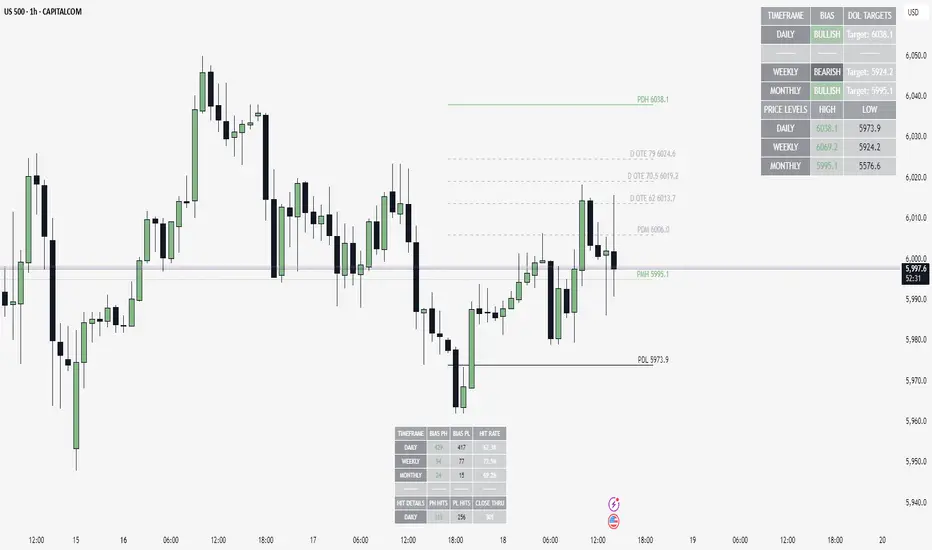
// Author TradersTavern
// version 1.0
//
// This indicator combines multiple ICT (Inner Circle Trader) concepts for market analysis:
// • Daily and Weekly bias calculation based on displacement and failed breaks
// • Fair Value Gaps (FVG) detection across multiple timeframes
// • Key market structure levels (PDH, PDL, PWH, PWL)
// • NY Session open price tracking
// • Midpoint levels for both daily and weekly ranges
//
// Features:
// ═════════
// • Multi-timeframe bias calculation (Daily and Weekly)
// • FVG detection with customizable settings
// • Automatic NY midnight open price tracking
// • Customizable label sizes and colors
// • Comprehensive information table
// • Multiple alert conditions
//
// Notes:
// ══════
// • NY Open detection is based on America/New_York timezone
// • FVGs can be displayed for current timeframe, higher timeframe, or both
// • Label sizes can be adjusted to prevent overcrowding
// • All colors and display options are fully customizable
//
// Disclaimer:
// ═══════════
// This indicator is for information and educational purposes only.
// The NY Open functionality depends on the exchange and chart timezone settings.
// Previous day/week calculations are based on the chart's session settings.
//
// Version History:
// ═══════════════
// v1.0 - Initial release
// • Daily and Weekly bias calculation
// • FVG detection and management
// • NY Midnight open tracking
// • Customizable label sizes
// • Information table with bias and DOL levels
What's New & Improved
1. OTE Levels: Full Customization & Visual Clarity
- Multi-Timeframe OTE Levels:
- Plot ICT OTE levels for Daily, Weekly, and Monthly timeframes—simultaneously!
- Distinct Appearance for Each Timeframe:
- Each OTE level (Daily, Weekly, Monthly) can have its own color and line style (solid, dashed, dotted).
- Option to use the indicator's default neutral grey for OTE lines, or pick your own custom color for each timeframe.
- Clear Labeling:
- OTE labels now include a prefix ("D OTE", "W OTE", "M OTE") so you always know which timeframe each level belongs to.
- All OTE settings are easily accessible in the indicator's settings panel.
2. New Hit Counter Statistics Table
- Bias Hit Tracking:
- Added a new table (can be toggled on/off) that shows how often price hits the bias targets for Daily, Weekly, and Monthly timeframes.
- Includes hit rates, bias counts, and close-through stats for each timeframe.
- Customizable Table Position and Size:
- You can choose where to display the table and how large it appears.
3. User Experience & Visual Improvements
- Theme Consistency:
- Option to use the indicator's neutral color for OTE levels, matching the rest of your chart theme.
- Visual Distinction:
- Even with all OTE timeframes enabled, you can easily distinguish between them thanks to color, style, and label improvements.
4. Code Quality & Stability
- Helper Functions Organized:
- All utility functions (like label size, OTE color/style) are now defined at the top of the script, preventing reference errors.
- Removed Unused/Problematic Code:
- The OTE statistics table and all day/week separator code and settings have been removed for a cleaner, more stable script.
- No More Variable Shadowing:
- All function parameters and local variables that shadowed built-in Pine variables have been renamed, eliminating warnings.
- Alert Logic:
- All alert conditions are now robust and use proper boolean logic.
What Remains from the Original
- All original bias, FVG, and level logic is intact and fully functional.
- The main statistics table and alerting remain as before.
How to Use the New Features
- Customize OTE Colors/Styles:
Go to the "Level Settings" group in the indicator settings to pick your preferred color and line style for each OTE timeframe, or use the default theme color.
- Toggle Hit Counter Table:
Enable or disable the new hit counter table and choose its position/size as desired.
This update makes the indicator more flexible, visually clear, and user-friendly—especially for those who use multiple OTE timeframes or want to track bias performance!
If you have any questions or suggestions, please leave a comment. Thank you for your support and feedback!
สคริปต์แบบเฉพาะผู้ได้รับเชิญเท่านั้น
เฉพาะผู้ใช้งานที่ผู้เขียนอนุมัตเท่านั้นจึงจะสามารถเข้าถึงสคริปต์นี้ได้ คุณจะต้องขอและได้รับอนุญาตก่อนใช้งาน ซึ่งโดยทั่วไปจะได้รับอนุญาตหลังจากชำระเงินแล้ว สำหรับรายละเอียดเพิ่มเติม โปรดทำตามคำแนะนำของผู้เขียนด้านล่าง หรือติดต่อ TradersTavern โดยตรง
โปรดทราบว่าสคริปต์แบบเฉพาะผู้ได้รับเชิญส่วนตัวนี้ไม่ได้ถูกตรวจสอบโดยผู้ดูแลสคริปต์ และยังไม่มีการกำหนดว่าสคริปต์นี้จะสอดคล้องกับกฎระเบียบการใช้งานหรือไม่ TradingView ไม่แนะนำให้จ่ายเงินหรือใช้สคริปต์ เว้นแต่คุณจะเชื่อถือผู้เขียนและเข้าใจวิธีการทำงานของสคริปต์นั้นอย่างถ่องแท้ คุณยังสามารถหาทางเลือกแบบโอเพนซอร์สฟรีได้ใน สคริปต์ชุมชนของเรา
คำแนะนำของผู้เขียน

คำจำกัดสิทธิ์ความรับผิดชอบ
สคริปต์แบบเฉพาะผู้ได้รับเชิญเท่านั้น
เฉพาะผู้ใช้งานที่ผู้เขียนอนุมัตเท่านั้นจึงจะสามารถเข้าถึงสคริปต์นี้ได้ คุณจะต้องขอและได้รับอนุญาตก่อนใช้งาน ซึ่งโดยทั่วไปจะได้รับอนุญาตหลังจากชำระเงินแล้ว สำหรับรายละเอียดเพิ่มเติม โปรดทำตามคำแนะนำของผู้เขียนด้านล่าง หรือติดต่อ TradersTavern โดยตรง
โปรดทราบว่าสคริปต์แบบเฉพาะผู้ได้รับเชิญส่วนตัวนี้ไม่ได้ถูกตรวจสอบโดยผู้ดูแลสคริปต์ และยังไม่มีการกำหนดว่าสคริปต์นี้จะสอดคล้องกับกฎระเบียบการใช้งานหรือไม่ TradingView ไม่แนะนำให้จ่ายเงินหรือใช้สคริปต์ เว้นแต่คุณจะเชื่อถือผู้เขียนและเข้าใจวิธีการทำงานของสคริปต์นั้นอย่างถ่องแท้ คุณยังสามารถหาทางเลือกแบบโอเพนซอร์สฟรีได้ใน สคริปต์ชุมชนของเรา